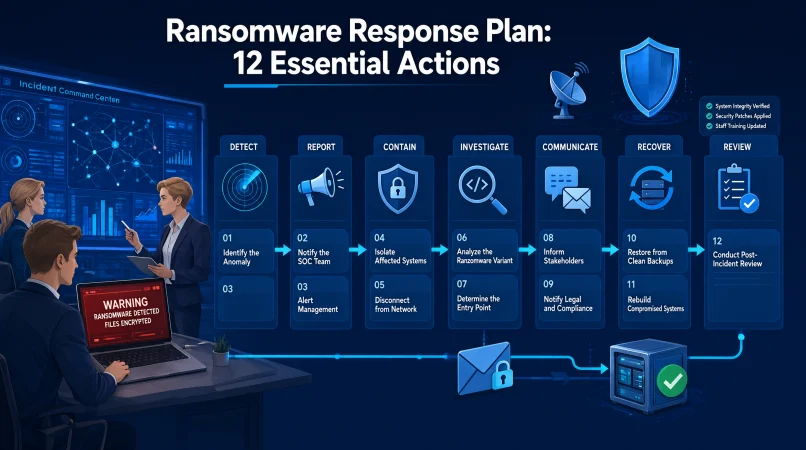
A ransomware response plan is a documented guide that helps an organization respond to ransomware attacks, contain affected systems, protect critical data, communicate clearly, and restore operations safely. It assigns responsibilities and outlines actions to take before, during, and after an incident.
Top alternatives: ransomware incident response plan, ransomware recovery plan, cybersecurity incident response procedure, ransomware containment strategy, ransomware disaster recovery plan
One suspicious email, one compromised account, or one unpatched system can turn an ordinary workday into a cybersecurity emergency. Suddenly, files may become inaccessible, business applications may stop working, and employees may wonder whether to unplug everything or call the IT team first.
That is exactly why a ransomware response plan matters. It gives your organization a practical playbook before panic takes over. Whether you manage a small business, lead an IT department, support customers, or coordinate a security team, clear responsibilities and communication can make a difficult incident easier to manage.
A good plan covers preparation, detection, containment, investigation, recovery, and lessons learned. It also helps people avoid rushed decisions, preserve useful evidence, and follow approved procedures. Think of it as your team’s emergency checklist for a digital crisis, because ransomware is definitely not the time for guesswork.
Ransomware Response Plan Basics
Defining Scope and Identifying Critical Systems
1. Define the Incident Response Scope
Example: Use this when documenting which systems, locations, business units, and services the plan covers.
Meaning: Establishes the boundaries of the response process.
2. Identify Critical Business Systems
Example: List essential applications, databases, servers, and services that the organization needs to operate.
Meaning: Helps prioritize protection and recovery.
3. Assign an Incident Response Lead
Example: Name the person authorized to coordinate decisions during a confirmed ransomware incident.
Meaning: Establishes clear leadership and accountability.
Escalation, Priorities, and Decision-Making
4. Create an Incident Escalation Path
Example: Document who must be contacted when ransomware affects sensitive data or critical operations.
Meaning: Ensures serious incidents reach the right decision-makers.
5. Establish Clear Response Priorities
Example: Set priorities around protecting people, containing the incident, safeguarding evidence, and restoring essential services.
Meaning: Helps the team make consistent decisions under pressure.
6. Document Decision-Making Authority
Example: Specify who can approve system isolation, emergency shutdowns, external notifications, and recovery actions.
Meaning: Reduces delays caused by unclear responsibilities.
Incident Classification and Compliance Requirements
7. Define a Ransomware Incident
Example: Describe the warning signs and evidence that trigger the organization’s ransomware response process.
Meaning: Helps staff recognize when the plan should be activated.
8. Include Legal and Compliance Requirements
Example: Document the process for consulting legal counsel about reporting obligations and affected data.
Meaning: Helps the organization address applicable legal duties.
9. Establish Incident Severity Levels
Example: Classify incidents according to their operational impact, scope, and sensitivity.
Meaning: Supports consistent escalation and resource allocation.
Emergency Contacts and Plan Maintenance
10. Maintain an Emergency Contact List
Example: Keep current contact details for security staff, executives, legal advisers, insurers, and recovery providers.
Meaning: Helps the organization reach key people without wasting time.
11. Define the Plan Activation Process
Example: Specify who can declare a ransomware incident and how that decision is communicated.
Meaning: Makes it clear when formal response procedures begin.
12. Review the Plan Regularly
Example: Schedule periodic reviews after major system changes, exercises, or security incidents.
Meaning: Keeps the plan useful as the organization evolves.
Ransomware Detection and Initial Response Examples
Recognizing and Reporting Early Warning Signs
1. Report Suspicious File Encryption
Example: Use this when an employee notices that documents are changing names or becoming inaccessible unexpectedly.
Meaning: Encourages early reporting of a possible ransomware incident.
2. Preserve the Ransom Note
Example: Record the note’s appearance and location through approved procedures without interacting with suspicious links.
Meaning: Retains potentially useful incident evidence.
3. Notify the Security Team Immediately
Example: Use this when antivirus alerts, endpoint detections, or unusual file activity suggest ransomware.
Meaning: Starts the organization’s established investigation process.
Recording Initial Incident Details
4. Record the First Known Detection Time
Example: Document when the alert appeared or when the affected employee first noticed unusual activity.
Meaning: Helps establish the incident timeline.
5. Identify the Affected Device or Account
Example: Record the device name, assigned user, location, and relevant alert details.
Meaning: Helps responders scope the potential impact.
6. Avoid Unapproved Cleanup Attempts
Example: Use this when employees want to delete suspicious files before the security team investigates.
Meaning: Reduces the risk of destroying evidence or complicating recovery.
Activating Response and Assessing Impact
7. Activate the Incident Response Plan
Example: Use this when available evidence meets the organization’s ransomware escalation criteria.
Meaning: Moves the response from informal reporting to coordinated action.
8. Determine Whether Critical Services Are Affected
Example: Assess whether essential business applications, shared storage, or operational systems are unavailable.
Meaning: Helps prioritize the response according to business impact.
9. Check for Signs of Data Exposure
Example: Review available security alerts and logs for indications that information may have been accessed or transferred.
Meaning: Helps distinguish encryption from a possible data theft incident.
Maintaining Evidence and Escalating Concerns
10. Keep an Accurate Incident Log
Example: Record observations, alerts, decisions, timestamps, and actions taken by the response team.
Meaning: Creates a reliable record for investigation and review.
11. Preserve Relevant Security Alerts
Example: Retain endpoint, identity, network, and other available security records according to approved procedures.
Meaning: Supports investigation into the scope and origin of the incident.
12. Escalate Uncertainty to Qualified Responders
Example: Use this when the team cannot confidently determine whether suspicious activity is ransomware.
Meaning: Encourages expert assessment rather than unsupported assumptions.
Ransomware Containment Response Examples
System Isolation and Access Restrictions
1. Isolate Confirmed Affected Systems
Example: Follow approved procedures to disconnect affected devices from networks when responders determine isolation is appropriate.
Meaning: Helps limit further spread.
2. Protect Unaffected Critical Systems
Example: Use established network controls to reduce unnecessary connections between affected and unaffected environments.
Meaning: Helps protect services that may still be operating safely.
3. Disable Compromised Accounts When Appropriate
Example: Have authorized identity or security staff suspend accounts believed to be under attacker control.
Meaning: Reduces the risk of continued unauthorized access.
Network Controls and Evidence Protection
4. Restrict Suspicious Remote Access
Example: Review and restrict remote access pathways that may be involved in the incident.
Meaning: Helps limit an attacker’s ability to reach additional systems.
5. Preserve Evidence Before Major Changes
Example: Coordinate evidence collection with qualified responders before wiping, rebuilding, or reconfiguring affected devices.
Meaning: Supports investigation and future recovery decisions.
6. Apply Emergency Network Controls
Example: Use approved firewall or segmentation controls to restrict suspicious communication identified by the response team.
Meaning: Helps reduce the attacker’s opportunities to move between systems.
Backup Security and Operational Coordination
7. Protect Backup Environments
Example: Review access to backup systems and restrict it when compromise is suspected.
Meaning: Helps preserve recovery options.
8. Identify Potentially Connected Systems
Example: Examine approved monitoring data for other devices that show related suspicious activity.
Meaning: Helps establish the possible extent of the incident.
9. Coordinate Isolation With Operational Teams
Example: Consult system owners before disconnecting specialized equipment when doing so could create safety or service risks.
Meaning: Balances containment with operational safety.
Verification, Documentation, and Reassessment
10. Verify That Containment Actions Worked
Example: Review monitoring data and incident indicators after applying approved containment measures.
Meaning: Checks whether the immediate response has reduced the identified threat.
11. Track Every Containment Decision
Example: Document who authorized a change, when it occurred, and which systems it affected.
Meaning: Improves accountability and supports later review.
12. Reassess Containment as New Evidence Appears
Example: Update isolation measures when investigation reveals additional affected accounts or systems.
Meaning: Keeps the response aligned with the evolving incident.
Ransomware Investigation and Evidence Preservation
Timeline Development and Initial Investigation
1. Build a Timeline of the Incident
Example: Combine relevant alerts, login events, user reports, and system changes into a chronological record.
Meaning: Helps investigators understand how the incident developed.
2. Identify the Earliest Known Signs
Example: Review available logs for the first suspicious activity associated with the incident.
Meaning: Helps narrow down when the compromise may have started.
3. Review Authentication Logs
Example: Examine sign-in records for unusual locations, unexpected access, or suspicious account activity.
Meaning: Helps identify possible account compromise.
Endpoint, Network, and Access Analysis
4. Examine Endpoint Security Alerts
Example: Review detections from affected workstations and servers using approved investigation procedures.
Meaning: Provides clues about suspicious activity on devices.
5. Review Relevant Network Activity
Example: Examine available network records for unusual connections linked to affected systems.
Meaning: Helps investigators assess how the incident may have spread.
6. Check for Unauthorized Privilege Changes
Example: Review administrative activity for unexpected account permissions or newly elevated privileges.
Meaning: Helps identify possible attempts to gain broader access.
Evidence Preservation and Incident Scope
7. Preserve Original Evidence Where Possible
Example: Follow forensic procedures to retain relevant files, logs, and system information before making major changes.
Meaning: Supports reliable analysis and future investigation.
8. Document Systems Potentially Affected
Example: Maintain a list of confirmed and suspected devices, accounts, servers, and applications.
Meaning: Helps define the investigation’s scope.
9. Investigate Possible Data Exfiltration
Example: Have qualified responders assess available records for signs that information may have left the environment.
Meaning: Helps determine whether the incident involves potential data exposure.
Evidence Handling and Investigation Reporting
10. Record Evidence Sources and Handling
Example: Document where evidence came from, who collected it, and how it was stored.
Meaning: Supports traceability and evidence integrity.
11. Coordinate With External Specialists
Example: Engage an authorized incident response provider when internal resources cannot complete the investigation.
Meaning: Brings in additional expertise when needed.
12. Document Findings and Remaining Unknowns
Example: Separate confirmed facts from working theories in the incident report.
Meaning: Helps decision-makers act on reliable information without overlooking uncertainty.
Ransomware Response Communication Templates
Internal Notifications and Leadership Updates
1. Internal Incident Notification
Example: Use this message when notifying authorized staff that a ransomware incident is under investigation.
Meaning: Alerts relevant employees while avoiding premature conclusions.
2. Executive Status Update
Example: Summarize the known impact, containment actions, business disruption, and decisions needed for leadership.
Meaning: Gives decision-makers a concise view of the situation.
3. IT Service Disruption Notice
Example: Use this when employees need to know that an application or shared drive is temporarily unavailable.
Meaning: Explains the disruption and directs staff to approved updates.
Employee, Customer, and Vendor Communications
4. Employee Security Advisory
Example: Send this when staff need to report suspicious messages or avoid using affected services.
Meaning: Gives employees clear actions during the incident.
5. Customer Communication Draft
Example: Prepare a factual update for customers when the organization confirms a service disruption affecting them.
Meaning: Communicates the impact without making unsupported claims.
6. Vendor Coordination Message
Example: Notify relevant technology vendors when their systems or services may be involved.
Meaning: Helps coordinate investigation and technical support.
Legal, Compliance, and External Communications
7. Legal and Compliance Escalation Notice
Example: Share the confirmed facts and current uncertainties with authorized legal or compliance personnel.
Meaning: Helps the organization assess its obligations.
8. Cyber Insurance Notification
Example: Follow the policy’s reporting process when a potentially covered ransomware incident occurs.
Meaning: Helps preserve access to the insurer’s approved support process.
9. Business Continuity Update
Example: Inform department leads which services remain available and which approved workarounds can be used.
Meaning: Helps teams adapt operations during disruption.
Recovery Updates and Incident Closure
10. External Media Holding Statement
Example: Prepare a brief factual statement for use by the authorized communications team if media inquiries arise.
Meaning: Promotes consistent external messaging.
11. Recovery Progress Update
Example: Share confirmed information about restored systems and services that remain unavailable.
Meaning: Sets realistic expectations during recovery.
12. Incident Closure Communication
Example: Notify relevant stakeholders after the response lead confirms that the incident has moved into the appropriate closure stage.
Meaning: Clarifies the current status and any remaining follow-up actions.
Ransomware Response Plan for Small Businesses
Identifying Critical Assets and Assigning Responsibilities
1. Identify Your Most Important Business Data
Example: List customer records, accounting files, contracts, inventory data, and essential business documents.
Meaning: Helps the business prioritize protection and recovery.
2. Assign a Primary and Backup Contact
Example: Name the main incident coordinator and an alternate who can act when the primary contact is unavailable.
Meaning: Prevents a response from stalling because one person cannot be reached.
3. Maintain a Current System Inventory
Example: Record business computers, cloud services, important applications, and backup locations.
Meaning: Helps establish what may need protection or recovery.
Strengthening Security and Protecting Backups
4. Set Up Secure Backups
Example: Maintain tested backups that are protected from unauthorized changes and separated appropriately from production systems.
Meaning: Improves the chance of recovering important data.
5. Keep Software and Devices Updated
Example: Establish a process for applying supported security updates to operating systems, applications, and network equipment.
Meaning: Helps reduce exposure to known vulnerabilities.
6. Enable Multifactor Authentication
Example: Require multifactor authentication for important accounts, especially administrative and remote access.
Meaning: Adds protection beyond passwords alone.
Preparing Support and Communication Procedures
7. Establish an Emergency Support Arrangement
Example: Identify a qualified IT provider or incident response specialist before an emergency occurs.
Meaning: Gives the business a known route to expert help.
8. Create a Simple Employee Reporting Process
Example: Tell staff how to report suspicious attachments, unexpected file encryption, or unusual account activity.
Meaning: Encourages quick reporting instead of silent guesswork.
9. Separate Business-Critical Access
Example: Limit administrative permissions to the people and accounts that genuinely need them.
Meaning: Reduces unnecessary access across business systems.
Testing Recovery and Improving Readiness
10. Prepare an Offline Contact List
Example: Keep emergency contact information available in a secure format that remains accessible during a system outage.
Meaning: Helps staff coordinate if digital communication tools fail.
11. Test Recovery Before You Need It
Example: Schedule a restoration exercise using a representative set of business data and systems.
Meaning: Checks whether recovery arrangements work in practice.
12. Review the Plan With the Team
Example: Run a short exercise in which employees practice reporting a suspected ransomware incident.
Meaning: Helps everyone understand their role before a real emergency.
Ransomware Backup and Recovery Plan Examples
Identifying and Verifying Safe Backup Sources
1. Identify Approved Backup Sources
Example: Document which backup repositories contain copies of critical systems and business data.
Meaning: Helps responders locate appropriate recovery sources.
2. Verify Backup Integrity
Example: Use approved checks to confirm that selected backup data is readable and has not been altered unexpectedly.
Meaning: Helps establish whether backups are suitable for recovery.
3. Confirm Backups Are Not Compromised
Example: Have qualified personnel assess whether backup systems or credentials may have been affected by the attack.
Meaning: Reduces the risk of restoring from an unsafe source.
Setting Recovery Priorities and Targets
4. Establish Recovery Priorities
Example: Rank systems according to business impact, dependencies, and recovery requirements.
Meaning: Helps restore the most important services in a sensible order.
5. Define Recovery Time Objectives
Example: Document how long the business can tolerate a critical service being unavailable.
Meaning: Establishes a target for acceptable downtime.
6. Define Recovery Point Objectives
Example: Specify how much data loss, measured by time, is acceptable for a given system.
Meaning: Clarifies the data restoration target.
Restoring Systems and Validating Security
7. Rebuild Systems From Trusted Sources
Example: Follow the approved process for rebuilding affected devices using verified installation media and secure configurations.
Meaning: Reduces the chance of carrying the compromise into the restored environment.
8. Reset Credentials When Required
Example: Have authorized staff reset affected passwords, keys, tokens, or other credentials according to the recovery plan.
Meaning: Helps prevent attackers from reusing compromised access.
9. Validate Restored Applications
Example: Test critical workflows and system dependencies before releasing a restored application to users.
Meaning: Checks that the service works as expected.
Monitoring Recovery and Confirming Readiness
10. Monitor Recovered Systems Closely
Example: Apply enhanced monitoring after restored systems return to operation.
Meaning: Helps detect suspicious activity that may persist after recovery.
11. Record Recovery Decisions and Results
Example: Document which backups were used, which systems were restored, and what validation occurred.
Meaning: Creates an auditable recovery record.
12. Confirm Business Owner Acceptance
Example: Ask the responsible service owner to verify that the recovered system meets agreed operational requirements.
Meaning: Establishes that the service is ready for its intended use.
Ransomware Response Roles and Responsibilities
1. Incident Commander
Example: Assign an incident commander to coordinate priorities, approvals, and communication during the response.
Meaning: Provides centralized leadership.
2. Security Operations Lead
Example: Assign security staff to investigate alerts, assess suspicious activity, and coordinate technical containment.
Meaning: Establishes responsibility for security analysis.
3. IT Infrastructure Lead
Example: Assign infrastructure staff to assess affected servers, networks, and business applications.
Meaning: Connects the response plan with technical operations.
4. Backup and Recovery Lead
Example: Designate a person to coordinate backup verification, restoration planning, and recovery testing.
Meaning: Gives recovery work a clear owner.
5. Legal Adviser
Example: Involve authorized legal counsel when assessing reporting duties, contracts, or potential legal exposure.
Meaning: Supports informed legal decisions.
6. Privacy or Data Protection Lead
Example: Assign a qualified person to assess whether personal or regulated information may be affected.
Meaning: Helps address privacy and notification considerations.
7. Communications Lead
Example: Assign an authorized spokesperson to prepare employee, customer, and external updates.
Meaning: Keeps communications consistent and controlled.
8. Human Resources Contact
Example: Involve HR when employee guidance, internal policies, or workforce communications require coordination.
Meaning: Helps manage employee-related aspects of the incident.
9. Executive Decision-Maker
Example: Identify the executive authorized to approve major business continuity decisions and exceptional spending.
Meaning: Ensures high-impact decisions have proper authority.
10. External Incident Response Provider
Example: Define when an external cybersecurity specialist should be contacted for investigation or recovery support.
Meaning: Provides a clear route to specialist assistance.
11. Department Representatives
Example: Ask each critical department to identify operational dependencies and recovery priorities.
Meaning: Ensures business needs inform technical decisions.
12. Incident Recorder
Example: Assign someone to maintain the incident timeline, decisions, contacts, and action log.
Meaning: Keeps the response documented and organized.
Ransomware Prevention and Preparedness Checklist
Strengthening Systems and Access Controls
1. Maintain an Accurate Asset Inventory
Example: Review the list of devices, applications, cloud services, and systems connected to business operations.
Meaning: Helps identify what needs protection.
2. Apply Security Updates Promptly
Example: Follow a documented patch management schedule for supported operating systems and applications.
Meaning: Helps close known security gaps.
3. Use Strong Authentication Controls
Example: Require multifactor authentication for privileged accounts and important remote access services.
Meaning: Makes unauthorized account access more difficult.
Reducing Exposure to Common Threats
4. Limit Administrative Privileges
Example: Review which users and service accounts have elevated permissions.
Meaning: Reduces unnecessary opportunities for misuse.
5. Filter Suspicious Email and Attachments
Example: Configure appropriate email security controls and train employees to report suspicious messages.
Meaning: Helps reduce phishing-related risk.
6. Segment Important Networks
Example: Separate critical systems from general user networks according to the organization’s security architecture.
Meaning: Can limit the spread of an incident between environments.
Protecting Backups and Improving Detection
7. Protect Backup Credentials
Example: Restrict access to backup administration accounts and monitor their use.
Meaning: Helps protect recovery resources from unauthorized changes.
8. Test Backup Restoration
Example: Restore sample files or systems in a controlled test environment on a regular schedule.
Meaning: Verifies that backups can actually be used.
9. Centralize Security Monitoring
Example: Collect and review relevant logs from endpoints, identity systems, and important infrastructure.
Meaning: Helps responders identify suspicious patterns.
Building Staff Readiness and Testing Response Plans
10. Train Employees to Report Incidents
Example: Run brief exercises on reporting phishing messages, unexpected encryption, and unusual login alerts.
Meaning: Makes early reporting part of everyday security practice.
11. Review Third-Party Access
Example: Check vendor accounts, remote access arrangements, and permissions for external service providers.
Meaning: Helps manage risks introduced through third parties.
12. Conduct a Tabletop Exercise
Example: Walk the response team through a fictional ransomware incident and ask participants to explain their actions.
Meaning: Reveals gaps before an actual emergency.
Ransomware Response Plan for Schools and Healthcare Organizations
Prioritizing Safety and Protecting Sensitive Information
1. Prioritize Safety-Critical Services
Example: Identify systems that support patient care, emergency communications, or essential school operations.
Meaning: Helps prioritize services with direct safety implications.
2. Define Special Escalation Procedures
Example: Document when clinical, educational, safeguarding, or operational leaders must join the response.
Meaning: Ensures specialist decision-makers are involved.
3. Protect Sensitive Personal Information
Example: Restrict access to student, patient, employee, and other confidential records during the investigation.
Meaning: Supports appropriate data protection.
Maintaining Essential Operations During Disruption
4. Establish Downtime Procedures
Example: Prepare approved manual workflows for essential activities when digital systems become unavailable.
Meaning: Helps maintain critical functions during an outage.
5. Coordinate With Relevant Authorities
Example: Identify the appropriate emergency, regulatory, privacy, or law enforcement contacts for the organization.
Meaning: Helps staff follow applicable reporting and coordination requirements.
6. Maintain an Emergency Contact Directory
Example: Keep contact details for leadership, technical teams, service providers, and relevant external partners.
Meaning: Supports coordination if normal systems are unavailable.
Communicating Clearly and Managing Dependencies
7. Prepare Clear Staff Instructions
Example: Provide approved guidance explaining which systems to avoid and how to report suspicious activity.
Meaning: Reduces confusion during service disruption.
8. Assess Third-Party Service Dependencies
Example: Identify essential electronic records, scheduling platforms, learning systems, or hosted applications.
Meaning: Helps reveal indirect effects on operations.
9. Coordinate Safe Service Restoration
Example: Require technical and operational owners to validate essential services before returning them to routine use.
Meaning: Balances recovery with safety and reliability.
Documenting Decisions and Improving Preparedness
10. Prepare Accessible Communications
Example: Plan alternative communication methods for people who cannot access normal digital channels.
Meaning: Helps important updates reach affected communities.
11. Document Decisions Affecting Service Delivery
Example: Record approved changes to appointment handling, school operations, or other essential services during an outage.
Meaning: Supports continuity and accountability.
12. Review the Response With Relevant Stakeholders
Example: Conduct a post-incident review with technical, operational, privacy, and leadership representatives.
Meaning: Helps improve preparedness across the organization.
Ransomware Response Plan for Cloud Services
Identifying Cloud Risks and Protecting Access
1. Identify Critical Cloud Accounts
Example: Maintain a current inventory of cloud tenants, subscriptions, administrative accounts, and essential hosted services.
Meaning: Helps responders understand the cloud environment involved.
2. Review Identity Provider Alerts
Example: Examine relevant authentication logs for suspicious sign-ins or unexpected changes to access permissions.
Meaning: Helps identify potential account compromise.
3. Protect Cloud Administrative Access
Example: Review privileged roles and restrict access according to approved incident procedures.
Meaning: Helps reduce unauthorized control over cloud resources.
Investigating Activity and Assessing Impact
4. Revoke Suspected Compromised Sessions
Example: Have authorized administrators invalidate sessions or tokens when compromise is suspected and the response plan calls for it.
Meaning: Can help interrupt unauthorized access.
5. Review Cloud Audit Logs
Example: Examine available records for unusual file operations, configuration changes, or administrative activity.
Meaning: Supports investigation of actions taken in the cloud environment.
6. Assess Shared Storage and Collaboration Services
Example: Check whether shared files, team workspaces, or synchronized folders show signs of unauthorized changes.
Meaning: Helps determine which collaborative services may be affected.
Securing Backups and Coordinating Recovery
7. Verify Cloud Backup Isolation
Example: Confirm that recovery copies and backup administration remain protected from compromised production credentials.
Meaning: Helps preserve recovery options.
8. Coordinate With the Cloud Provider
Example: Contact the provider through its approved support or security reporting process when its assistance is needed.
Meaning: Brings the provider into the response where appropriate.
9. Review Connected Applications
Example: Examine third-party integrations and application permissions for potential exposure.
Meaning: Helps identify access paths beyond the main cloud account.
Restoring Services and Monitoring Security
10. Restore Cloud Data From Verified Sources
Example: Follow the recovery process to restore suitable data after confirming its integrity and security.
Meaning: Helps avoid reintroducing compromised content.
11. Validate Access Policies After Recovery
Example: Check permissions, administrative roles, and authentication requirements before resuming normal use.
Meaning: Helps ensure restored services have appropriate security controls.
12. Monitor Cloud Activity After Restoration
Example: Review alerts and audit records closely after recovered services return to use.
Meaning: Helps identify lingering unauthorized activity.
Ransomware Incident Reporting and Compliance Examples
Assessing Reporting Duties and Incident Facts
1. Determine Applicable Reporting Duties
Example: Ask authorized legal and compliance staff to assess relevant laws, contracts, and reporting deadlines.
Meaning: Helps the organization identify which obligations may apply.
2. Record the Confirmed Incident Facts
Example: Document the systems affected, known timeline, current impact, and actions taken.
Meaning: Creates a factual basis for reporting decisions.
3. Distinguish Confirmed Facts From Suspicions
Example: Label unverified claims separately from findings supported by evidence.
Meaning: Reduces the risk of inaccurate reporting.
Assessing Data Exposure and Making Notifications
4. Identify Potentially Affected Data
Example: Have qualified staff assess whether personal, financial, confidential, or regulated information may be involved.
Meaning: Helps determine the possible scope of data exposure.
5. Consult Legal Counsel Before External Disclosures
Example: Use this step when an incident may trigger contractual, regulatory, or privacy obligations.
Meaning: Helps ensure disclosures are appropriately reviewed.
6. Notify Relevant Authorities When Required
Example: Follow the applicable reporting process after authorized personnel determine that notification is necessary.
Meaning: Supports compliance with relevant obligations.
Preserving Records and Managing Obligations
7. Preserve Incident Records
Example: Retain relevant logs, reports, decisions, communications, and evidence under the organization’s procedures.
Meaning: Supports audits, investigations, and follow-up reviews.
8. Document Notification Decisions
Example: Record why a notification was made or why the organization determined that it was not required.
Meaning: Makes the decision process traceable.
9. Coordinate With Cyber Insurance Representatives
Example: Follow policy requirements for reporting the event and seeking approved assistance.
Meaning: Helps the organization manage insurance-related obligations.
Tracking Deadlines and Reviewing Compliance
10. Track Notification Deadlines
Example: Assign an authorized person to monitor relevant deadlines and required follow-up actions.
Meaning: Reduces the chance of missing important dates.
11. Maintain Confidentiality During Investigation
Example: Restrict incident records to authorized people who need the information.
Meaning: Helps protect sensitive details.
12. Review Reporting Outcomes After the Incident
Example: Check whether required notifications were completed and whether additional actions remain outstanding.
Meaning: Helps close compliance tasks responsibly.
Ransomware Recovery and Business Continuity Messages
Prioritizing Services and Managing Expectations
1. Essential Services Remain the Priority
Example: Use this in an internal update when teams must focus on restoring the organization’s most important functions.
Meaning: Keeps recovery priorities clear.
2. Recovery Is Proceeding in Planned Stages
Example: Use this when systems are being restored according to approved dependencies and priorities.
Meaning: Explains why services may return at different times.
3. Some Systems May Remain Temporarily Unavailable
Example: Include this in an employee notice when recovery work is still underway.
Meaning: Sets realistic expectations during restoration.
Maintaining Security During Recovery
4. Please Use Only Approved Workarounds
Example: Use this when staff need temporary processes while normal systems are offline.
Meaning: Helps prevent unapproved methods from creating additional risk.
5. Do Not Reconnect Affected Devices Without Authorization
Example: Include this in a recovery update while security staff continue validating affected systems.
Meaning: Helps prevent premature reconnection.
6. Restored Services Are Being Validated
Example: Use this after technical recovery when business owners still need to test important workflows.
Meaning: Communicates that restoration includes verification.
Communicating Progress and Validating Data
7. Please Report Any New Suspicious Activity
Example: Include this in employee communications after systems return to use.
Meaning: Encourages continued vigilance.
8. Recovery Timing Will Be Shared When Confirmed
Example: Use this when the team cannot yet provide a reliable completion estimate.
Meaning: Avoids misleading promises.
9. Business Teams Are Coordinating Their Return to Normal Operations
Example: Use this when departments must confirm their readiness after a major outage.
Meaning: Shows that recovery involves people and processes as well as technology.
Tracking Remaining Tasks and Learning From Incidents
10. Data Restoration Is Being Checked for Accuracy
Example: Use this when recovered files or databases require validation.
Meaning: Emphasizes the importance of data integrity.
11. Outstanding Recovery Tasks Are Being Tracked
Example: Use this when some systems are working but follow-up tasks remain.
Meaning: Helps stakeholders understand that recovery is still being managed.
12. A Post-Incident Review Will Follow
Example: Include this in the final recovery update after immediate response activities have stabilized.
Meaning: Signals a commitment to learning and improvement.
Ransomware Response Plan Testing and Training
Practicing Scenarios and Escalation Procedures
1. Run a Tabletop Scenario
Example: Present the team with a fictional ransomware alert and ask what each person would do first.
Meaning: Tests decision-making without disrupting real systems.
2. Practice Incident Escalation
Example: Simulate an alert that requires notification to security staff, leadership, and legal advisers.
Meaning: Checks whether escalation paths work.
3. Test Emergency Contact Details
Example: Verify that listed responders can be reached using the approved contact methods.
Meaning: Helps prevent communication failures during an incident.
Testing Recovery and Communication Readiness
4. Exercise the Backup Recovery Process
Example: Restore selected systems or files in a controlled environment according to the recovery plan.
Meaning: Tests whether recovery steps are practical.
5. Review Staff Reporting Knowledge
Example: Ask employees to identify the correct reporting channel for suspicious file encryption or phishing.
Meaning: Checks whether staff know how to raise an alert.
6. Test Alternative Communications
Example: Practice sending approved updates when normal email or collaboration tools are unavailable.
Meaning: Helps maintain coordination during an outage.
Validating Roles and Decision-Making
7. Validate Role Assignments
Example: Confirm that primary and backup personnel understand their responsibilities.
Meaning: Reduces uncertainty over who should act.
8. Check External Support Arrangements
Example: Verify the organization’s approved process for contacting incident response providers and critical vendors.
Meaning: Helps ensure outside assistance can be coordinated.
9. Test Decision-Making Under Pressure
Example: Use a scenario involving competing recovery priorities and ask authorized leaders to explain their decisions.
Meaning: Reveals unclear authority or competing priorities.
Documenting Findings and Improving the Plan
10. Record Exercise Findings
Example: Document delays, missing contacts, unclear procedures, and recovery gaps after a drill.
Meaning: Turns exercise observations into actionable improvements.
11. Assign Owners to Improvement Tasks
Example: Give each identified gap a responsible person and a target completion date.
Meaning: Makes follow-up work measurable.
12. Repeat Exercises After Major Changes
Example: Schedule another exercise after major infrastructure changes or significant updates to the response plan.
Meaning: Keeps training relevant to the current environment.
Ransomware Response Plan Templates and Ready-to-Use Checklist Items
1. Incident Summary Template
Example: Record the incident date, detection method, affected systems, current status, and incident lead.
Meaning: Provides a concise overview for responders and decision-makers.
2. Initial Response Checklist
Example: List reporting, escalation, immediate safety considerations, evidence preservation, and authorized containment actions.
Meaning: Gives the team a consistent starting point.
3. Affected Asset Register
Example: Track affected devices, accounts, applications, data stores, and their current status.
Meaning: Helps maintain visibility over the incident scope.
4. Incident Timeline Template
Example: Record significant alerts, decisions, communications, containment actions, and recovery milestones.
Meaning: Creates a chronological account of the response.
5. Stakeholder Contact Sheet
Example: Include approved contact details for incident leaders, technical responders, executives, legal advisers, and service providers.
Meaning: Makes important contacts easier to locate.
6. Business Impact Assessment
Example: Record which services are unavailable, which departments are affected, and what operational consequences are known.
Meaning: Helps leaders prioritize response and recovery.
7. Containment Action Log
Example: Document each approved isolation or access-control action, its authorization, and its result.
Meaning: Supports accountability and review.
8. Evidence Tracking Sheet
Example: Record evidence identifiers, collection details, storage locations, and authorized handlers.
Meaning: Helps maintain evidence traceability.
9. Recovery Priority Matrix
Example: Rank systems using business criticality, dependencies, recovery targets, and validation requirements.
Meaning: Provides a structured way to plan restoration.
10. Communication Approval Checklist
Example: Track who reviews internal notices, customer updates, regulatory communications, and public statements.
Meaning: Helps ensure messages are authorized and accurate.
11. Post-Incident Review Template
Example: Document what happened, what worked, what failed, and which improvements are needed.
Meaning: Converts response experience into practical learning.
12. Ransomware Plan Review Checklist
Example: Review contact lists, responsibilities, backup procedures, recovery priorities, and lessons from recent exercises.
Meaning: Helps keep the plan current and ready to use.
FAQs
What Is a Ransomware Response Plan?
It is a documented process for detecting, containing, investigating, and recovering from a ransomware attack.
Why Is a Ransomware Response Plan Important?
It reduces confusion, clarifies responsibilities, and helps organizations respond to cyber incidents more consistently.
What Are the First Steps in a Ransomware Incident?
Activate the response process, notify security staff, assess the risk, and follow approved containment procedures.
Should You Disconnect a Device During a Ransomware Attack?
Follow your organization’s incident procedure and authorized security guidance to isolate affected devices safely.
Should You Pay a Ransomware Demand?
Payment does not guarantee recovery or prevent data exposure. Consult qualified incident response and legal professionals.
Can Backups Help Recover From Ransomware?
Yes, if backups are intact, accessible, and sufficiently protected from the attack.
How Often Should a Ransomware Response Plan Be Tested?
Test it regularly and after significant changes, incidents, or exercises reveal important gaps.
Who Is Responsible for a Ransomware Response Plan?
Security and IT teams usually coordinate it, with support from leadership, legal, privacy, and business teams.
What Should a Ransomware Incident Report Include?
Include the timeline, affected systems, confirmed findings, response actions, business impact, and recovery status.
Should Customers Be Notified About a Ransomware Attack?
Notification depends on the incident, applicable laws, contracts, and the organization’s verified findings.
Is a Ransomware Response Plan the Same as a Backup Plan?
No. A backup plan supports data recovery, while a response plan covers the wider incident and recovery process.
Is Humor Appropriate During a Ransomware Incident?
Keep active incident communications factual, calm, and professional. Save humor for training materials when appropriate.
Conclusion
A ransomware response plan gives your organization something valuable during a cybersecurity crisis: a clear next step. From identifying suspicious activity and containing affected systems to protecting backups, communicating with stakeholders, and restoring essential services, every stage benefits from preparation.
The goal is not to predict every possible attack but to make sure your team knows how to respond when the unexpected happens. Start with clear responsibilities, reliable contacts, tested backups, and practical procedures that fit your business.
Review the plan regularly and turn every exercise into an opportunity to improve. Save this guide, share it with your IT and security teams, and keep building a stronger, more prepared organization.











1 thought on “150+ Ransomware Response Plan Examples: Essential Steps, Checklists And Templates For 2026”