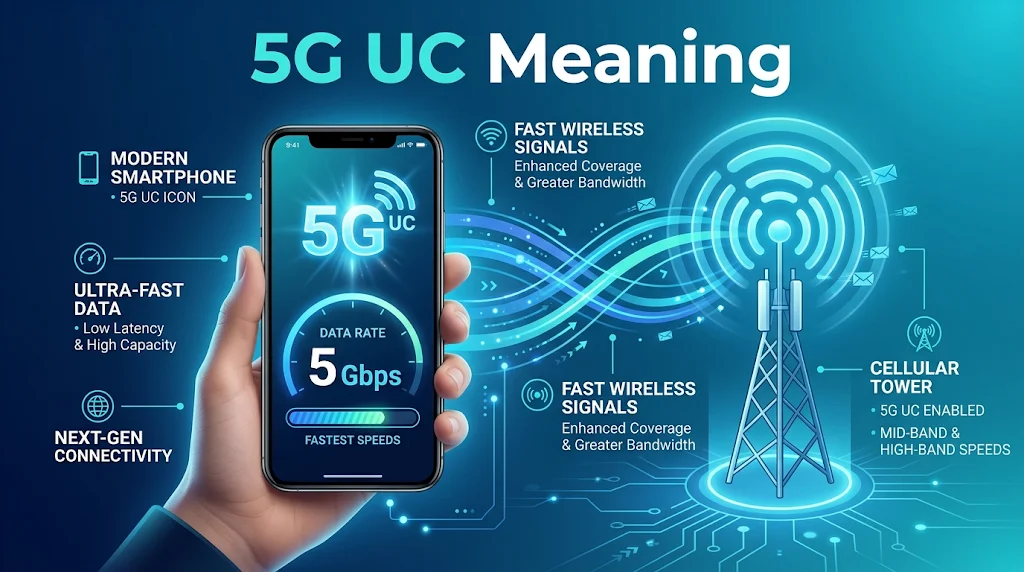
The term “5G UC” stands for 5G Ultra Capacity, a mobile network indicator commonly displayed on T-Mobile phones. It means your device is connected to T-Mobile’s faster 5G network, which uses mid-band or high-band spectrum to deliver higher speeds and greater data capacity than its standard extended-range 5G service.
You may see the 5G UC symbol at the top of your phone screen when using a compatible device in an area with coverage. In simple terms, 5G UC indicates access to a faster 5G connection, although actual internet speeds depend on network coverage, signal strength, congestion, and your device.
Have you ever looked at the top of your smartphone screen and noticed a small 5G UC symbol next to your signal bars? You might wonder whether it means your phone has a special internet connection, why it suddenly appears, or whether it makes your browsing and downloads faster.
If you’ve seen this indicator while watching videos, playing online games, or scrolling through social media, you’re not alone. Many smartphone users notice these network symbols but don’t know what they actually represent or how they affect their mobile internet experience.
Understanding the 5G UC meaning helps you identify the type of mobile network your smartphone is using and what kind of performance you can expect. In telecommunications, 5G UC stands for 5G Ultra Capacity, a branding term used by T-Mobile in the United States for its higher-capacity 5G network.
It primarily relies on mid-band spectrum, including 2.5 GHz, and may also use millimeter-wave technology in supported areas. Unlike standard extended-range 5G, this network is designed to provide faster download speeds and greater capacity.
In this guide, we’ll explain what 5G UC means, how it works, how it compares with regular 5G, and why the symbol appears on your phone.
Table of Contents
- What Does 5G UC Mean?
- What Is 5G Ultra Capacity?
- How Does 5G UC Work?
- 5G UC vs. 5G vs. 5G UW vs. LTE
- What Speeds Can You Expect?
- Why Does the 5G UC Icon Appear or Disappear?
- Does 5G UC Drain Your Phone Battery?
- Which Phones Support 5G UC?
- How to Get a 5G UC Connection
- Frequently Asked Questions
- Conclusion
What Does 5G UC Mean?
The 5G UC symbol on a smartphone stands for 5G Ultra Capacity. It is T-Mobile’s branding for parts of its 5G network that offer higher capacity and the potential for faster data speeds than its broader low-band 5G coverage.
You may notice this label near the signal bars at the top of your iPhone or Android screen. It tells you that your phone has connected to a network using T-Mobile’s Ultra Capacity 5G service. It does not mean that your phone has a special feature called UC or that every online activity will automatically run faster.
The distinction is important. A network indicator describes the type of cellular connection available, not a guaranteed internet speed.
For example, you might see 5G UC while browsing websites, streaming a video, downloading an app, or using a navigation service. The symbol can also appear when you are not actively using mobile data because your phone is registered on that network.
What Does Each Part of the Label Mean?
The abbreviation combines two ideas:
- 5G: Fifth-generation cellular network technology, designed to improve mobile connectivity, capacity, and performance.
- UC: Ultra Capacity, T-Mobile’s name for its higher-capacity 5G network.
Together, the label identifies a higher-capacity 5G connection. It is a network branding term rather than a separate generation of wireless technology.
Is 5G UC Exclusive to T-Mobile?
Yes, 5G UC is T-Mobile’s network indicator and branding in the United States. Other carriers use different labels to identify their enhanced 5G services.
For example, Verizon uses 5G Ultra Wideband, commonly displayed as 5G UW. AT&T uses 5G+ for parts of its enhanced 5G network.
These labels describe similar broad ideas, but they are not identical technical standards. Each carrier uses its own network equipment, spectrum, coverage strategy, and naming system.
What Is 5G Ultra Capacity?
5G Ultra Capacity refers to the higher-capacity part of T-Mobile’s 5G network. It mainly uses mid-band spectrum, with millimeter-wave technology available in selected locations.
To understand why this matters, it helps to know that mobile networks use radio frequencies to send information between phones and nearby cell sites. Different frequency ranges have different strengths. Some cover large areas, while others can carry more data but have shorter effective ranges.
Mid-Band 5G
Mid-band spectrum provides a balance between coverage and speed. T-Mobile’s 2.5 GHz spectrum is a major part of its Ultra Capacity network.
This frequency range can carry more data than low-band spectrum while generally covering a wider area than millimeter-wave signals. That makes it useful for serving neighborhoods, busy roads, shopping areas, and other places where many people use mobile data.
Mid-band 5G is one reason users may notice a meaningful improvement when their phones switch from standard low-band 5G to 5G UC.
Millimeter-Wave 5G
Millimeter-wave, often shortened to mmWave, uses very high radio frequencies, generally in the range above 24 GHz. It can deliver extremely high data capacity, but its signals travel shorter distances and are more easily blocked by walls, trees, and other obstacles.
For that reason, mmWave coverage is usually concentrated in selected locations rather than spread across entire cities. T-Mobile includes this technology within its Ultra Capacity branding where it is available.
Low-Band 5G
Low-band 5G is designed to cover larger areas and provide better reach indoors and across less densely populated locations. T-Mobile’s 600 MHz spectrum is an important example.
It generally offers wider coverage than mid-band and mmWave, but it has less available capacity and usually delivers lower peak speeds. T-Mobile identifies its broader low-band 5G service with the standard 5G label rather than 5G UC.
| 5G spectrum type | Main strength | Main limitation | Typical use |
| Low-band | Wider coverage and better reach | Usually lower data capacity | Rural areas and broad geographic coverage |
| Mid-band | Balance of coverage and speed | Does not reach as far as low-band | Cities, suburbs, and busy neighborhoods |
| Millimeter-wave | Very high data capacity | Shorter range and limited coverage | Selected high-traffic locations |
The key point is that 5G UC does not refer to one single frequency. It identifies T-Mobile’s higher-capacity network service, which can use more than one spectrum range.
How Does 5G UC Work?
Your phone connects to a nearby cellular site, also called a cell tower or base station. That site communicates with your device using radio signals and connects your phone to the carrier’s wider mobile network.
When you enter an area with Ultra Capacity coverage, a compatible phone and plan can connect to the available higher-capacity 5G service. Your device then displays the 5G UC indicator when the network connection meets the carrier’s conditions for showing that label.
Several things influence whether this connection works well.
1. Network Coverage
Your phone needs to be within the carrier’s coverage area. A city may have strong Ultra Capacity service in its downtown district but weaker coverage in nearby residential streets.
Coverage can also change inside buildings. Thick walls, underground spaces, and certain construction materials can weaken radio signals.
2. Phone Compatibility
Not every phone supports every 5G frequency. A device may support 5G generally but lack the hardware needed for a particular spectrum band used by the carrier.
A compatible phone must also support the carrier’s network configuration. This is why checking the exact model number matters when buying a device for use with a particular network.
3. Network Congestion
A cell site serves multiple users at the same time. When many people are using data in the same area, available capacity is shared among connected devices.
Ultra Capacity networks are designed to provide more capacity, but they are not immune to congestion. A crowded stadium, concert, or busy shopping district can still affect performance.
4. Signal Quality
A 5G UC icon does not tell you how strong or clean the radio signal is. Your phone might be connected to the right network layer but still have a weak signal because of distance, obstacles, or indoor conditions.
A strong signal generally helps your device maintain a better connection, although signal bars alone do not tell the whole story.
5G UC vs. 5G vs. 5G UW vs. LTE
The labels shown on your phone can be confusing, especially when different carriers use different names for their networks. They all describe cellular connections, but they do not mean exactly the same thing.
| Network label | Common meaning | Carrier association | General performance |
| 5G UC | 5G Ultra Capacity | T-Mobile | Higher-capacity 5G |
| 5G | Standard 5G indicator | Multiple carriers | Depends on the carrier’s spectrum and coverage |
| 5G UW | 5G Ultra Wideband | Verizon | Enhanced 5G using mid-band and/or mmWave |
| 5G+ | Enhanced 5G service | AT&T | Higher-capacity 5G in supported areas |
| LTE | Long-Term Evolution, commonly associated with 4G | Multiple carriers | Mature 4G mobile broadband |
5G UC vs. Regular 5G
The main difference is the type of 5G service being indicated.
The standard 5G label can represent a broader coverage layer, often using low-band spectrum. The 5G UC label identifies T-Mobile’s higher-capacity 5G service, which mainly uses mid-band spectrum and can include mmWave.
In suitable conditions, a UC connection can provide faster downloads and better performance in areas with heavy mobile data use. However, the actual difference depends on the location and network conditions.
5G UC vs. 5G UW
These labels belong to different carriers.
- 5G UC: T-Mobile’s Ultra Capacity branding.
- 5G UW: Verizon’s Ultra Wideband branding.
Both indicate enhanced 5G service, but their coverage areas, spectrum holdings, and network deployments differ. A phone displaying 5G UW is not connected to T-Mobile’s Ultra Capacity service.
5G UC vs. LTE
LTE is a widely used 4G mobile technology. It supports activities such as video streaming, browsing, online gaming, and video calls.
5G UC uses fifth-generation network technology and can provide higher capacity and faster data rates when conditions are favorable. Still, a strong LTE connection can sometimes perform better than a weak or congested 5G connection.
The newer label does not guarantee a better experience in every location.
What Speeds Can You Expect?
One reason people pay attention to the UC indicator is its potential for faster mobile internet. Mid-band and mmWave 5G can offer much higher data capacity than many low-band connections, but there is no single speed that every user should expect.
Your results depend on several factors, including the spectrum available in your area, signal quality, phone capabilities, network congestion, and your carrier plan.
Download and Upload Speeds
Download speed affects how quickly your phone receives information. It matters when you stream videos, download apps, open large files, or load websites.
Upload speed affects how quickly your phone sends information. It matters when you share videos, upload photographs, join video meetings, or back up files online.
A strong 5G UC connection may improve both, although download speeds are often more noticeable in everyday use.
Does 5G UC Always Mean Faster Internet?
No. The icon indicates a connection to a higher-capacity network layer, not a guaranteed speed.
For example, a phone connected to 5G UC in a busy shopping center may experience slower downloads than a phone connected to standard 5G in a quieter area. Network congestion, signal interference, and available capacity can change the result.
If you want to know how your connection performs, use a reputable speed-testing app and compare results in different locations. Run more than one test if you want a clearer picture, since a single reading can be affected by temporary network conditions.
Why Does the 5G UC Icon Appear or Disappear?
You may see the indicator while traveling through one neighborhood, only for it to change to regular 5G or LTE a few minutes later. This is normal.
Your phone continually checks available cellular connections and may switch between network types as you move. The change does not necessarily mean something is wrong with your device.
Here are some common reasons the icon changes:
- Moving outside coverage: Your phone may leave an Ultra Capacity coverage area and connect to standard 5G or LTE.
- Entering a building: Walls, concrete, metal structures, and underground spaces can weaken higher-frequency signals.
- Changing locations: Different cell sites may offer different network bands.
- Network conditions: The carrier may manage connections based on coverage and network availability.
- Device limitations: Your phone may not support every band or network configuration available nearby.
Does the Icon Need to Stay Visible?
No. A phone does not need to display 5G UC constantly to provide a useful internet connection.
Standard 5G and LTE can still handle everyday tasks, including messaging, navigation, video streaming, and browsing. If the UC label disappears but your phone continues working normally, there may be nothing to fix.
If the connection repeatedly drops or becomes unusually slow, check your signal, restart the phone, and confirm that mobile data is enabled.
Does 5G UC Drain Your Phone Battery?
A 5G connection can affect battery consumption, but the UC label alone does not tell you how much power your phone is using.
Battery life depends on the phone’s modem, signal conditions, network activity, screen brightness, and background applications. A device working hard to maintain a weak cellular connection may use more power than one connected to a strong signal.
Downloading large files, streaming high-resolution video, and using mobile hotspots can also increase energy use.
Why Battery Consumption Can Increase
There are a few common reasons:
- Weak coverage: Your phone may use more power while trying to maintain a connection.
- Heavy data activity: Large downloads and continuous streaming require ongoing network communication.
- Frequent network switching: Moving between different coverage areas can cause the phone to search for and change connections.
- Background activity: Apps may continue syncing, updating, or transferring data even when you are not actively using them.
How to Save Battery
If battery life matters more than maximum mobile speed, consider using your phone’s automatic or battery-saving network settings. Many devices can select an appropriate connection without requiring you to stay on the fastest available network.
You can also reduce unnecessary background data, avoid running a hotspot when you do not need it, and use Wi-Fi when a reliable connection is available.
There is no need to disable 5G simply because the UC symbol appears. Focus on your actual battery performance instead.
Which Phones Support 5G UC?
A phone needs compatible 5G hardware and support for the relevant T-Mobile network bands to connect to Ultra Capacity service.
Many newer smartphones support these connections, but compatibility depends on the exact model and regional version. Two phones with similar names may support different frequency bands.
Examples of phone families with 5G models include:
- Apple iPhone: iPhone 12 and later generations include 5G-capable models, although exact band support varies by model and region.
- Samsung Galaxy: Selected Galaxy S, Z, and other 5G-capable models support T-Mobile’s compatible network bands.
- Google Pixel: Many recent Pixel models include 5G connectivity, with supported bands varying by generation and version.
- OnePlus: Selected OnePlus 5G models support compatible T-Mobile frequencies.
These examples do not mean every device in each family will display the same network indicator. Check the manufacturer’s specifications and T-Mobile’s device compatibility information before purchasing a phone.
Does the Phone Need a Special SIM Card?
In most cases, a compatible device needs an appropriate T-Mobile SIM or eSIM and an active plan that provides access to the carrier’s 5G network.
Older SIM cards may work in some situations, but compatibility can depend on the device and account. If your phone supports 5G but does not connect as expected, T-Mobile support can check whether your SIM or account needs an update.
How to Get a 5G UC Connection
If you have a compatible phone and T-Mobile service, you do not normally need to activate Ultra Capacity manually. Your phone should connect automatically when the service is available and network conditions allow it.
If the indicator does not appear, try these checks:
- Confirm coverage: Check whether T-Mobile offers Ultra Capacity service in your area.
- Check phone compatibility: Make sure your exact device model supports the required 5G bands.
- Enable 5G: Open your cellular or mobile network settings and select a 5G-compatible option.
- Check your plan: Confirm that your account has access to the relevant 5G service.
- Update your phone: Install available software and carrier settings updates.
- Restart the device: A restart can help your phone reconnect to the network.
- Contact your carrier: If the issue continues, ask T-Mobile to check your account and local coverage.
Menu names differ between iPhone and Android devices, so the exact steps may vary.
On an iPhone
On a supported iPhone, open Settings, select Cellular, choose Cellular Data Options, and look for Voice & Data. If available, select a 5G option such as 5G Auto or 5G On.
The phone will manage its connection according to the selected setting and available coverage. Selecting 5G On does not create Ultra Capacity coverage where none exists.
On an Android Phone
Android settings vary by manufacturer. On many devices, open Settings, go to Connections or Network & Internet, and find the mobile network settings.
Look for a preferred network type that includes 5G. If your phone supports the relevant bands and your carrier provides coverage, it can connect automatically.
FAQs
Does 5G UC mean my phone is connected to Wi-Fi?
No. It indicates a cellular 5G connection through T-Mobile, not a Wi-Fi connection. Your phone can use mobile data while the symbol is visible.
Can I make calls while 5G UC is showing?
Yes. Compatible phones can make calls while connected to 5G service. Call handling depends on the device, carrier configuration, and available voice network technology.
Does 5G UC work when roaming?
It depends on the roaming agreement, carrier, device, and location. You should not assume that T-Mobile Ultra Capacity service will be available on every partner network.
Why does my phone show 5G UC but websites load slowly?
The icon does not guarantee a particular speed. Congestion, weak signal quality, server delays, and other network conditions can slow browsing.
Does 5G UC cost extra?
The network indicator itself is not a separate paid feature. However, plan terms, data limits, and eligibility depend on your T-Mobile subscription.
Can I turn off the 5G UC symbol?
You generally cannot disable only the UC label while keeping the same connection. You can change your preferred network settings, but this may also affect your access to 5G service.
Conclusion
The 5G UC label identifies T-Mobile’s higher-capacity 5G service, which mainly uses mid-band spectrum and can include millimeter-wave coverage. It can provide faster downloads and better capacity than standard low-band 5G, but performance still depends on your phone, location, signal, and network conditions.
If the symbol appears on your screen, your device is using a supported Ultra Capacity connection. You do not need to change anything unless you are experiencing connection or performance problems.