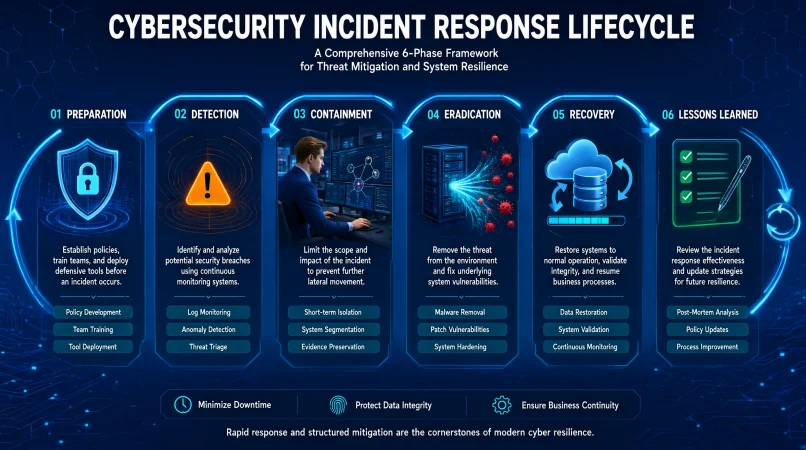
The incident response phase refers to a specific stage in the process an organization follows to detect, manage, contain, and recover from a cybersecurity incident. The commonly recognized phases include preparation, detection and analysis, containment, eradication, recovery, and post-incident improvement.
Top alternatives: incident response lifecycle, cybersecurity incident response stages, incident management process, security incident handling steps, incident response framework
A cybersecurity incident rarely arrives with a polite calendar invitation. One minute, everything looks normal; the next, employees cannot access files, suspicious logins appear, or a system starts behaving like it has a mind of its own.
That is where a clear incident response plan makes all the difference. Understanding each incident response phase helps security teams know what to do, who should do it, and how to limit damage without making the situation worse.
Whether you work in IT, manage a business, study cybersecurity, or simply want to understand how organizations handle attacks, knowing the stages is useful. From preparation and detection to recovery and lessons learned, each stage has a purpose.
Let’s break down the process with practical examples, straightforward explanations, and actions that make sense in real-world situations.
I’ve organized the content under all 15 original H2 headings. Each section has exactly four relevant H3 subheadings, with three numbered entries under each. The original examples and meanings are preserved.
Preparation Phase: Getting Ready Before an Incident
Building the Response Team and Plan
1. Build an Incident Response Team
Example: A company assigns security analysts, IT staff, legal contacts, and communications leads to its response team.
Meaning: Clear ownership prevents confusion when an incident occurs.
2. Create an Incident Response Plan
Example: An organization documents how employees should report suspected ransomware.
Meaning: A written plan gives responders a consistent starting point.
3. Identify Critical Assets
Example: An IT team lists customer databases, payment systems, and essential business applications.
Meaning: Knowing what matters most helps prioritize protection and recovery.
Establishing Security Procedures and Communication
4. Define Incident Severity Levels
Example: A security team classifies a suspicious login differently from a confirmed data breach.
Meaning: Severity levels help determine urgency and escalation.
5. Establish Communication Channels
Example: Responders set up secure ways to communicate if company email becomes unavailable.
Meaning: Reliable communication keeps the response coordinated.
6. Maintain System Backups
Example: A business keeps protected backups of important files and tests whether they can be restored.
Meaning: Recoverable backups can reduce downtime and data loss.
Preparing Employees and Security Resources
7. Train Employees
Example: Staff practice reporting suspicious emails and unexpected login requests.
Meaning: Employee awareness can help identify threats earlier.
8. Prepare Security Tools
Example: The security team checks that endpoint protection, logging, and monitoring systems are working.
Meaning: Ready-to-use tools help responders investigate incidents efficiently.
9. Document Key Contacts
Example: An incident plan includes current contacts for IT leaders, legal advisers, vendors, and executives.
Meaning: Responders can reach the right people without wasting time.
Reviewing and Testing Readiness
10. Review Security Risks
Example: A company assesses which systems are most exposed to phishing or unauthorized access.
Meaning: Risk assessments help guide preventive security decisions.
11. Practice Incident Simulations
Example: Employees and security staff participate in a simulated ransomware exercise.
Meaning: Exercises reveal gaps before a real emergency happens.
12. Update the Response Plan
Example: A security manager revises procedures after a major system upgrade.
Meaning: Current documentation is more useful than an outdated plan.
Detection and Analysis Phase: Finding Out What Happened
Monitoring Systems and Identifying Threats
1. Monitor Security Alerts
Example: Analysts review alerts from endpoint protection and network monitoring systems.
Meaning: Monitoring helps identify suspicious activity that may indicate an incident.
2. Investigate Unusual Logins
Example: A security analyst checks an account that logged in from an unexpected location.
Meaning: Unusual access patterns may reveal compromised credentials.
3. Review System Logs
Example: Responders examine authentication records after a server reports suspicious activity.
Meaning: Logs help reconstruct events and identify possible attack paths.
Verifying Suspicious Activity and Classifying Incidents
4. Identify Malware Activity
Example: Security software detects a suspicious file attempting to run on an employee laptop.
Meaning: Malware indicators can signal a possible security incident.
5. Verify Suspicious Emails
Example: An analyst checks whether a reported email contains a malicious attachment or phishing link.
Meaning: Verification separates genuine threats from harmless messages.
6. Determine the Incident Type
Example: The response team identifies whether an event involves ransomware, phishing, or unauthorized access.
Meaning: Classification helps select suitable response actions.
Assessing the Incident Scope and Impact
7. Assess the Scope
Example: Investigators check whether suspicious activity affected one workstation or multiple servers.
Meaning: Scope assessment shows how widely the incident may have spread.
8. Establish the Timeline
Example: Analysts compare login records, alerts, and file changes to build an event timeline.
Meaning: A timeline helps explain when the incident began and how it developed.
9. Identify Affected Accounts
Example: Responders review accounts that accessed a compromised application.
Meaning: Account analysis helps locate possible unauthorized access.
Preserving Evidence and Escalating Incidents
10. Evaluate Business Impact
Example: A company determines whether an affected system supports customer payments.
Meaning: Impact assessment helps prioritize the response.
11. Preserve Initial Evidence
Example: Analysts save relevant logs and alert details before making system changes.
Meaning: Early evidence preservation supports investigation and later review.
12. Escalate Confirmed Incidents
Example: A monitoring analyst notifies the incident response lead after confirming malicious activity.
Meaning: Escalation brings the right decision-makers into the response.
Containment Phase: Limiting the Damage
Isolating Compromised Devices and Accounts
1. Isolate an Infected Device
Example: IT disconnects a malware-infected workstation from the corporate network.
Meaning: Isolation can help prevent further spread.
2. Disable a Compromised Account
Example: Administrators temporarily suspend an account linked to unauthorized access.
Meaning: Disabling access can stop an attacker from continuing to use the account.
3. Block Malicious Network Traffic
Example: Network staff block communication with a confirmed malicious address.
Meaning: Blocking suspicious traffic can disrupt an attacker’s connection.
Restricting Access and Separating Affected Systems
4. Restrict Access to Sensitive Systems
Example: Administrators temporarily limit access to a database under investigation.
Meaning: Access restrictions can reduce additional exposure.
5. Segment Affected Networks
Example: IT separates a compromised network segment from unaffected business systems.
Meaning: Segmentation can limit movement between connected environments.
6. Quarantine Suspicious Files
Example: Endpoint security software isolates a file identified as malicious.
Meaning: Quarantine prevents the file from being used normally while it is investigated.
Securing Credentials and Applying Temporary Controls
7. Revoke Exposed Credentials
Example: Administrators invalidate credentials suspected of being stolen.
Meaning: Revocation reduces the chance of continued unauthorized access.
8. Apply Temporary Security Rules
Example: The security team adds a temporary firewall rule during an active investigation.
Meaning: Temporary controls can reduce immediate exposure.
9. Protect Critical Services
Example: Responders prioritize keeping essential customer services available while isolating affected systems.
Meaning: Containment should limit damage while considering business continuity.
Coordinating and Reviewing Containment Actions
10. Coordinate With System Owners
Example: Security analysts consult application owners before isolating a production server.
Meaning: Coordination helps avoid unnecessary disruption.
11. Record Containment Actions
Example: Responders document which accounts, devices, and network connections they restricted.
Meaning: Accurate records support accountability and investigation.
12. Reassess the Scope
Example: Analysts continue monitoring for additional infected devices after isolating the first one.
Meaning: Containment may need adjustment as new evidence appears.
Eradication Phase: Removing the Threat
Removing Malware and Unauthorized Access
1. Remove Confirmed Malware
Example: Security staff use approved tools to remove malware from an affected endpoint.
Meaning: Eradication removes the identified malicious software.
2. Eliminate Unauthorized Accounts
Example: Administrators remove accounts created by an attacker.
Meaning: Removing unauthorized access paths helps prevent repeat entry.
3. Close Exploited Vulnerabilities
Example: IT applies a security patch to a server exploited during the incident.
Meaning: Fixing the weakness reduces the chance of the same attack succeeding again.
Eliminating Persistence and Securing Credentials
4. Remove Malicious Persistence
Example: Investigators identify and remove unauthorized startup tasks or services.
Meaning: Removing persistence mechanisms makes it harder for an attacker to regain access.
5. Reset Compromised Credentials
Example: The organization resets passwords and rotates affected service credentials.
Meaning: Credential changes help secure accounts exposed during the incident.
6. Review Administrative Access
Example: Security staff remove unnecessary administrator permissions from affected accounts.
Meaning: Least-privilege access reduces opportunities for misuse.
Checking Systems and Closing Access Routes
7. Check for Additional Malware
Example: Analysts scan related devices for other malicious files or processes.
Meaning: A broader check helps avoid leaving hidden threats behind.
8. Remove Unauthorized Remote Access
Example: IT disables an unapproved remote access tool found on a server.
Meaning: Removing unauthorized access tools closes another possible entry route.
9. Verify Security Configurations
Example: Administrators review firewall and endpoint settings changed during the attack.
Meaning: Configuration checks help identify attacker-created weaknesses.
Investigating and Validating Remediation
10. Investigate the Root Cause
Example: The response team determines how a phishing email led to account compromise.
Meaning: Understanding the cause helps guide complete remediation.
11. Validate Remediation
Example: Security analysts rescan affected systems after removing the threat.
Meaning: Validation checks whether eradication actions worked.
12. Document Removed Threats
Example: Responders record malware names, affected systems, and remediation steps.
Meaning: Documentation supports future investigations and prevention.
Recovery Phase: Restoring Normal Operations
Restoring Systems and Essential Services
1. Restore Clean Backups
Example: IT restores business files from verified backups after removing ransomware.
Meaning: Clean backups can help recover lost or inaccessible data.
2. Rebuild Compromised Systems
Example: Administrators reinstall an affected server using trusted installation media.
Meaning: Rebuilding can provide a clean and controlled system environment.
3. Test Systems Before Reconnection
Example: Security staff scan a restored workstation before returning it to the company network.
Meaning: Testing helps reduce the risk of reintroducing the threat.
Validating Data and User Access
4. Restore Essential Services First
Example: A business prioritizes payment processing before less critical internal applications.
Meaning: Recovery priorities help reduce operational disruption.
5. Monitor Restored Systems
Example: Analysts watch restored servers for unusual logins or suspicious processes.
Meaning: Monitoring can reveal signs that the incident is not fully resolved.
6. Validate Data Integrity
Example: IT checks restored customer records against trusted copies.
Meaning: Integrity checks help confirm that recovered information is accurate.
Communicating Service Status and Operational Readiness
7. Confirm User Access
Example: Employees test their accounts after administrators restore a business application.
Meaning: Access checks help confirm that services are usable again.
8. Communicate Service Status
Example: The IT department informs employees when a restored application becomes available.
Meaning: Clear updates help users understand what is working.
9. Increase Monitoring Temporarily
Example: Security analysts apply closer monitoring to systems affected by a recent breach.
Meaning: Extra visibility can help detect recurring suspicious activity.
Documenting and Approving Recovery
10. Confirm Business Operations
Example: Department managers verify that essential workflows function after restoration.
Meaning: Technical recovery should also support operational readiness.
11. Keep Recovery Records
Example: IT documents restored systems, backup sources, and validation results.
Meaning: Recovery records provide evidence of completed work.
12. Obtain Formal Sign-Off
Example: System owners approve the return of critical services to normal operation.
Meaning: Sign-off confirms that responsible teams accept the restored service.
Post-Incident Review Phase: Learning From the Event
Reviewing the Incident and Reconstructing Events
1. Hold a Lessons-Learned Meeting
Example: Security, IT, and business teams review what happened after a ransomware incident.
Meaning: A review helps identify what worked and what needs improvement.
2. Build a Final Incident Timeline
Example: Analysts combine alerts, logs, and response records into one timeline.
Meaning: A complete timeline supports accurate reporting.
3. Identify the Root Cause
Example: Investigators determine that an unpatched server enabled unauthorized access.
Meaning: Root-cause analysis identifies the underlying weakness.
Evaluating Response Speed and Communication
4. Review Response Delays
Example: Managers examine why an alert remained unassigned for several hours.
Meaning: Reviewing delays can improve future response speed.
5. Evaluate Communication
Example: The team checks whether employees and executives received timely updates.
Meaning: Communication reviews reveal gaps in coordination.
6. Measure Business Impact
Example: A company calculates downtime, recovery costs, and affected services.
Meaning: Impact measurement helps explain the incident’s consequences.
Improving Security Policies, Training, and Tools
7. Update Security Policies
Example: An organization changes its account access policy after a credential theft incident.
Meaning: Policy updates turn lessons into stronger controls.
8. Improve Employee Training
Example: Staff receive new phishing awareness exercises after a successful email attack.
Meaning: Training addresses behavior that contributed to the incident.
9. Review Security Tools
Example: Analysts assess whether monitoring tools detected the attack quickly enough.
Meaning: Tool reviews help identify visibility gaps.
Assigning and Tracking Improvements
10. Assign Improvement Actions
Example: Managers assign owners and deadlines for each corrective action.
Meaning: Clear responsibility makes improvements more likely to happen.
11. Share Relevant Findings
Example: The security team provides approved incident findings to appropriate internal stakeholders.
Meaning: Sharing lessons helps other teams reduce similar risks.
12. Track Improvements to Completion
Example: A security manager checks whether agreed changes were implemented.
Meaning: Follow-up ensures the review leads to practical improvements.
Incident Response Phase Examples in Real-World Cyberattacks
Malware and Email-Based Attacks
1. Ransomware Attack
Example: A company detects encrypted files, isolates affected devices, removes the threat, and restores clean backups.
Meaning: The response limits malware spread and supports safe recovery.
2. Phishing Attack
Example: Employees report a suspicious email, and security staff block its link and investigate affected accounts.
Meaning: Early reporting helps reduce credential theft and further compromise.
3. Malware Infection
Example: Security software identifies malware, and responders isolate the infected endpoint.
Meaning: Isolation can prevent further spread while the device is investigated.
Account Compromise and Data Exposure
4. Data Breach
Example: A business identifies exposed customer records, restricts access, and investigates the disclosure.
Meaning: The response aims to limit exposure and understand what information was affected.
5. Compromised Employee Account
Example: An organization disables a compromised account and resets its credentials.
Meaning: Access controls help prevent continued account misuse.
6. Cloud Account Compromise
Example: Administrators revoke suspicious cloud sessions and review access permissions.
Meaning: The response helps secure cloud resources and identities.
Network and Insider-Related Incidents
7. Distributed Denial-of-Service Attack
Example: Network teams work with service providers to filter malicious traffic during an outage.
Meaning: Traffic mitigation helps restore service availability.
8. Insider Threat
Example: A company investigates unusual file downloads by an employee account.
Meaning: Activity analysis helps determine whether information was accessed improperly.
9. Supply Chain Attack
Example: A company investigates a compromised software update from a third-party provider.
Meaning: The response assesses whether trusted software or connected systems were affected.
Website, Device, and Financial Security Incidents
10. Website Defacement
Example: A business takes a compromised website offline while IT investigates unauthorized changes.
Meaning: Temporary isolation can prevent further misuse and protect visitors.
11. Lost Company Laptop
Example: IT disables access tokens and uses approved device-management controls after a laptop goes missing.
Meaning: These actions can reduce the risk of data exposure.
12. Business Email Compromise
Example: Finance staff report a suspicious payment request, and the company verifies transactions through trusted channels.
Meaning: Verification can help prevent fraudulent payments.
Professional Incident Response Phase Actions for Security Teams
Activating and Organizing the Response
1. Activate the Response Procedure
Example: The incident manager formally starts the response process after a confirmed security alert.
Meaning: Activation establishes an organized response.
2. Assign an Incident Lead
Example: A security manager appoints one person to coordinate investigation and response tasks.
Meaning: Central coordination reduces conflicting decisions.
3. Establish an Incident Record
Example: Analysts create a case containing the incident time, affected assets, and initial findings.
Meaning: A central record keeps information organized.
Prioritizing Work and Coordinating Teams
4. Prioritize by Business Risk
Example: The team handles an exposed payment system before a low-impact test server.
Meaning: Risk-based prioritization directs resources where they matter most.
5. Coordinate Technical Teams
Example: Network, endpoint, cloud, and application teams work from a shared response plan.
Meaning: Collaboration helps address incidents across connected systems.
6. Involve Legal Advisers When Needed
Example: A company consults legal counsel after discovering a possible personal-data breach.
Meaning: Legal guidance helps assess obligations and response requirements.
Managing External Support and Evidence
7. Coordinate External Providers
Example: The response lead contacts a cloud provider to investigate suspicious activity.
Meaning: External support may be necessary when services are managed by third parties.
8. Maintain an Evidence Record
Example: Investigators record where collected logs and forensic copies came from.
Meaning: Evidence records support traceability and reliable analysis.
9. Approve High-Impact Actions
Example: A designated manager approves shutting down a critical production service.
Meaning: Approval procedures help balance security and business continuity.
Communicating, Tracking, and Closing the Incident
10. Provide Executive Updates
Example: The incident lead briefs senior management on scope, impact, and response priorities.
Meaning: Decision-makers need reliable information to support the response.
11. Track Open Tasks
Example: The response coordinator maintains a list of unresolved investigation and recovery actions.
Meaning: Task tracking helps prevent important work from being missed.
12. Close the Incident Formally
Example: The incident manager confirms that recovery and required documentation are complete.
Meaning: Formal closure establishes an accountable endpoint while allowing ongoing improvements.
Incident Response Phase Checklist for Businesses
Confirming and Organizing the Incident
1. Confirm the Alert
Example: An analyst checks whether a reported security event is genuine.
Meaning: Verification helps avoid unnecessary incident activation.
2. Identify Affected Assets
Example: IT lists the devices, accounts, and applications involved.
Meaning: Asset identification defines the investigation scope.
3. Assign Response Owners
Example: A manager gives investigation, communication, and recovery tasks to named team members.
Meaning: Ownership makes responsibilities clear.
Classifying and Assessing the Threat
4. Preserve Relevant Logs
Example: Analysts retain authentication and network records related to the event.
Meaning: Logs can help establish what happened.
5. Classify the Incident
Example: The team records the event as suspected malware or confirmed unauthorized access.
Meaning: Classification guides the response process.
6. Assess Potential Impact
Example: Managers identify affected services, data, and business operations.
Meaning: Impact assessment supports informed decisions.
Containing and Recovering From the Incident
7. Contain the Threat
Example: IT isolates affected devices and restricts compromised accounts.
Meaning: Containment aims to limit additional damage.
8. Remove the Cause
Example: Security staff remove malicious files and fix the exploited weakness.
Meaning: Eradication addresses the threat and its entry path.
9. Restore Trusted Systems
Example: IT rebuilds affected systems and restores verified data.
Meaning: Recovery returns services to a secure operating state.
Verifying Results and Recording Lessons
10. Verify Normal Operations
Example: System owners test applications and confirm expected performance.
Meaning: Validation checks that recovery is successful.
11. Notify Relevant Stakeholders
Example: The response lead provides approved updates to employees and leadership.
Meaning: Timely communication reduces confusion.
12. Record Lessons Learned
Example: The team documents gaps and assigns corrective actions after the incident.
Meaning: A checklist should lead to improvement, not just closure.
Incident Response Phase Roles and Responsibilities
Incident Leadership and Security Investigation
1. Incident Response Manager
Example: The manager coordinates the overall response to a confirmed breach.
Meaning: This role provides leadership and keeps activities aligned.
2. Security Analyst
Example: An analyst reviews alerts and investigates suspicious activity.
Meaning: Analysts help detect and understand security events.
3. Digital Forensics Specialist
Example: A specialist examines forensic copies of a compromised device.
Meaning: Forensic analysis helps reconstruct activity and preserve evidence.
Technical Operations and Legal Support
4. IT Administrator
Example: An administrator isolates affected servers and restores approved configurations.
Meaning: IT staff perform essential system-level response tasks.
5. Network Engineer
Example: A network engineer reviews traffic and applies approved containment rules.
Meaning: Network specialists help identify and restrict malicious communication.
6. Legal Adviser
Example: Legal staff review potential reporting and contractual obligations.
Meaning: Legal input helps the organization respond responsibly.
Communication and Organizational Decision-Making
7. Communications Manager
Example: A communications lead prepares an approved update for employees.
Meaning: This role helps maintain clear and consistent messaging.
8. Executive Leadership
Example: Senior leaders approve major business decisions during a serious incident.
Meaning: Leadership provides authority and resources.
9. Human Resources
Example: HR supports an investigation involving possible employee misuse of access.
Meaning: HR helps manage employee-related procedures appropriately.
External Support and Business Recovery
10. Third-Party Provider
Example: A cloud provider assists with investigating suspicious activity in a hosted service.
Meaning: Vendors may hold information or technical capabilities the organization needs.
11. Business Continuity Team
Example: Continuity staff arrange temporary processes while a critical application is unavailable.
Meaning: Their work helps maintain essential operations.
12. System Owner
Example: An application owner validates a restored service before users return to it.
Meaning: System owners confirm that business systems meet operational needs.
Common Mistakes During the Incident Response Phase
Detection and Reporting Mistakes
1. Ignoring Early Alerts
Example: A team dismisses repeated login failures without investigating them.
Meaning: Ignored warnings can allow suspicious activity to continue.
2. Delaying Incident Reporting
Example: An employee waits several days before reporting a suspicious attachment.
Meaning: Delayed reporting can make investigation and containment harder.
3. Acting Without a Clear Plan
Example: Multiple administrators make conflicting changes during an active incident.
Meaning: Uncoordinated actions can increase disruption.
Investigation and Containment Mistakes
4. Destroying Evidence
Example: A responder wipes an affected device before relevant evidence is preserved.
Meaning: Premature cleanup can make it harder to understand the incident.
5. Failing to Check Related Systems
Example: IT fixes one infected laptop but does not investigate connected devices.
Meaning: Other affected systems may remain compromised.
6. Restoring Too Early
Example: A company reconnects a server before confirming that the threat has been removed.
Meaning: Premature restoration may allow the incident to return.
Security and Communication Mistakes
7. Forgetting Credential Security
Example: An organization restores systems but leaves exposed passwords unchanged.
Meaning: Attackers may retain access through compromised credentials.
8. Poor Internal Communication
Example: Employees receive conflicting instructions about whether a service is safe to use.
Meaning: Inconsistent updates can create confusion.
9. Overlooking Third Parties
Example: A company investigates its own systems but ignores a potentially compromised vendor connection.
Meaning: External dependencies may be part of the incident.
Recovery and Improvement Mistakes
10. Skipping Recovery Tests
Example: IT restores files without checking whether the data is complete.
Meaning: Untested recovery can leave business operations unreliable.
11. Closing Without a Review
Example: A team ends the incident response without documenting what caused the breach.
Meaning: The organization loses an opportunity to improve.
12. Leaving Corrective Actions Unassigned
Example: A review identifies weak access controls but nobody owns the fix.
Meaning: Unassigned improvements are less likely to be completed.
Incident Response Phase Metrics and Performance Indicators
Measuring Detection and Response Speed
1. Mean Time to Detect
Example: A security team measures the average time between an incident beginning and its detection.
Meaning: This metric helps assess detection speed.
2. Mean Time to Respond
Example: An organization tracks how long it takes to begin meaningful response actions after an alert.
Meaning: The metric shows how quickly teams mobilize.
3. Mean Time to Contain
Example: Analysts measure the time required to isolate affected systems.
Meaning: This indicates how quickly the organization limits an incident.
Measuring Recovery and Incident Scope
4. Mean Time to Recover
Example: IT tracks how long critical services take to return to normal operation.
Meaning: This measures recovery performance.
5. Number of Affected Systems
Example: Investigators count the endpoints and servers involved in an incident.
Meaning: The count helps estimate technical scope.
6. Number of Affected Accounts
Example: Analysts record how many user accounts required investigation or restriction.
Meaning: Account impact helps guide identity security improvements.
Evaluating Incident Quality and Preparedness
7. Incident Severity Distribution
Example: A security manager compares the number of low-, medium-, and high-severity incidents.
Meaning: Severity trends help explain the organization’s incident profile.
8. Alert Accuracy
Example: Analysts review how many security alerts represent genuine threats.
Meaning: Alert quality can indicate whether monitoring needs tuning.
9. Backup Restoration Success
Example: IT records whether scheduled recovery tests restore data successfully.
Meaning: This metric shows whether backups are dependable.
Tracking Improvement and Business Impact
10. Response Plan Test Results
Example: A company tracks issues discovered during incident response exercises.
Meaning: Exercise results reveal weaknesses before real incidents.
11. Corrective Action Completion
Example: Managers measure how many post-incident tasks are completed by their deadlines.
Meaning: Completion rates show whether lessons become actual improvements.
12. Business Downtime
Example: A company records how long essential services remain unavailable.
Meaning: Downtime helps measure operational impact.
Incident Response Phase vs. Incident Management and Disaster Recovery
Understanding the Main Focus of Each Process
1. Incident Response Focuses on Security Events
Example: A security team investigates unauthorized access to a company database.
Meaning: Incident response addresses cybersecurity threats and their effects.
2. Incident Management Covers Broader Service Issues
Example: IT handles an application outage caused by a failed software update.
Meaning: Incident management can cover service disruptions beyond cyberattacks.
3. Disaster Recovery Restores Technology Services
Example: A business restores servers after a major infrastructure failure.
Meaning: Disaster recovery focuses on bringing systems and data back.
Understanding Business Continuity and Process Overlap
4. Business Continuity Maintains Essential Work
Example: Employees use an approved alternative process while a key application is unavailable.
Meaning: Business continuity helps keep critical operations running.
5. The Processes Can Overlap
Example: A ransomware incident activates security response, disaster recovery, and continuity procedures.
Meaning: One event can require several coordinated plans.
6. Incident Response Investigates the Cause
Example: Analysts determine how an attacker gained access to a network.
Meaning: Investigation helps explain the security event.
Comparing Investigation, Restoration, and Coordination
7. Disaster Recovery Prioritizes Restoration
Example: IT rebuilds critical servers using verified backups.
Meaning: Restoration helps return technology services to operation.
8. Incident Management Coordinates Service Restoration
Example: A service desk tracks an outage and updates affected users.
Meaning: Incident management organizes the handling of service interruptions.
9. Business Continuity Considers People and Processes
Example: A company moves essential work to an alternate location during an outage.
Meaning: Continuity planning covers more than technology alone.
Connecting Evidence, Recovery, and Testing
10. Security Response May Require Evidence Preservation
Example: Investigators preserve relevant logs before rebuilding a compromised server.
Meaning: Evidence can be important for understanding the incident.
11. Recovery Plans Need Coordination
Example: Security and IT teams agree when a restored system is safe to reconnect.
Meaning: Coordination helps prevent recovery from reintroducing threats.
12. All Plans Should Be Tested
Example: A business runs a combined exercise involving security, IT, and continuity teams.
Meaning: Testing helps identify gaps between related response processes.
Incident Response Phase Frameworks and Standards
Understanding NIST Guidance and Cybersecurity Frameworks
1. NIST SP 800-61 Revision 3
Example: A security manager uses the publication to align incident response with broader cybersecurity risk management.
Meaning: The guidance connects incident response with the NIST Cybersecurity Framework 2.0.
2. NIST Cybersecurity Framework 2.0
Example: An organization maps its security activities to Govern, Identify, Protect, Detect, Respond, and Recover.
Meaning: The framework provides a broader structure for managing cybersecurity risk.
3. Preparation Activities
Example: A business establishes policies, assigns responsibilities, and protects critical systems before an incident.
Meaning: Preparation builds the capabilities needed for effective response.
Applying the Detect, Respond, and Recover Functions
4. Detect Function
Example: Analysts monitor systems and investigate unusual activity.
Meaning: Detection helps discover and understand possible cybersecurity incidents.
5. Respond Function
Example: A response team takes coordinated action to manage a confirmed incident.
Meaning: Response activities address the incident and limit its impact.
6. Recover Function
Example: IT restores affected services and verifies that they are functioning.
Meaning: Recovery supports the return of systems and operations.
Understanding Lifecycle Models and Continuous Improvement
7. Continuous Improvement
Example: A company uses incident findings to update security policies and monitoring.
Meaning: Improvement feeds lessons back into cybersecurity risk management.
8. The Older Four-Phase Model
Example: A training course explains preparation, detection and analysis, containment and recovery, and post-incident activity.
Meaning: This traditional model remains useful for understanding the incident handling lifecycle.
9. Containment, Eradication, and Recovery
Example: A response plan separates limiting an attack, removing its cause, and restoring services.
Meaning: These activities describe practical steps within the response and recovery effort.
Selecting and Integrating Incident Response Practices
10. Post-Incident Activity
Example: A team reviews the incident and records improvements after services are restored.
Meaning: Follow-up helps strengthen future response capabilities.
11. Choose a Suitable Lifecycle Model
Example: A small business adapts a straightforward response workflow to its size and technical environment.
Meaning: Organizations should select a model that fits their risks and capabilities.
12. Integrate Response Across the Organization
Example: Security, IT, leadership, and business teams contribute to incident planning.
Meaning: Effective response is an organizational responsibility, not just an IT task.
Best Practices for Improving Every Incident Response Phase
Strengthening Plans, Responsibilities, and Recovery Readiness
1. Keep the Plan Practical
Example: A business writes clear instructions for reporting and escalating a suspected breach.
Meaning: Simple procedures are easier to follow under pressure.
2. Assign Clear Responsibilities
Example: Each response task has a named owner and backup contact.
Meaning: Defined roles reduce delays and uncertainty.
3. Maintain Reliable Backups
Example: IT tests protected backups on a regular schedule.
Meaning: Tested backups improve recovery readiness.
Improving Detection, Training, and Evidence Handling
4. Improve Security Monitoring
Example: Analysts review detection rules after discovering missed suspicious activity.
Meaning: Better monitoring can improve threat visibility.
5. Train Employees Regularly
Example: Staff practice reporting phishing emails during security awareness sessions.
Meaning: Regular training reinforces safe behavior.
6. Test the Response Plan
Example: The organization runs a tabletop exercise based on a simulated data breach.
Meaning: Exercises reveal weaknesses in decisions and coordination.
Coordinating Teams and Managing External Risks
7. Protect Incident Evidence
Example: Investigators preserve relevant records and document how evidence was collected.
Meaning: Good evidence handling supports reliable analysis.
8. Coordinate With Business Teams
Example: Security responders consult service owners before making changes that affect customers.
Meaning: Coordination helps balance security needs with operational priorities.
9. Review Third-Party Risks
Example: A company checks how vendors will support incident reporting and investigation.
Meaning: Supplier readiness matters when systems and data are shared.
Measuring Performance and Maintaining Improvements
10. Track Response Performance
Example: Security leaders review detection, containment, and recovery times after incidents.
Meaning: Metrics help identify areas that need improvement.
11. Update Plans After Changes
Example: An organization revises response procedures after moving workloads to cloud services.
Meaning: Plans should reflect the current technology environment.
12. Make Improvement Ongoing
Example: Teams update controls and training after each meaningful incident or exercise.
Meaning: Continuous improvement helps the organization become more resilient.
FAQs
What is the incident response phase?
It is a stage in the process of identifying, managing, and recovering from a cybersecurity incident.
What are the main incident response phases?
Traditional models include preparation, detection and analysis, containment, eradication, recovery, and post-incident review.
What is the first phase of incident response?
Preparation is traditionally the first phase because organizations need plans, people, and tools ready.
What happens during the detection phase?
Security teams investigate alerts, identify suspicious activity, and determine whether an incident has occurred.
What is the most important incident response phase?
Every phase matters because preparation, detection, containment, and recovery depend on one another.
What is the difference between containment and eradication?
Containment limits the damage, while eradication removes the threat and its underlying cause.
What happens after the recovery phase?
Teams review the incident, document lessons, and improve security controls and response procedures.
How many incident response phases are there?
The number depends on the framework. Traditional models use four broad phases or several expanded stages.
Is incident response part of cybersecurity?
Yes. It helps organizations manage security incidents and reduce their operational and security impact.
What is the NIST incident response framework?
NIST SP 800-61 Rev. 3 aligns incident response guidance with the Cybersecurity Framework 2.0.
What is the difference between incident response and disaster recovery?
Incident response manages security incidents, while disaster recovery focuses on restoring systems and data.
Why is the post-incident review important?
It helps teams identify weaknesses, improve procedures, and reduce the risk of similar incidents.
Conclusion
Understanding every incident response phase helps organizations handle cybersecurity incidents with greater confidence and control. Preparation builds readiness, detection identifies suspicious activity, containment limits damage, eradication removes threats, and recovery brings essential services back. The post-incident review then turns experience into practical improvements.
Remember, incident response is not just a checklist that security teams pull out when something goes wrong. It is an ongoing process involving people, technology, communication, and smart decisions. Use these examples to strengthen your knowledge, improve your organization’s response planning, or prepare for cybersecurity discussions. Save this guide, share it with your team, and keep building a stronger security mindset!