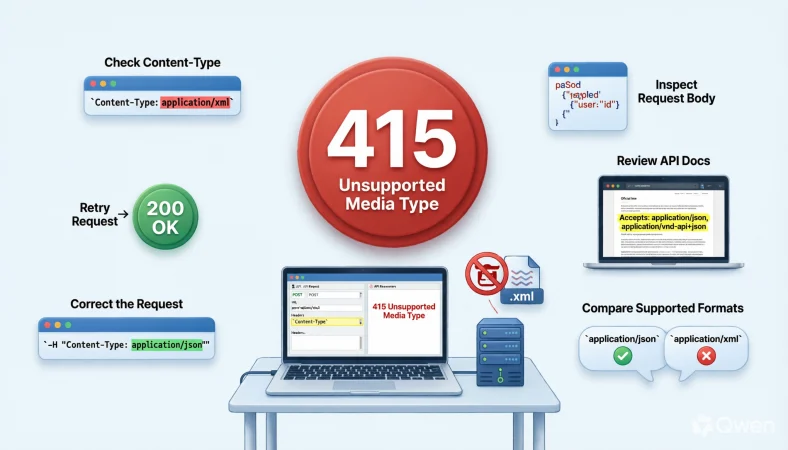
The 415 response code means a server refused to process a request because the media format or content type sent by the client is not supported. It commonly appears when an API receives an unsupported Content-Type or request format.
Top alternatives: HTTP 415 error, Unsupported Media Type, 415 HTTP status code, API 415 error, HTTP content type error
Getting a 415 response code when testing an API can feel like your request just got left on read by the server. You send the endpoint what looks like a perfectly reasonable request, only to receive a mysterious HTTP status and a very unhelpful moment of “okay, now what?”
Whether you are working on an API, debugging a website, checking a request in Postman, reviewing backend logs, or explaining an error to a teammate, understanding the 415 response code makes troubleshooting much easier. This status usually points toward a mismatch between the format your client sends and the formats the server is prepared to process.
The good news is that the issue is often straightforward once you inspect the request headers and body. Below, you will find practical, funny, professional, beginner-friendly, and clever explanations and responses to help make HTTP 415 errors much easier to understand.
Funny 415 Response Code Explanations
“The server said: wrong format, bestie.”
Use this when casually explaining a 415 error to a teammate.
Meaning: The request uses a media type the server does not support.
“415 walked in and rejected the file format.”
Use this when making an API debugging session less serious.
Meaning: The server refused the request because of its media type.
“Your request brought the wrong outfit to the API party.”
Use this during a lighthearted coding discussion.
Meaning: The request format does not match what the server expects.
“The API has standards, apparently.”
Use this after discovering an unsupported Content-Type.
Meaning: The server only accepts specific media formats.
“415 said, ‘Not that content type.’”
Use this when summarizing an API failure.
Meaning: The server rejected the request representation.
“The payload got turned away at the format door.”
Use this in a developer meme or team chat.
Meaning: The request body arrived in an unsupported format.
“HTTP said: nice request, wrong media type.”
Use this when joking about a failed API call.
Meaning: The request may be valid in general but uses an unsupported representation.
“The server understands you, just not your format.”
Use this when explaining the error simply.
Meaning: The server cannot process the submitted media type.
“415 is the API version of ‘please speak my language.’”
Use this in beginner-friendly technical content.
Meaning: The request needs to use a supported media format.
“Your JSON may be innocent, but the header looks suspicious.”
Use this when troubleshooting request headers.
Meaning: The declared media type may not match what the server expects.
“The endpoint has entered its picky-eater era.”
Use this during a casual debugging session.
Meaning: The endpoint accepts only certain content formats.
“415: because apparently format matters.”
Use this as a short developer caption.
Meaning: The server rejected the request because of its media type.
Professional 415 Response Code Responses
“The server returned 415 Unsupported Media Type.”
Use this in a technical incident summary.
Meaning: The request contained a media type the server could not process.
“Please verify the request’s Content-Type header.”
Use this when reviewing an API request.
Meaning: The declared media type may be unsupported or incorrect.
“Confirm that the request body matches the declared media type.”
Use this during API troubleshooting.
Meaning: The payload and its Content-Type should correspond.
“Review the endpoint’s supported media types.”
Use this when investigating a 415 response.
Meaning: The endpoint may accept only specific representations.
“Check whether the API expects JSON, XML, form data, or another format.”
Use this when helping a developer diagnose the issue.
Meaning: The client should send a format supported by the endpoint.
“Validate the request headers before retrying.”
Use this during structured debugging.
Meaning: Correct headers can help the server interpret the request properly.
“Confirm the API documentation for supported content types.”
Use this when an endpoint returns 415 unexpectedly.
Meaning: Documentation can clarify which request formats are accepted.
“Ensure the client sends the expected representation.”
Use this in a code review.
Meaning: The request should use a media type recognized by the server.
“Compare the successful request with the failing request.”
Use this during API diagnostics.
Meaning: Differences in headers or payload format may reveal the problem.
“Check whether the request is being transformed by an intermediary.”
Use this when headers appear correct locally.
Meaning: A proxy or gateway may alter the request before it reaches the server.
“Retest with a supported media type.”
Use this after identifying the accepted format.
Meaning: The request should be sent again using the server-supported representation.
“Document the accepted request formats for future integrations.”
Use this after resolving a recurring 415 issue.
Meaning: Clear documentation can prevent the same problem from returning.
Beginner-Friendly 415 Response Code Ideas
“415 usually means the server does not support the format you sent.”
Use this when explaining HTTP errors to beginners.
Meaning: The request’s media type is not accepted by the server.
“Start by checking Content-Type.”
Use this as a first troubleshooting suggestion.
Meaning: The header tells the server what type of content the request contains.
“Look at the request body next.”
Use this when teaching API debugging.
Meaning: The actual payload should match the declared content type.
“Check what the endpoint expects.”
Use this when troubleshooting a new API.
Meaning: Different endpoints can require different request formats.
“JSON needs the right header too.”
Use this when explaining JSON API requests.
Meaning: A JSON body should be identified appropriately.
“Do not assume every endpoint accepts JSON.”
Use this during beginner API training.
Meaning: APIs can support different media types.
“Compare your request with the API example.”
Use this when documentation provides sample requests.
Meaning: The official example can reveal formatting differences.
“Check for a typo in the media type.”
Use this when debugging a simple 415 error.
Meaning: An incorrect Content-Type value can cause rejection.
“Make sure your body and header agree.”
Use this as a beginner-friendly explanation.
Meaning: The declared media type should accurately describe the payload.
“A 415 does not automatically mean your endpoint is broken.”
Use this when someone assumes the server is malfunctioning.
Meaning: The problem may be limited to the request representation.
“Fix the request format before changing the endpoint.”
Use this during troubleshooting.
Meaning: The request should be validated before making larger changes.
“Think format first when you see 415.”
Use this as a memorable learning tip.
Meaning: Media type compatibility is a common starting point for diagnosis.
Creative 415 HTTP Error Explanations
“415 is a format mismatch wearing an HTTP badge.”
Use this in a technical blog or social post.
Meaning: The status identifies an unsupported media type.
“Your payload arrived speaking the wrong dialect.”
Use this when explaining content-type compatibility.
Meaning: The server does not understand the submitted representation.
“The endpoint has a menu, and your payload ordered something unavailable.”
Use this during a playful API explanation.
Meaning: Only certain media types are supported.
“The request knocked, but the content type had the wrong ID.”
Use this as a memorable analogy.
Meaning: The server rejected the request representation.
“415 is your API asking for a different wrapper.”
Use this when discussing media formats.
Meaning: The content needs to be represented using a supported type.
“The body showed up, but the server could not process its format.”
Use this for a simple technical explanation.
Meaning: The request content type is unsupported.
“Same endpoint, different format, very different outcome.”
Use this when comparing requests.
Meaning: Media type can affect whether the server accepts a request.
“Think of Content-Type as the payload’s name tag.”
Use this when teaching beginners.
Meaning: The header identifies the media type of the request body.
“415 is the server politely declining your payload.”
Use this in casual technical content.
Meaning: The server refuses to process the supplied media type.
“Format first, frustration second.”
Use this as a debugging reminder.
Meaning: Check the media type before making complicated changes.
“Your endpoint may be fine; your representation may not be.”
Use this during API troubleshooting.
Meaning: The error can originate from the request format rather than the endpoint.
“The server is not ghosting you, it is rejecting the format.”
Use this in developer-focused social content.
Meaning: A 415 response indicates an unsupported media type.
Sarcastic 415 Response Code Lines
“Of course the server has formatting preferences.”
Use this after encountering a 415 during testing.
Meaning: The server accepts only particular media types.
“Because sending the right data was not enough.”
Use this when joking about a format mismatch.
Meaning: The request also needs an accepted representation.
“415: another day, another header to inspect.”
Use this in a developer team chat.
Meaning: Troubleshooting often starts with request headers.
“Apparently JSON needs an invitation.”
Use this when a JSON request receives 415.
Meaning: The endpoint may require an appropriate content type or another format.
“The payload passed the vibe check, not the media-type check.”
Use this in informal developer content.
Meaning: The request content was rejected because of its representation.
“Nothing says debugging like reading one tiny header for twenty minutes.”
Use this during a frustrating API session.
Meaning: A small header difference can cause a request failure.
“415 has entered the conversation.”
Use this when a new HTTP error appears.
Meaning: The request format needs investigation.
“The server accepts content, just not that content.”
Use this as a witty explanation.
Meaning: The endpoint supports some media types but not the submitted one.
“My request was technically present, apparently.”
Use this when a payload reaches the server but fails.
Meaning: Sending data does not guarantee the format is supported.
“The header has chosen violence against my afternoon.”
Use this as a humorous developer caption.
Meaning: A small header issue is creating a debugging problem.
“415 really said ‘read the docs.’”
Use this after discovering the supported media type in documentation.
Meaning: The API requirements explain what format should be used.
“The endpoint wants standards, not vibes.”
Use this during a casual technical discussion.
Meaning: Requests need to follow the server’s accepted media types.
Clear 415 API Troubleshooting Responses
“Check the Content-Type header first.”
Use this as an initial debugging step.
Meaning: The header identifies the request’s media type.
“Confirm the server supports that media type.”
Use this when investigating an endpoint response.
Meaning: The submitted representation must be accepted by the server.
“Inspect the request body for format mismatches.”
Use this during API troubleshooting.
Meaning: The body should correspond to the declared media type.
“Review the endpoint documentation.”
Use this when the expected format is unclear.
Meaning: Documentation often specifies supported request representations.
“Compare headers between working and failing requests.”
Use this during a debugging session.
Meaning: Header differences can reveal the source of the problem.
“Check whether the client automatically sets the content type.”
Use this when working with an HTTP library.
Meaning: Client behavior may affect the request headers.
“Remove unsupported media types from the request.”
Use this when an endpoint accepts a narrower set of formats.
Meaning: The client should send only supported representations.
“Verify that the payload is encoded as expected.”
Use this when a request format looks unusual.
Meaning: Encoding and representation should match server expectations.
“Test the request with the documented example.”
Use this when troubleshooting an unfamiliar API.
Meaning: A known-good example provides a useful baseline.
“Inspect proxy and gateway behavior if the request looks correct.”
Use this when the application sends the expected request locally.
Meaning: Intermediary systems can sometimes affect HTTP requests.
“Retry only after correcting the media type.”
Use this during incident troubleshooting.
Meaning: Repeating an unchanged request is unlikely to solve the issue.
“Record the working request format for future tests.”
Use this after successfully fixing the problem.
Meaning: Keeping a known-good example can speed up future debugging.
Professional 415 Error Fix Phrases
“Set the request Content-Type to a supported media type.”
Use this when the server documentation identifies an accepted format.
Meaning: The client should declare a media type the endpoint supports.
“Send the request body using the expected representation.”
Use this when the payload format is incorrect.
Meaning: The actual body should match the endpoint’s requirements.
“Replace the unsupported media type with the documented alternative.”
Use this when an endpoint supports multiple formats.
Meaning: The request should use one of the accepted representations.
“Validate the request against the API specification.”
Use this during a formal debugging process.
Meaning: The specification can confirm expected request formats.
“Correct the content-type mismatch before retrying.”
Use this in a technical support response.
Meaning: The format discrepancy should be resolved first.
“Confirm whether the endpoint consumes JSON or another representation.”
Use this when the accepted format is unclear.
Meaning: The client needs to send a supported request type.
“Ensure client configuration matches the API contract.”
Use this during integration work.
Meaning: Client settings should reflect server expectations.
“Review serialization settings.”
Use this when a client generates an unexpected payload.
Meaning: Serialization can affect how request data is represented.
“Check framework defaults for request headers.”
Use this during application debugging.
Meaning: Framework behavior may automatically determine the media type.
“Verify the content negotiation configuration.”
Use this when the API uses multiple representations.
Meaning: Negotiation settings can affect which media types are exchanged.
“Use the endpoint’s supported representation.”
Use this when correcting an integration.
Meaning: The request should conform to server capabilities.
“Confirm the fix with a repeatable test.”
Use this after changing the request.
Meaning: A repeatable test helps establish that the problem is resolved.
415 Response Code For JSON Requests
“Check whether Content-Type: application/json is expected.”
Use this when a JSON API request returns 415.
Meaning: The endpoint may require JSON to be identified explicitly.
“Make sure the body is actually valid JSON.”
Use this during JSON API debugging.
Meaning: The body should match the declared JSON representation.
“Do not label non-JSON content as JSON.”
Use this when request headers and bodies disagree.
Meaning: The media type should accurately describe the payload.
“Compare the JSON request with the API documentation.”
Use this when an endpoint rejects a JSON payload.
Meaning: The documented request provides a useful reference.
“Check whether the endpoint accepts JSON for this method.”
Use this when different methods have different requirements.
Meaning: An endpoint may support different representations depending on the operation.
“Verify the exact media type expected by the server.”
Use this during integration testing.
Meaning: Some APIs distinguish between specific media type values.
“Inspect automatically generated headers.”
Use this when using an SDK or HTTP client.
Meaning: The client may send a different content type than expected.
“Check for accidental form-data submission.”
Use this when a JSON body is unexpectedly rejected.
Meaning: The client may be sending the payload using another representation.
“Confirm that the request body matches its JSON declaration.”
Use this during code review.
Meaning: The payload and header should describe the same format.
“Use the server-supported JSON media type.”
Use this when documentation specifies one.
Meaning: The client should follow the endpoint’s accepted representation.
“Test a minimal JSON payload.”
Use this when troubleshooting a complex request.
Meaning: A smaller request can help isolate the format issue.
“Document the working JSON request.”
Use this after resolving the 415.
Meaning: A known-good example makes future integration easier.
415 Response Code For Postman Testing
“Check the Body tab before sending.”
Use this when troubleshooting a Postman request.
Meaning: The selected body type can affect the request’s media type.
“Review the Headers tab for Content-Type.”
Use this during Postman debugging.
Meaning: The request header may explain the 415 response.
“Compare raw request data with the API documentation.”
Use this when the Postman configuration looks correct.
Meaning: The actual transmitted request may reveal a mismatch.
“Confirm Postman is sending the format you selected.”
Use this when using form data, raw JSON, or another body type.
Meaning: The selected body mode affects request representation.
“Check automatically generated headers.”
Use this when Postman appears to override a value.
Meaning: Automatic headers can affect how the server interprets the body.
“Try the documented example as a baseline.”
Use this when testing a new endpoint.
Meaning: A known-good request helps isolate configuration problems.
“Inspect the request preview before retrying.”
Use this during API testing.
Meaning: Reviewing the outgoing request can reveal format issues.
“Test with the server-supported media type.”
Use this after checking API documentation.
Meaning: The request should use an accepted content format.
“Avoid changing multiple request settings at once.”
Use this when methodically debugging.
Meaning: Isolating changes makes the actual cause easier to identify.
“Save the working Postman request.”
Use this after fixing the issue.
Meaning: A working example can become a useful regression test.
“Compare a successful request and the 415 request side by side.”
Use this during troubleshooting.
Meaning: Small differences can expose the mismatch.
“Document the correct Postman configuration.”
Use this for team knowledge sharing.
Meaning: Clear setup instructions reduce repeated errors.
Clever 415 HTTP Status Code Lines
“415 is less about what you sent and more about how you represented it.”
Use this when teaching HTTP concepts.
Meaning: The server’s complaint concerns the media type of the request.
“The payload can be valid and still wear the wrong content type.”
Use this when explaining API errors.
Meaning: A valid payload does not guarantee that the server accepts its representation.
“HTTP status codes tell stories if you read the headers.”
Use this as a developer learning phrase.
Meaning: Headers often provide useful clues when diagnosing errors.
“When 415 appears, inspect the representation before rewriting the application.”
Use this during troubleshooting.
Meaning: A format issue may require only a small request change.
“Your data and your Content-Type should be on speaking terms.”
Use this when explaining request consistency.
Meaning: The declared media type should match the payload.
“A 415 is often a request-format conversation, not an endpoint funeral.”
Use this when reassuring a developer.
Meaning: The endpoint may work correctly while rejecting the request format.
“The server received something, just not something it agreed to process.”
Use this when explaining the status.
Meaning: The request reached the server but used an unsupported media type.
“Headers are small, but their consequences are not.”
Use this during API training.
Meaning: A single header can influence how a request is interpreted.
“Format compatibility is part of the API contract.”
Use this in professional documentation.
Meaning: Clients need to follow the server’s accepted representations.
“The fastest 415 fix often starts with one header.”
Use this as a troubleshooting reminder.
Meaning: Checking Content-Type is a practical first step.
“Read the request like the server reads it.”
Use this during debugging training.
Meaning: Developers should inspect headers and body together.
“Correct representation, smoother integration.”
Use this as a concise technical slogan.
Meaning: Matching supported formats reduces compatibility problems.
415 Response Code For Developers
“Inspect the raw HTTP request.”
Use this during backend debugging.
Meaning: Raw headers and body contents can reveal format mismatches.
“Check the declared media type.”
Use this when investigating a 415.
Meaning: The server uses the request’s media type to determine how to process it.
“Confirm the endpoint’s accepted representations.”
Use this during API integration.
Meaning: The endpoint may support only specific formats.
“Review serialization and request-building logic.”
Use this when a client generates unexpected content.
Meaning: Client code may be producing a representation the server does not support.
“Compare framework behavior with the API contract.”
Use this during integration debugging.
Meaning: Framework defaults may not match server expectations.
“Inspect middleware and gateway transformations.”
Use this when the application request appears correct.
Meaning: Intermediate layers can alter request headers or bodies.
“Check whether the endpoint treats request methods differently.”
Use this when one operation works and another returns 415.
Meaning: Different endpoints or methods may accept different representations.
“Test with a minimal supported request.”
Use this when isolating a complex integration issue.
Meaning: A simple request can help distinguish format problems from other issues.
“Keep a known-good request fixture.”
Use this during automated API testing.
Meaning: A working request provides a stable comparison point.
“Add regression coverage for the corrected representation.”
Use this after fixing a recurring 415 issue.
Meaning: Automated tests can help prevent the same mismatch from returning.
“Log enough request metadata to diagnose media-type issues.”
Use this during application observability planning.
Meaning: Useful request metadata can speed up troubleshooting.
“Treat repeated 415 errors as an integration signal.”
Use this during system reviews.
Meaning: Frequent format mismatches may indicate unclear API contracts or client configuration.
Chill And Casual 415 Responses
“Yep, 415 usually means the format is the problem.”
Use this in a relaxed developer chat.
Meaning: The server rejected the request’s media type.
“Check the content type first.”
Use this when giving quick troubleshooting advice.
Meaning: The request header is a practical starting point.
“Your API probably wants a different format.”
Use this when helping someone diagnose a request.
Meaning: The submitted media type may not be supported.
“Try matching the request to the docs.”
Use this when someone is testing an unfamiliar endpoint.
Meaning: Documentation usually identifies accepted formats.
“Look at the body and header together.”
Use this when a request seems correct at first glance.
Meaning: Both parts should describe the same representation.
“415 is usually a format clue.”
Use this as a quick debugging reminder.
Meaning: The status points toward media-type compatibility.
“No need to rebuild the whole API yet.”
Use this when someone starts making large changes.
Meaning: Check the request format before changing the application.
“Try the simplest supported payload.”
Use this during troubleshooting.
Meaning: A minimal request can isolate the problem.
“Check what the endpoint actually accepts.”
Use this when the error message is vague.
Meaning: The server’s supported media types matter.
“Tiny header, big headache.”
Use this as a humorous debugging comment.
Meaning: A small content-type issue can stop a request.
“Fix the format, then give it another shot.”
Use this after identifying the mismatch.
Meaning: The corrected request can then be tested again.
“415 looks dramatic, but the fix can be simple.”
Use this when reassuring a beginner.
Meaning: A media-type mismatch is often straightforward to correct.
Confident 415 Error Analysis Statements
“The response clearly points us toward media-type compatibility.”
Use this during a technical review.
Meaning: The 415 status provides a useful troubleshooting direction.
“The next check is the request Content-Type.”
Use this when outlining a debugging workflow.
Meaning: The declared media type should be verified.
“We should compare the request against the documented format.”
Use this during an API investigation.
Meaning: Documentation provides the expected request structure.
“The endpoint may support a narrower set of representations.”
Use this when explaining why one request fails.
Meaning: Server support for media types can be limited.
“The request body and media type need to align.”
Use this during code review.
Meaning: The body should correspond to the declared representation.
“We can isolate this by testing a known-good request.”
Use this during debugging.
Meaning: A working baseline can identify the difference.
“The error does not require us to assume the server is broken.”
Use this when avoiding premature conclusions.
Meaning: The request itself may be incompatible.
“The integration contract should define supported formats.”
Use this during API architecture discussions.
Meaning: Clear media-type expectations reduce compatibility problems.
“We should verify intermediary systems if the client request is correct.”
Use this when investigating gateways or proxies.
Meaning: Intermediate layers may influence the transmitted request.
“The corrected media type should be verified with a repeatable test.”
Use this after making a change.
Meaning: Testing confirms the fix works consistently.
“The root cause should be documented once confirmed.”
Use this during incident resolution.
Meaning: Recording the cause can prevent recurrence.
“A repeatable request is the best proof of the fix.”
Use this after resolving a 415 issue.
Meaning: A reproducible test provides confidence in the correction.
Educational 415 Response Code Examples
“415 means Unsupported Media Type.”
Use this as a basic HTTP learning statement.
Meaning: The server refuses to process the request because of its media type.
“The status belongs to the HTTP 4xx client-error family.”
Use this during HTTP fundamentals training.
Meaning: The response indicates an issue associated with the request.
“The server may support other formats.”
Use this when explaining the error to beginners.
Meaning: Rejection of one media type does not necessarily mean all formats are rejected.
“Content-Type identifies the request body format.”
Use this during API education.
Meaning: The header tells the server what media type the body represents.
“A JSON body should be declared appropriately.”
Use this when teaching API request construction.
Meaning: The request metadata should accurately identify JSON content.
“Different endpoints can support different representations.”
Use this when explaining API behavior.
Meaning: Media-type support depends on the server implementation.
“A 415 response is different from a missing resource error.”
Use this when comparing HTTP status codes.
Meaning: 415 concerns request representation rather than resource availability.
“A 415 response is different from an authentication failure.”
Use this in HTTP training.
Meaning: The status points to media-type compatibility rather than credentials.
“A valid URL does not guarantee a valid request representation.”
Use this when explaining API requests.
Meaning: Correct routing and correct content format are separate concerns.
“Headers and body work together.”
Use this during beginner API lessons.
Meaning: The server interprets the body using request metadata.
“Documentation should identify accepted request formats.”
Use this when discussing API usability.
Meaning: Clear format requirements make integrations easier.
“Understanding 415 makes API debugging much less mysterious.”
Use this as a lesson takeaway.
Meaning: Recognizing media-type problems provides a practical troubleshooting path.
Smart 415 Debugging Checklist Responses
“Check the status code.”
Use this as the first item in a debugging checklist.
Meaning: Confirm that the server actually returned 415.
“Inspect Content-Type.”
Use this as the next troubleshooting step.
Meaning: The media type may be unsupported or incorrect.
“Inspect the request body.”
Use this after reviewing the header.
Meaning: The body should match the declared media type.
“Review endpoint documentation.”
Use this when the expected format is uncertain.
Meaning: Documentation can identify supported representations.
“Compare against a successful request.”
Use this when a known-good request exists.
Meaning: Differences can reveal the cause.
“Check client defaults.”
Use this when an SDK or framework creates the request.
Meaning: Automatic configuration can affect headers.
“Check proxy or gateway behavior.”
Use this when the outgoing request looks correct.
Meaning: Intermediaries can sometimes modify requests.
“Test a minimal payload.”
Use this when the original request is complicated.
Meaning: Simplification can isolate format-related issues.
“Use a supported representation.”
Use this after identifying the accepted format.
Meaning: The client must send content the server can process.
“Repeat the request.”
Use this after making the correction.
Meaning: Retesting confirms whether the format change solved the problem.
“Record the successful configuration.”
Use this after resolving the issue.
Meaning: The working setup can help future developers.
“Add the lesson to your integration notes.”
Use this when a 415 caused repeated troubleshooting.
Meaning: Documenting the issue can prevent future confusion.
415 Response Code For API Documentation
“Document supported request media types.”
Use this when improving API documentation.
Meaning: Developers need to know which formats the server accepts.
“Show the expected Content-Type.”
Use this in API reference documentation.
Meaning: Explicit headers make request construction clearer.
“Include a complete working request example.”
Use this when writing integration guides.
Meaning: Developers can compare their requests with a known-good example.
“Document body requirements separately from headers.”
Use this when structuring API documentation.
Meaning: Clear separation makes request requirements easier to understand.
“Explain unsupported media-type responses.”
Use this when improving error documentation.
Meaning: Developers should know what a 415 response indicates.
“List accepted representations by endpoint.”
Use this during API reference design.
Meaning: Different endpoints may have different format requirements.
“Include examples for common clients.”
Use this when creating developer documentation.
Meaning: Practical examples can reduce integration friction.
“Keep content-type requirements consistent.”
Use this when reviewing API specifications.
Meaning: Consistent conventions make integrations more predictable.
“Document changes to supported media types.”
Use this during API version management.
Meaning: Format changes can affect existing clients.
“Make error messages actionable.”
Use this when designing API responses.
Meaning: Helpful errors should guide developers toward a solution.
“Give developers a clear path from 415 to resolution.”
Use this in API support documentation.
Meaning: Troubleshooting guidance can reduce support requests.
“Treat media-type documentation as part of the API contract.”
Use this during technical writing.
Meaning: Accepted representations are important integration requirements.
Creative 415 Error Message Responses
“Unsupported format detected. Check your Content-Type.”
Use this as a concise application error message.
Meaning: The client should verify the request’s media type.
“This endpoint does not support the submitted media type.”
Use this in a technical API response.
Meaning: The server cannot process the requested representation.
“Request format not supported. Please review the API documentation.”
Use this when providing user-friendly API feedback.
Meaning: The client should use a documented format.
“Your content type does not match this endpoint’s requirements.”
Use this when the request body is in the wrong format.
Meaning: The client needs to send an accepted representation.
“Unsupported request representation.”
Use this as a short diagnostic message.
Meaning: The submitted media type is not supported.
“Check the request header and payload format.”
Use this when guiding developers through troubleshooting.
Meaning: Both metadata and content should be reviewed.
“This request format is not available for this endpoint.”
Use this when an API supports only selected representations.
Meaning: The endpoint has limited media-type support.
“Please send the request using a supported media type.”
Use this in a professional error response.
Meaning: The client must change the request representation.
“Media type mismatch detected.”
Use this as a concise technical message.
Meaning: The request’s declared or actual format does not meet expectations.
“Request received, format unsupported.”
Use this when designing simple API error messaging.
Meaning: The server received the request but cannot process its representation.
“Unsupported content type. Review endpoint requirements.”
Use this for developer-facing diagnostics.
Meaning: The client should check the endpoint’s accepted media types.
“Format rejected. Please verify the request representation.”
Use this as a clear troubleshooting message.
Meaning: The client should correct the media type or payload format.
415 Response Code For API Integrations
“Align the client format with the server contract.”
Use this during integration planning.
Meaning: Client requests should follow the API’s accepted representations.
“Verify media-type compatibility before deployment.”
Use this during integration testing.
Meaning: Format mismatches should be caught before production use.
“Keep supported content types visible to integration teams.”
Use this when improving developer workflows.
Meaning: Clear requirements reduce unnecessary debugging.
“Test every documented request representation.”
Use this during API quality assurance.
Meaning: Supported formats should work as expected.
“Check client-library defaults during integration setup.”
Use this when an SDK produces unexpected requests.
Meaning: Libraries may configure request headers automatically.
“Keep integration examples synchronized with the API.”
Use this when maintaining documentation.
Meaning: Outdated examples can lead to 415 responses.
“Monitor repeated 415 responses.”
Use this during API operations.
Meaning: Frequent format errors may indicate an integration problem.
“Review media-type changes during API updates.”
Use this when planning releases.
Meaning: Changes to accepted formats can affect clients.
“Provide clear migration guidance for format changes.”
Use this during API version transitions.
Meaning: Clients need instructions when supported representations change.
“Use contract testing for request formats.”
Use this in an API engineering workflow.
Meaning: Automated checks can detect incompatibilities early.
“Keep a known-good request for every critical integration.”
Use this during integration maintenance.
Meaning: Working examples provide useful troubleshooting references.
“Treat recurring 415 errors as a documentation opportunity.”
Use this after seeing repeated support issues.
Meaning: Frequent errors may signal unclear format requirements.
Short And Clever 415 Response Code Answers
“415 = unsupported media type.”
Use this as a quick answer in a developer chat.
Meaning: The server does not support the request’s media type.
“Check Content-Type.”
Use this as a fast troubleshooting suggestion.
Meaning: The request header may be the source of the issue.
“Match the body to the header.”
Use this when the request format appears inconsistent.
Meaning: The declared media type should describe the payload.
“Read the endpoint docs.”
Use this when the expected format is unclear.
Meaning: Documentation should identify accepted representations.
“Try a supported format.”
Use this after identifying the server’s requirements.
Meaning: The request needs an accepted media type.
“415 points to representation compatibility.”
Use this when summarizing the status.
Meaning: The request format is the key area to investigate.
“Inspect the outgoing request.”
Use this during API debugging.
Meaning: Raw request details can reveal mismatches.
“Check the client defaults.”
Use this when using an SDK.
Meaning: Automatic settings may affect the content type.
“Compare working versus failing requests.”
Use this when troubleshooting systematically.
Meaning: Differences can expose the root cause.
“Do not ignore the headers.”
Use this when teaching API debugging.
Meaning: Headers provide important information about request processing.
“Fix the format, then retry.”
Use this after identifying the issue.
Meaning: A corrected representation should be tested again.
“415 is a clue, not a mystery.”
Use this as a reassuring developer phrase.
Meaning: The status gives a useful direction for troubleshooting.
FAQs
What Does The 415 Response Code Mean?
The 415 response code means the server refuses to process the request because its media type is unsupported. The issue often involves the request’s Content-Type or the format of the submitted body.
Is A 415 Response Code The Same As A 404 Error?
No. A 404 generally indicates that the requested resource could not be found, while 415 concerns an unsupported media type in the request.
Is The 415 Response Code Related To JSON?
It can be. For example, an API may return 415 when a client sends JSON incorrectly or when the endpoint does not accept the media type used in the request.
Can A 415 Response Code Be A Flirty Or Emotional Phrase?
Not normally. 415 response code is a technical HTTP term. You can use humorous or playful language when explaining it, but its actual meaning is strictly related to HTTP request media types.
How Do You Professionally Explain A 415 Error?
A professional explanation could be: “The server returned HTTP 415 because the request uses an unsupported media type. Please verify the Content-Type header and confirm the endpoint’s accepted representations.”
What If You Do Not Actually Mean The 415 Explanation?
Keep the wording precise rather than guessing. If you are unsure about the exact cause, say that the response indicates an unsupported media type and that the request headers, body, and endpoint requirements should be reviewed.
Is Humor Appropriate When Explaining A 415 Error?
Yes, especially in team chats, social posts, tutorials, or informal training. For production error messages and technical documentation, clear and direct wording is usually better.
What Should You Check First For A 415 Error?
Start with the request’s Content-Type, then compare the body format with the endpoint’s documented requirements. Also check client-generated headers if an SDK or framework builds the request.
Does A 415 Error Mean The Server Is Broken?
Not necessarily. A 415 response commonly indicates that the server received a request using a media type it does not support.
Can Changing The Content Type Fix A 415?
It can, if the request is otherwise correct and the new media type is supported by the endpoint. The body should also match the declared content type.
Conclusion
A 415 response code might look intimidating at first, but it often gives you a surprisingly useful clue: check the request format. Start with the Content-Type header, inspect the request body, review the endpoint documentation, and compare the failing request with a known-good example. Once you understand how media types and request representations work, 415 errors become much less mysterious.
Whether you are debugging an API, writing documentation, testing requests, or helping a teammate, a calm and systematic approach usually beats random code changes. Save this guide for your next API debugging session, share it with your developer crew, and reuse the explanations that fit your situation. Keep learning, keep testing, and let every 415 teach you something useful!