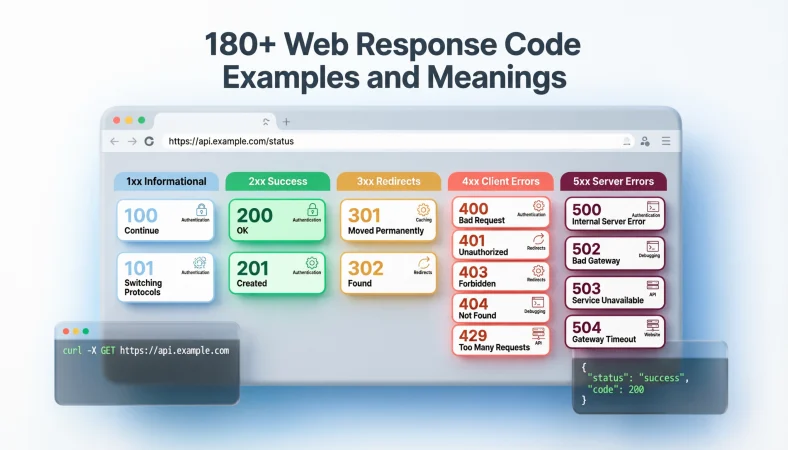
A web response code usually refers to the HTTP status code a server sends back after receiving a request. These three-digit codes tell the client whether the request succeeded, needs another action, or encountered an error. HTTP status codes are grouped into five classes: 1xx, 2xx, 3xx, 4xx, and 5xx.
Top alternatives: HTTP status code, HTTP response code, web status code, server response code, HTTP error code
Ever stared at a browser error and thought, “Okay, but what does 404 actually want from me?” You are definitely not alone. From websites and APIs to mobile apps, dashboards, checkout pages, and backend systems, web response code terminology appears everywhere.
These tiny three-digit numbers can quickly tell developers whether a request worked, redirected somewhere else, failed because of the client, or ran into a server problem. HTTP status codes are organized into five major groups, from informational 1xx responses through successful 2xx responses, redirects in the 3xx range, client errors in the 4xx range, and server errors in the 5xx range.
Knowing what common codes mean makes debugging much less mysterious. Whether you are checking a website, building an API, reading browser DevTools, or explaining an error to your team, this guide makes the numbers easier to understand.
Basic Web Response Code Examples
1. “200 OK means the request worked.”
Example: Use it when explaining a successful GET request to someone new to HTTP.
Meaning: The server successfully handled the request.
2. “201 Created means something new was created.”
Example: Use it when documenting a successful resource-creation API request.
Meaning: The request succeeded and created a resource.
3. “202 Accepted means processing may still be happening.”
Example: Use it for an asynchronous job that has been accepted but is not finished.
Meaning: The server accepted the request without confirming completion.
4. “204 No Content means success without a response body.”
Example: Use it when explaining a successful deletion endpoint.
Meaning: The request succeeded but there is no content to return.
5. “301 means permanently redirected.”
Example: Use it when discussing a website that permanently moved to a new URL.
Meaning: The requested resource has a permanent redirect.
6. “302 means temporary redirection.”
Example: Use it when describing a temporary redirect during a web request.
Meaning: The client is being directed elsewhere temporarily.
7. “304 means use your cached copy.”
Example: Use it when explaining why a browser may reuse an existing resource.
Meaning: The resource has not changed since the cached version was validated.
8. “400 means the request was bad.”
Example: Use it when an API receives malformed or invalid request data.
Meaning: The server cannot process the request because of a client-side request problem.
9. “401 means authentication is required.”
Example: Use it when an API request lacks valid authentication credentials.
Meaning: The client needs valid authentication.
10. “403 means access is forbidden.”
Example: Use it when an authenticated user lacks permission to access something.
Meaning: The server refuses to authorize the request.
11. “404 means the resource was not found.”
Example: Use it when a requested webpage or API resource does not exist at that location.
Meaning: The server cannot find the requested resource.
12. “500 means something went wrong on the server.”
Example: Use it when an application unexpectedly fails while processing a request.
Meaning: The server encountered an internal condition it could not handle.
Funny Web Response Code Explanations
1. “200: The internet said yes.”
Example: Use it in a lighthearted developer post celebrating a successful request.
Meaning: The request completed successfully.
2. “404: The page went on vacation.”
Example: Use it in a playful explanation of a missing webpage.
Meaning: The requested resource could not be found.
3. “500: The server needs a coffee.”
Example: Use it when joking about an unexpected internal server problem.
Meaning: The server encountered an error.
4. “403: Nice try, but nope.”
Example: Use it when explaining forbidden access in a casual team chat.
Meaning: The server understood the request but will not allow it.
5. “401: Please show your ID.”
Example: Use it when explaining authentication requirements to a beginner.
Meaning: Valid authentication credentials are required.
6. “301: We moved. Permanently.”
Example: Use it when joking about a website changing its URL.
Meaning: The resource has moved permanently.
7. “302: We moved, but chill.”
Example: Use it when describing a temporary redirect.
Meaning: The resource is temporarily available somewhere else.
8. “503: Server taking a mental health day.”
Example: Use it in an informal internal status message about downtime.
Meaning: The server is temporarily unable to handle the request.
9. “429: Too many requests, bestie.”
Example: Use it in a developer meme about hitting a rate limit.
Meaning: Too many requests were sent in a given period.
10. “418: The teapot has entered the chat.”
Example: Use it when discussing the famous April Fools HTTP status code.
Meaning: It references the humorous 418 status code.
11. “204: Nothing to see here.”
Example: Use it when explaining a successful response with no body.
Meaning: The request succeeded without returning content.
12. “502: Gateway chose violence.”
Example: Use it in a humorous incident update involving an upstream failure.
Meaning: A gateway received an invalid response from an upstream server.
Professional Web Response Code Explanations
1. “The response code confirms the request outcome.”
Example: Use it in technical documentation describing API behavior.
Meaning: The status code communicates the result of the HTTP request.
2. “A 2xx response generally indicates success.”
Example: Use it when explaining HTTP response classes to a development team.
Meaning: The request was successfully received and handled.
3. “A 3xx response generally indicates redirection.”
Example: Use it when documenting redirect behavior.
Meaning: Additional action is generally needed to complete the request.
4. “A 4xx response indicates a client-side request issue.”
Example: Use it during API troubleshooting.
Meaning: The request contains a problem or cannot be fulfilled as submitted.
5. “A 5xx response indicates a server-side failure.”
Example: Use it in incident documentation.
Meaning: The server failed to fulfill an apparently valid request.
6. “Check the status code before inspecting application data.”
Example: Use it when teaching structured API debugging.
Meaning: The response status provides an immediate high-level outcome.
7. “The status code should match the intended semantics.”
Example: Use it during an API design review.
Meaning: Developers should select codes that accurately describe the response.
8. “Do not treat every non-200 response as identical.”
Example: Use it when reviewing error-handling logic.
Meaning: Different status classes and codes communicate different situations.
9. “Use response details alongside the status code.”
Example: Use it when designing an API error response.
Meaning: Status codes provide context but may need additional response information.
10. “Document expected response codes.”
Example: Use it when creating an API reference.
Meaning: Consumers should know which outcomes an endpoint can return.
11. “Handle unexpected status codes gracefully.”
Example: Use it when reviewing production client logic.
Meaning: Clients should remain robust when receiving unfamiliar responses.
12. “Treat the status code as part of the API contract.”
Example: Use it when discussing reliable API design.
Meaning: Response codes communicate important behavioral expectations.
Web Response Code 1xx Informational Responses
1. “100 Continue means keep sending the request.”
Example: Use it when explaining an interim response during request processing.
Meaning: The client can continue with the request.
2. “101 Switching Protocols means the protocol is changing.”
Example: Use it when discussing an HTTP Upgrade request.
Meaning: The server is switching protocols as requested.
3. “103 Early Hints helps prepare resources early.”
Example: Use it when explaining early resource preloading.
Meaning: The response can provide hints while the server prepares the final response.
4. “1xx responses are informational.”
Example: Use it when teaching HTTP response classes.
Meaning: They provide interim information rather than representing the final result.
5. “A 1xx response is not the final answer.”
Example: Use it when explaining multi-stage HTTP responses.
Meaning: A final response normally follows an informational response.
6. “100 is useful during request continuation.”
Example: Use it when describing the Expect mechanism.
Meaning: It indicates that the client may proceed with the request.
7. “101 is associated with protocol switching.”
Example: Use it when discussing connection upgrades.
Meaning: The server agrees to switch protocols.
8. “103 can support performance optimization.”
Example: Use it when discussing resource hints.
Meaning: It can allow clients to begin preparing resources sooner.
9. “1xx codes belong to the informational class.”
Example: Use it in a status-code reference guide.
Meaning: The first digit identifies the informational category.
10. “Informational responses can precede the final response.”
Example: Use it when explaining HTTP response sequencing.
Meaning: An HTTP exchange can include interim informational responses.
11. “The final outcome comes later.”
Example: Use it when simplifying 1xx behavior for beginners.
Meaning: Informational codes do not normally communicate the completed request outcome.
12. “Think of 1xx as a progress signal.”
Example: Use it as a beginner-friendly analogy.
Meaning: It provides information while processing continues.
Web Response Code 2xx Success Responses
1. “200 OK means success.”
Example: Use it when explaining the most familiar successful HTTP response.
Meaning: The request succeeded.
2. “201 Created means a resource was created.”
Example: Use it after a successful create operation.
Meaning: The request resulted in creation of one or more resources.
3. “202 Accepted means accepted for processing.”
Example: Use it for a queued background operation.
Meaning: Processing has been accepted but may not be complete.
4. “203 means non-authoritative information.”
Example: Use it when discussing a response whose metadata or content differs from the origin’s version.
Meaning: The returned information is not necessarily the exact authoritative representation.
5. “204 means successful with no content.”
Example: Use it for a successful operation that needs no response body.
Meaning: The request succeeded without returning content.
6. “205 means reset the content.”
Example: Use it when discussing responses intended to reset a user interface state.
Meaning: The response instructs the client to reset the document view.
7. “206 means partial content.”
Example: Use it when explaining range requests for large files.
Meaning: The server is returning only the requested portion of a representation.
8. “207 is associated with WebDAV multi-status responses.”
Example: Use it when documenting a WebDAV application.
Meaning: The response can communicate multiple resource statuses.
9. “208 indicates already reported.”
Example: Use it when explaining WebDAV responses involving repeated bindings.
Meaning: Members of a binding have already been enumerated.
10. “226 means instance manipulation used.”
Example: Use it in an advanced HTTP status-code reference.
Meaning: The response reflects successful instance manipulation.
11. “2xx codes belong to the success class.”
Example: Use it when teaching HTTP status categories.
Meaning: The first digit identifies successful responses.
12. “Success does not always mean 200.”
Example: Use it when correcting an overly simplistic API rule.
Meaning: HTTP provides multiple successful status codes for different outcomes.
Web Response Code 3xx Redirect Responses
1. “300 means multiple choices.”
Example: Use it when documenting a resource with multiple possible representations.
Meaning: More than one response may satisfy the request.
2. “301 means permanent redirect.”
Example: Use it when a website has permanently changed its URL.
Meaning: The resource has moved permanently.
3. “302 means temporary redirect.”
Example: Use it when redirecting users temporarily.
Meaning: The requested resource is temporarily available elsewhere.
4. “303 points the client to another resource.”
Example: Use it after an operation where the client should retrieve a separate resource.
Meaning: The response directs the client to another URI.
5. “304 means the cached version is still valid.”
Example: Use it when explaining browser caching.
Meaning: The resource has not changed since the cached representation was validated.
6. “305 is no longer used in modern HTTP.”
Example: Use it when discussing historical HTTP status codes.
Meaning: The code is obsolete.
7. “307 preserves the request method during redirection.”
Example: Use it when explaining method-preserving temporary redirects.
Meaning: The client should repeat the request at another location without changing the method.
8. “308 preserves the method for a permanent redirect.”
Example: Use it when documenting a permanent method-preserving redirect.
Meaning: The resource has moved permanently while the request method remains unchanged.
9. “3xx generally means redirection.”
Example: Use it when teaching status-code categories.
Meaning: Further action is generally needed to complete the request.
10. “A redirect is not automatically an error.”
Example: Use it when reviewing website logs.
Meaning: Redirection can be an intentional part of normal web behavior.
11. “304 is different from 404.”
Example: Use it when explaining caching to a beginner.
Meaning: 304 validates cached content, while 404 indicates a resource was not found.
12. “301 and 308 are permanent redirect options.”
Example: Use it when comparing redirect strategies.
Meaning: Both communicate permanent relocation, with different method-handling semantics.
Web Response Code 4xx Client Errors
1. “400 means Bad Request.”
Example: Use it when invalid request syntax or data reaches an API.
Meaning: The server cannot process the request as submitted.
2. “401 means authentication is required.”
Example: Use it when a protected API receives missing or invalid authentication.
Meaning: The client needs valid authentication.
3. “403 means Forbidden.”
Example: Use it when access is denied despite the request being understood.
Meaning: The server refuses to fulfill the request.
4. “404 means Not Found.”
Example: Use it when a requested page no longer exists at a URL.
Meaning: The server cannot find the requested resource.
5. “405 means the HTTP method is not allowed.”
Example: Use it when an endpoint rejects a method such as DELETE.
Meaning: The target resource does not support that method.
6. “406 means the response is not acceptable.”
Example: Use it when content negotiation cannot produce an acceptable representation.
Meaning: The server cannot provide a representation matching the request’s criteria.
7. “408 means the request timed out.”
Example: Use it when a client takes too long to send a request.
Meaning: The server did not receive the complete request in time.
8. “409 means a conflict occurred.”
Example: Use it when a request conflicts with the current resource state.
Meaning: The request cannot be completed because of a resource conflict.
9. “410 means the resource is gone.”
Example: Use it when documenting a resource intentionally and permanently removed.
Meaning: The server knows the resource is no longer available.
10. “429 means too many requests.”
Example: Use it when an API client exceeds a rate limit.
Meaning: The client has sent too many requests within a given period.
11. “4xx does not always mean the entire website is broken.”
Example: Use it when interpreting an isolated API failure.
Meaning: The problem can be specific to the request or resource.
12. “Check the request before blaming the server.”
Example: Use it as a troubleshooting reminder for 4xx errors.
Meaning: Client-side request details are often relevant to the failure.
Web Response Code 5xx Server Errors
1. “500 means Internal Server Error.”
Example: Use it when an application fails unexpectedly.
Meaning: The server encountered an internal condition it could not handle.
2. “501 means Not Implemented.”
Example: Use it when a server does not support a requested method or capability.
Meaning: The server does not implement the functionality needed to fulfill the request.
3. “502 means Bad Gateway.”
Example: Use it when a gateway receives an invalid response from an upstream server.
Meaning: A gateway or proxy encountered an invalid upstream response.
4. “503 means Service Unavailable.”
Example: Use it during maintenance or temporary overload.
Meaning: The server is temporarily unable to handle the request.
5. “504 means Gateway Timeout.”
Example: Use it when a gateway does not receive a timely upstream response.
Meaning: An upstream server failed to respond within the expected time.
6. “505 means HTTP Version Not Supported.”
Example: Use it when a server does not support the HTTP version used by the request.
Meaning: The server does not support the requested HTTP protocol version.
7. “506 means Variant Also Negotiates.”
Example: Use it when discussing advanced content negotiation problems.
Meaning: The server configuration creates a negotiation loop.
8. “507 means Insufficient Storage.”
Example: Use it when discussing WebDAV storage limitations.
Meaning: The server cannot store the representation needed to complete the request.
9. “508 means Loop Detected.”
Example: Use it when explaining a WebDAV recursive processing loop.
Meaning: The server detected an infinite loop while processing the request.
10. “510 means Not Extended.”
Example: Use it in an advanced HTTP status-code reference.
Meaning: Additional extensions are required for the server to fulfill the request.
11. “511 means Network Authentication Required.”
Example: Use it when explaining network access that requires authentication.
Meaning: The client needs to authenticate to gain network access.
12. “5xx usually points toward the server side.”
Example: Use it when triaging an HTTP incident.
Meaning: The server failed to fulfill an apparently valid request.
Web Response Code 400 vs 401 vs 403
1. “400 means the request itself has a problem.”
Example: Use it when malformed input reaches an API.
Meaning: The request cannot be processed as submitted.
2. “401 is about authentication.”
Example: Use it when a request lacks acceptable authentication credentials.
Meaning: The client must authenticate.
3. “403 is about permission.”
Example: Use it when an authenticated user cannot access a resource.
Meaning: The server refuses the request because access is forbidden.
4. “400 is not the same as 401.”
Example: Use it when reviewing an API error specification.
Meaning: Bad request and missing authentication represent different conditions.
5. “401 is not the same as 403.”
Example: Use it when teaching authentication versus authorization.
Meaning: Authentication establishes identity, while authorization determines permitted access.
6. “Check credentials for 401.”
Example: Use it during API authentication debugging.
Meaning: Authentication information should be reviewed.
7. “Check permissions for 403.”
Example: Use it when access is denied to a known resource.
Meaning: Authorization rules may be preventing access.
8. “Check request data for 400.”
Example: Use it when an API rejects submitted parameters.
Meaning: Input, syntax, or request structure may be invalid.
9. “The three codes tell different stories.”
Example: Use it when training a new developer.
Meaning: Each code identifies a different category of client-side problem.
10. “Do not automatically retry every 4xx error.”
Example: Use it when reviewing client retry logic.
Meaning: Many 4xx responses require correcting the request rather than repeating it.
11. “Authentication and authorization are different.”
Example: Use it in API security documentation.
Meaning: Proving identity is separate from receiving permission.
12. “Read the response body too.”
Example: Use it when troubleshooting an API response.
Meaning: Additional server-provided details can explain why the status occurred.
Web Response Code 404 Troubleshooting
1. “Check the URL first.”
Example: Use it when a browser suddenly shows a 404 page.
Meaning: A typo or incorrect path can cause the resource to be missing.
2. “Check whether the resource was moved.”
Example: Use it when a previously working page disappears.
Meaning: The resource may have changed location.
3. “Check routing rules.”
Example: Use it when an application returns 404 for a valid-looking path.
Meaning: Server or application routing may not recognize the requested path.
4. “Check the request method.”
Example: Use it when an API behaves differently across methods.
Meaning: The endpoint may require a specific HTTP method.
5. “Check deployment configuration.”
Example: Use it when a new release suddenly creates missing routes.
Meaning: Deployment settings can affect resource availability.
6. “Check case sensitivity.”
Example: Use it when a URL works locally but not on production Linux hosting.
Meaning: Path capitalization can matter depending on the environment.
7. “Check the API endpoint.”
Example: Use it when a client application cannot reach a resource.
Meaning: The endpoint path may be incorrect or outdated.
8. “Check whether the resource actually exists.”
Example: Use it when debugging an object lookup.
Meaning: The requested resource may genuinely be absent.
9. “Check rewrite rules.”
Example: Use it when clean URLs suddenly stop resolving.
Meaning: Rewrite configuration can affect routing.
10. “Check application logs.”
Example: Use it when the URL looks correct but still returns 404.
Meaning: Logs may reveal how the request was routed.
11. “A 404 does not automatically mean the server is down.”
Example: Use it when explaining a missing webpage to a nontechnical user.
Meaning: The server can be working while a specific resource is unavailable.
12. “Compare the working URL with the failing URL.”
Example: Use it during endpoint troubleshooting.
Meaning: Differences in paths or parameters can reveal the problem.
Web Response Code API Examples
1. “GET /users returning 200 means retrieval succeeded.”
Example: Use it when documenting a user-list endpoint.
Meaning: The requested representation was successfully retrieved.
2. “POST /users returning 201 means creation succeeded.”
Example: Use it in API documentation for a create endpoint.
Meaning: A new resource was created.
3. “DELETE /users/5 returning 204 means deletion succeeded without content.”
Example: Use it when documenting a deletion response.
Meaning: The operation succeeded without returning a response body.
4. “GET /missing returning 404 means the resource was not found.”
Example: Use it in a testing example.
Meaning: The requested resource does not exist at that location.
5. “POST with invalid JSON may result in 400.”
Example: Use it when explaining malformed API payloads.
Meaning: The request cannot be understood or processed as submitted.
6. “Protected GET returning 401 signals authentication.”
Example: Use it when documenting a secured endpoint.
Meaning: The client needs valid authentication.
7. “Protected GET returning 403 signals forbidden access.”
Example: Use it when documenting authorization failures.
Meaning: The request is understood but access is refused.
8. “POST returning 202 can represent queued processing.”
Example: Use it for an API that starts a long-running background task.
Meaning: The server accepted the request but has not completed it.
9. “GET returning 304 can support cache validation.”
Example: Use it when explaining conditional requests.
Meaning: The client can use its cached representation.
10. “API clients should inspect response.status.”
Example: Use it when working with the browser Fetch API.
Meaning: The status property exposes the HTTP status code.
11. “Do not assume every successful endpoint returns 200.”
Example: Use it during API contract design.
Meaning: Different successful outcomes can use different 2xx codes.
12. “Document every expected response.”
Example: Use it when preparing an OpenAPI-style API reference.
Meaning: Consumers need to understand both successful and unsuccessful outcomes.
Web Response Code In JavaScript
1. “response.status tells you the HTTP status.”
Example: Use it when handling a Fetch API response.
Meaning: The property contains the response’s HTTP status code.
2. “Check response.ok for a broad success test.”
Example: Use it when writing simple Fetch API logic.
Meaning: It provides a convenient way to identify successful HTTP responses.
3. “200 can mean the fetch succeeded.”
Example: Use it after requesting a JSON resource.
Meaning: The server successfully handled the request.
4. “404 means your requested resource was not found.”
Example: Use it when a frontend cannot retrieve an endpoint.
Meaning: The server could not find the target resource.
5. “500 suggests a server-side problem.”
Example: Use it when a frontend receives an internal server error.
Meaning: The server encountered an unexpected condition.
6. “Read response.status before parsing assumptions.”
Example: Use it when handling unpredictable API responses.
Meaning: The status can guide appropriate response handling.
7. “response.statusText can expose a status message.”
Example: Use it when inspecting a response for debugging.
Meaning: The property contains the associated status message when available.
8. “A status of zero can appear for certain Fetch response types.”
Example: Use it when explaining unusual browser response behavior.
Meaning: Some opaque, opaqueredirect, or error response types expose status zero.
9. “Do not confuse status with response body.”
Example: Use it when teaching frontend API handling.
Meaning: The status code and returned content provide different information.
10. “Handle expected errors intentionally.”
Example: Use it when building a production frontend.
Meaning: Users should receive useful behavior when requests fail.
11. “Use status-specific handling when it matters.”
Example: Use it when 401 and 404 need different UI behavior.
Meaning: Different status codes can require different client actions.
12. “Keep error handling readable.”
Example: Use it during JavaScript code review.
Meaning: Clear status handling makes debugging and maintenance easier.
Web Response Code And Browser Errors
1. “404 usually means the page was not found.”
Example: Use it when explaining a missing webpage to a visitor.
Meaning: The server cannot locate the requested resource.
2. “403 usually means access is forbidden.”
Example: Use it when a user reaches a restricted page.
Meaning: The server refuses access.
3. “500 usually indicates an internal server problem.”
Example: Use it when a site displays a generic server error.
Meaning: Something unexpected happened while the server processed the request.
4. “502 often involves an upstream service.”
Example: Use it when a reverse proxy reports a gateway error.
Meaning: A gateway received an invalid response from another server.
5. “503 can indicate temporary unavailability.”
Example: Use it during planned website maintenance.
Meaning: The server is temporarily unable to handle requests.
6. “504 often points to an upstream timeout.”
Example: Use it when a proxy waits too long for another service.
Meaning: The upstream response did not arrive in time.
7. “A browser error page is only part of the story.”
Example: Use it when investigating a production incident.
Meaning: Logs and network details can provide more useful information.
8. “Open DevTools to inspect the network response.”
Example: Use it when debugging a failed browser request.
Meaning: Network tools can reveal the request and returned status.
9. “Check the requested URL.”
Example: Use it when troubleshooting a 404.
Meaning: The browser may be requesting an incorrect location.
10. “Check response headers too.”
Example: Use it when diagnosing redirects or caching.
Meaning: Headers provide additional information about response behavior.
11. “Refresh does not fix every status code.”
Example: Use it when explaining why repeated retries may fail.
Meaning: Some errors require correcting the request or server.
12. “Status codes make browser errors less mysterious.”
Example: Use it in beginner web-development content.
Meaning: The code gives a structured clue about what happened.
Web Response Code And SEO
1. “200 tells search engines a page responded successfully.”
Example: Use it when discussing basic HTTP behavior in SEO.
Meaning: The server successfully returned the requested resource.
2. “301 is commonly used for permanent URL changes.”
Example: Use it during a website migration discussion.
Meaning: It communicates permanent redirection.
3. “302 is generally associated with temporary redirection.”
Example: Use it when discussing short-term URL changes.
Meaning: It indicates temporary relocation.
4. “404 can indicate a missing page.”
Example: Use it during a technical SEO audit.
Meaning: The requested resource cannot be found.
5. “410 indicates that a resource is gone.”
Example: Use it when discussing permanently removed URLs.
Meaning: The server knows the resource is no longer available.
6. “Do not treat every 404 as a disaster.”
Example: Use it when explaining crawl and site-management issues.
Meaning: Context determines whether a missing URL requires action.
7. “Check redirects during migrations.”
Example: Use it when moving content to new URLs.
Meaning: Correct redirects can help preserve intended navigation.
8. “Avoid unnecessary redirect chains.”
Example: Use it when reviewing website architecture.
Meaning: Cleaner redirect paths make requests more efficient.
9. “Monitor important URLs for unexpected errors.”
Example: Use it during ongoing technical SEO maintenance.
Meaning: Sudden status changes can indicate broken resources.
10. “Use canonical strategy alongside redirects.”
Example: Use it when reviewing duplicate URL signals.
Meaning: URL handling involves more than response codes alone.
11. “Check server logs when SEO problems appear suddenly.”
Example: Use it after a website migration.
Meaning: Logs can reveal unexpected response patterns.
12. “HTTP status codes are one part of technical SEO.”
Example: Use it when explaining SEO diagnostics.
Meaning: Status codes matter, but they work alongside many other website signals.
Web Response Code Debugging Tips
1. “Start with the exact URL.”
Example: Use it as the first step when diagnosing an error.
Meaning: The requested location provides immediate context.
2. “Check the HTTP method.”
Example: Use it when an endpoint behaves unexpectedly.
Meaning: GET, POST, PUT, PATCH, and DELETE can have different semantics.
3. “Inspect request headers.”
Example: Use it when authentication or content negotiation may be involved.
Meaning: Headers can affect server processing.
4. “Inspect response headers.”
Example: Use it when troubleshooting caching or redirects.
Meaning: Response metadata can explain server behavior.
5. “Read the response body.”
Example: Use it when an API returns an error payload.
Meaning: The body may contain useful diagnostic details.
6. “Check browser DevTools.”
Example: Use it when debugging a frontend request.
Meaning: Network inspection exposes request and response details.
7. “Check server logs.”
Example: Use it when a 5xx error needs deeper investigation.
Meaning: Server-side logs can reveal the underlying failure.
8. “Reproduce the request.”
Example: Use it when troubleshooting a production API issue.
Meaning: Reproduction helps isolate the conditions causing the error.
9. “Compare successful and failed requests.”
Example: Use it when only one API call is failing.
Meaning: Differences can reveal the root cause.
10. “Check recent deployments.”
Example: Use it when errors appear immediately after a release.
Meaning: Recent changes may have introduced the issue.
11. “Check upstream dependencies.”
Example: Use it for 502 or 504 troubleshooting.
Meaning: Gateway errors can involve another service.
12. “Do not debug from the status code alone.”
Example: Use it when a team jumps to conclusions about an HTTP error.
Meaning: The code identifies the response class but additional context is often necessary.
Web Response Code Best Practices
1. “Choose status codes that match the outcome.”
Example: Use it when designing a new API endpoint.
Meaning: Accurate codes make the API easier to understand.
2. “Document expected status codes.”
Example: Use it in developer-facing API documentation.
Meaning: Consumers need predictable response behavior.
3. “Keep error messages useful.”
Example: Use it when designing API error payloads.
Meaning: Clients and developers need enough context to diagnose failures.
4. “Do not use 200 for every outcome.”
Example: Use it when reviewing an API that hides errors inside successful responses.
Meaning: HTTP status codes should communicate meaningful outcomes.
5. “Separate authentication from authorization.”
Example: Use it when designing protected endpoints.
Meaning: 401 and 403 represent different access conditions.
6. “Use redirects intentionally.”
Example: Use it when managing changed URLs.
Meaning: Redirect status codes communicate how clients should proceed.
7. “Handle rate limiting explicitly.”
Example: Use it when building an API client.
Meaning: Clients should respond appropriately to 429 responses.
8. “Design retry logic carefully.”
Example: Use it when building a resilient service client.
Meaning: Some failures may be temporary while others require correction.
9. “Monitor 5xx responses.”
Example: Use it in production observability.
Meaning: Unexpected server errors can indicate application or infrastructure problems.
10. “Test both success and error paths.”
Example: Use it before releasing an API.
Meaning: Reliable clients need predictable behavior for different outcomes.
11. “Do not invent undocumented meanings.”
Example: Use it when interpreting unfamiliar status codes.
Meaning: Standard definitions should guide implementation decisions.
12. “Remember that HTTP status codes are extensible.”
Example: Use it when discussing less common response codes.
Meaning: HTTP allows additional registered status codes beyond the most familiar ones.
Clever Web Response Code Comparisons
1. “200 is success, 404 is missing.”
Example: Use it as a simple beginner comparison.
Meaning: One confirms success while the other indicates the resource cannot be found.
2. “401 asks who you are, 403 says you cannot enter.”
Example: Use it to explain authentication versus authorization.
Meaning: The codes represent different access problems.
3. “404 is missing, 410 is gone.”
Example: Use it when comparing resource availability.
Meaning: 410 explicitly indicates that the resource is known to be gone.
4. “301 is permanent, 302 is temporary.”
Example: Use it when explaining redirect differences.
Meaning: The codes communicate different redirect intentions.
5. “502 is gateway trouble, 503 is service trouble.”
Example: Use it during infrastructure troubleshooting.
Meaning: The codes describe different server-side situations.
6. “503 says unavailable, 504 says timeout.”
Example: Use it when distinguishing temporary service failure from gateway timeout.
Meaning: The codes point toward different failure conditions.
7. “400 points toward the request, 500 points toward the server.”
Example: Use it when teaching basic error classification.
Meaning: The status classes help identify where to investigate.
8. “2xx means success, 4xx means client error.”
Example: Use it as a quick HTTP status refresher.
Meaning: The first digit identifies the response class.
9. “3xx means redirect, not necessarily failure.”
Example: Use it when someone assumes every non-200 code is bad.
Meaning: Redirects are legitimate HTTP responses.
10. “5xx deserves server-side investigation.”
Example: Use it during incident triage.
Meaning: The 5xx class represents server failures.
11. “Status codes are clues, not the entire story.”
Example: Use it when teaching debugging.
Meaning: Developers should combine status information with logs and response details.
12. “The first digit gives you the big picture.”
Example: Use it as a beginner memory trick.
Meaning: HTTP uses the first digit to define the response class.
Web Response Code Quick Reference And Team Notes
1. “100: Continue.”
Example: Use it in a compact status-code cheat sheet.
Meaning: The client can continue the request.
2. “101: Switching Protocols.”
Example: Use it when documenting protocol upgrades.
Meaning: The server is switching protocols.
3. “200: OK.”
Example: Use it when summarizing successful requests.
Meaning: The request succeeded.
4. “201: Created.”
Example: Use it for a newly created API resource.
Meaning: The request created a resource.
5. “204: No Content.”
Example: Use it when documenting a successful operation with no body.
Meaning: The request succeeded without response content.
6. “301: Moved Permanently.”
Example: Use it during a permanent URL migration.
Meaning: The resource has moved permanently.
7. “302: Found.”
Example: Use it when discussing a temporary redirect.
Meaning: The requested resource is temporarily available elsewhere.
8. “400: Bad Request.”
Example: Use it when documenting malformed input.
Meaning: The server cannot process the request as submitted.
9. “401: Unauthorized.”
Example: Use it when explaining authentication problems.
Meaning: Authentication is required or has not been successfully provided.
10. “403: Forbidden.”
Example: Use it when access is denied.
Meaning: The server refuses to fulfill the request.
11. “404: Not Found.”
Example: Use it when documenting missing resources.
Meaning: The server cannot find the requested resource.
12. “500: Internal Server Error.”
Example: Use it during server-side incident troubleshooting.
Meaning: The server encountered an unexpected condition.
FAQs
What does web response code mean?
A web response code usually refers to an HTTP status code returned by a server after receiving a request. It communicates the result of that request.
What are the five main web response code groups?
HTTP status codes are grouped into 1xx informational, 2xx successful, 3xx redirection, 4xx client error, and 5xx server error responses.
What does 200 mean?
HTTP 200 OK means the request succeeded. Its precise response meaning can vary according to the HTTP request method.
What does 404 mean?
A 404 Not Found response means the server cannot find the requested resource at the requested location.
What does 500 mean?
A 500 Internal Server Error indicates that the server encountered an unexpected condition that prevented it from fulfilling the request.
Is 401 the same as 403?
No. A 401 response relates to authentication, while 403 indicates that the server refuses to fulfill the request even though the request is understood.
Is a 3xx response an error?
Not necessarily. The 3xx class is used for redirection and indicates that additional action may be needed to complete the request.
What is the difference between 301 and 302?
301 communicates a permanent redirect, while 302 is generally associated with a temporary redirect. The exact handling can depend on the client and HTTP semantics.
What does 429 mean?
429 Too Many Requests indicates that the client has sent too many requests within a given period.
Can a web response code be customized?
HTTP status codes are extensible, and additional codes can be registered. Clients are expected to understand the general class indicated by the first digit even when they do not recognize a particular code.
Where can I see a web response code?
You can commonly see HTTP status codes in browser developer tools, API clients, server logs, monitoring platforms, and application debugging output.
Does every HTTP response have a three-digit status code?
Valid HTTP status codes are three-digit values in the 100 through 599 range.
What does response.status mean in JavaScript?
In the browser Fetch API, Response.status is the read-only property containing the HTTP status code of the response.
Should developers always return 200 for API responses?
No. APIs should use status codes that accurately communicate the result and semantics of the request. Different 2xx, 3xx, 4xx, and 5xx responses serve different purposes.
Is humor appropriate when explaining web response codes?
Absolutely, especially in informal tutorials, team chats, social posts, and developer communities. Just keep formal documentation clear and technically accurate.
Conclusion
Web response codes look like tiny numbers, but they can tell an entire story about what happened between a client and a server. Once you understand the basic pattern, HTTP becomes much less intimidating: 1xx provides information, 2xx signals success, 3xx handles redirection, 4xx points toward client-side request issues, and 5xx indicates server-side failures.
The real trick is not memorizing every number overnight. Start with the everyday codes such as 200, 201, 301, 302, 400, 401, 403, 404, 429, 500, 502, and 503. Save this guide, share it with your developer friends, and keep it nearby the next time a mysterious status code appears in your browser or API logs.





3 thoughts on “180+ Web Response Code Examples, Meanings, Errors And Practical HTTP Guide For 2026”