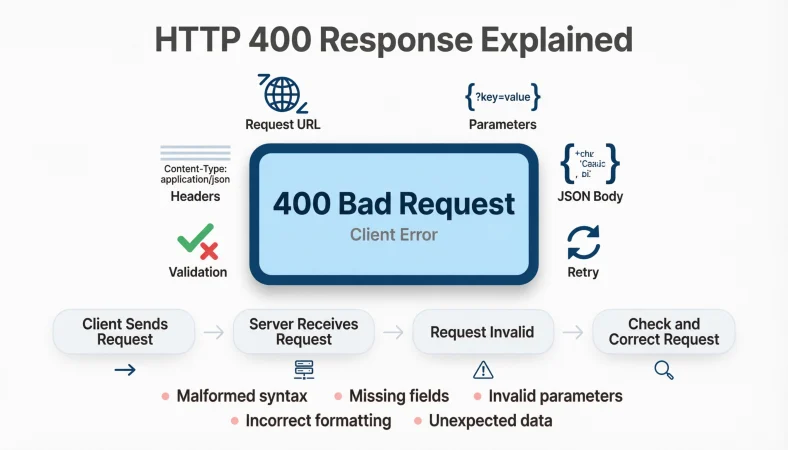
An HTTP 400 response means the server could not process the request because something about the request was invalid or malformed. It is commonly called 400 Bad Request and can appear when request data, syntax, parameters, headers, or formatting are incorrect.
Top alternatives: 400 Bad Request, HTTP 400 error, Bad Request response, 400 status code, client request error
Getting an HTTP 400 response is basically the internet saying, “I received your request, but something about it makes no sense.” It can appear while working with APIs, websites, mobile apps, browsers, forms, or backend systems. You might see it while debugging at work, testing an endpoint, helping a friend fix a website, or staring at a browser screen wondering what just happened.
Unlike a server-side error, an HTTP 400 response generally points toward a problem with the request sent by the client. The tricky part is figuring out exactly what went wrong because several issues can trigger it, including malformed syntax, invalid parameters, missing information, or unexpected request data.
The right response message can make debugging much easier. These ready-to-use explanations, messages, and practical lines help you describe a 400 response clearly without turning a simple error into a full detective series.
Simple HTTP 400 Response Explanations
The server rejected the request because it was invalid.
Example: A beginner uses this line when explaining a 400 status code.
Meaning: It gives a simple description of the error.
HTTP 400 means Bad Request.
Example: A student writes a short definition in technical notes.
Meaning: It identifies the standard meaning of status code 400.
The request reached the server, but the server could not process it correctly.
Example: A developer explains the error to a nontechnical teammate.
Meaning: It separates the request problem from a server failure.
A 400 response usually points to an issue with the client request.
Example: A developer summarizes an API debugging session.
Meaning: It directs attention toward the request data.
The server considers the request malformed or invalid.
Example: A technical writer defines HTTP 400 in documentation.
Meaning: It explains why processing stopped.
Check the request before blaming the server.
Example: A developer gives a quick debugging reminder.
Meaning: It encourages checking client-side input first.
HTTP 400 tells you the request was not acceptable as sent.
Example: Someone explains an API error to a new developer.
Meaning: It describes the request as improperly formed or invalid.
A bad request can come from incorrect parameters or formatting.
Example: A developer investigates a failed API call.
Meaning: It identifies common sources of the problem.
The 400 status code signals a request-side problem.
Example: A learner creates a study note about HTTP status codes.
Meaning: It provides a quick classification of the error.
The server understood that a request arrived, but could not handle its form.
Example: A teacher explains the status code during a web development lesson.
Meaning: It makes the concept easier for beginners.
An HTTP 400 response means the request needs attention.
Example: A support specialist summarizes a website issue.
Meaning: It provides a neutral explanation without assigning blame.
Think of 400 as the server saying, “That request is not valid.”
Example: A developer creates a memorable explanation for a beginner.
Meaning: It turns technical terminology into everyday language.
Professional HTTP 400 Response Messages
400 Bad Request: The server could not process the submitted request.
Example: A backend service uses this wording in an API response.
Meaning: It provides a concise professional error message.
The request contains invalid or malformed data.
Example: An API documentation page describes a failed request.
Meaning: It explains the likely request-level problem.
The request could not be processed due to invalid input.
Example: A business application displays an error after form submission.
Meaning: It identifies invalid input as the issue.
Please verify the request parameters and try again.
Example: A client-facing API message provides a next step.
Meaning: It politely directs the user toward correction.
The submitted request does not meet the required format.
Example: A service returns an error after receiving incorrectly structured data.
Meaning: It identifies a formatting problem.
The server rejected the request due to invalid request data.
Example: A developer documents an endpoint error.
Meaning: It clearly identifies the reason for rejection.
Request validation failed. Please review the submitted values.
Example: A form-based application displays this after invalid input.
Meaning: It connects the error with validation.
The request could not be understood in its current form.
Example: A support team writes a user-friendly error message.
Meaning: It avoids overly technical wording.
Invalid request syntax prevented successful processing.
Example: A technical report records an API failure.
Meaning: It specifically points toward request syntax.
Please check the request body, parameters, and headers.
Example: A developer receives a 400 response while testing an endpoint.
Meaning: It provides practical debugging targets.
The submitted request was rejected because required information was invalid or missing.
Example: An API returns a structured validation message.
Meaning: It covers two common request problems.
HTTP 400 indicates that the request should be corrected before resubmission.
Example: A technical guide explains the recommended next step.
Meaning: It emphasizes fixing the request.
Funny HTTP 400 Response Lines
The server said, “Please try making sense next time.”
Example: A developer jokes about a malformed test request.
Meaning: It playfully describes a rejected request.
HTTP 400: The internet needs a minute to understand you.
Example: Someone creates a humorous debugging caption.
Meaning: It turns the error into a relatable joke.
Apparently, my request failed the vibe check.
Example: A developer jokes after receiving a 400 response.
Meaning: It humorously describes an invalid request.
The server received my message and chose confusion.
Example: Someone posts a funny coding status.
Meaning: It personifies the server’s inability to process the request.
400 Bad Request: even the server has boundaries.
Example: A developer shares a lighthearted error caption.
Meaning: It jokes about the server rejecting the request.
My API request walked in without the right paperwork.
Example: A programmer jokes about missing request data.
Meaning: It compares invalid input with incomplete paperwork.
The server basically said, “That is not what I ordered.”
Example: A developer jokes about incorrect parameters.
Meaning: It highlights a mismatch between the request and expectations.
HTTP 400: rejected before the drama could begin.
Example: Someone captions a debugging screenshot.
Meaning: It humorously describes an early request failure.
My request arrived looking suspicious.
Example: A developer jokes about malformed request data.
Meaning: It gives the invalid request a playful personality.
The server saw my payload and needed clarification.
Example: A programmer jokes about malformed JSON.
Meaning: It playfully describes a request that cannot be processed.
400 said “not today, bestie.”
Example: A developer shares a casual coding joke.
Meaning: It makes the rejection feel playful rather than frustrating.
My request and the server clearly need couples therapy.
Example: Someone jokes after repeated API validation failures.
Meaning: It humorously describes communication problems between client and server.
Clever HTTP 400 Response Ideas
Check what you sent, not just what you received.
Example: A developer uses this reminder during debugging.
Meaning: It encourages inspecting the original request.
A 400 response is often a clue, not the whole diagnosis.
Example: A programmer explains why debugging should continue.
Meaning: It reminds readers that status codes provide limited context.
When 400 appears, inspect the request from the ground up.
Example: A developer begins troubleshooting an API call.
Meaning: It encourages systematic investigation.
The fastest fix may be hiding inside the request payload.
Example: A programmer investigates malformed submitted data.
Meaning: It directs attention toward the request body.
Treat HTTP 400 as a request-validation warning.
Example: A developer creates a troubleshooting note.
Meaning: It frames the status code as a useful clue.
Your endpoint may be fine while your request is not.
Example: A programmer distinguishes client and server problems.
Meaning: It prevents unnecessary server-side troubleshooting.
A tiny typo can create a very official-looking 400.
Example: Someone discovers a misspelled parameter during debugging.
Meaning: It highlights how small request mistakes can matter.
Read the request before rewriting the backend.
Example: A developer avoids making unnecessary code changes.
Meaning: It encourages checking the obvious source first.
The status code tells you where to look, not always what to change.
Example: A programmer explains debugging strategy to a teammate.
Meaning: It clarifies the limits of status-code information.
Validate the request, then investigate deeper if needed.
Example: A developer creates a practical troubleshooting workflow.
Meaning: It encourages an efficient debugging order.
A 400 response is your cue to inspect the client-side details.
Example: A developer investigates a failing API request.
Meaning: It points toward request construction.
Debugging gets easier when every request detail has a reason.
Example: A programmer reviews headers, parameters, and body data.
Meaning: It promotes deliberate request construction.
Sarcastic HTTP 400 Response Lines
Of course the server understood my intentions perfectly.
Example: A developer jokes after sending malformed data.
Meaning: It sarcastically highlights the communication failure.
Nothing says productivity like a mysterious 400 error.
Example: Someone jokes during a frustrating workday.
Meaning: It pokes fun at debugging delays.
My request was apparently too creative for the server.
Example: A programmer jokes about unusual request formatting.
Meaning: It sarcastically describes an invalid request.
The server has standards. Unfortunately, my request did not.
Example: A developer jokes about failed validation.
Meaning: It admits the request did not meet expectations.
HTTP 400, because apparently punctuation matters.
Example: A programmer discovers malformed syntax.
Meaning: It humorously exaggerates the importance of formatting.
The request was rejected with impressive efficiency.
Example: Someone comments on an instant API failure.
Meaning: It sarcastically praises the speed of the rejection.
My payload tried its best. The server disagreed.
Example: A developer jokes about invalid request data.
Meaning: It personifies the payload and server disagreement.
Nothing personal, just another 400.
Example: A programmer reacts casually to repeated errors.
Meaning: It makes a technical rejection sound like a social interaction.
Apparently “close enough” is not an API standard.
Example: Someone discovers an incorrectly formatted request.
Meaning: It jokes about precision requirements.
The server has spoken, and apparently I was wrong.
Example: A developer reacts to request validation failure.
Meaning: It humorously accepts responsibility for the invalid request.
My request got politely rejected by a machine.
Example: Someone shares a humorous development update.
Meaning: It emphasizes the amusing nature of automated rejection.
HTTP 400: because guessing the API format was apparently not enough.
Example: A programmer jokes about undocumented assumptions.
Meaning: It highlights the importance of correct request formatting.
Chill And Casual HTTP 400 Responses
It is probably worth checking the request first.
Example: A developer gives a relaxed troubleshooting suggestion.
Meaning: It points toward the most relevant starting point.
A 400 usually means something in the request needs fixing.
Example: Someone explains an API issue casually.
Meaning: It gives a simple practical interpretation.
Check the parameters and send it again.
Example: A programmer fixes a failed API call.
Meaning: It recommends reviewing request values.
The server did not like something about that request.
Example: A developer explains an error to a teammate.
Meaning: It describes the problem without unnecessary jargon.
Give the request a quick once-over.
Example: Someone reviews an API call after receiving 400.
Meaning: It suggests a quick request inspection.
Something probably went sideways in the request.
Example: A developer casually discusses a failed call.
Meaning: It communicates that the request likely needs attention.
Check the body, then check the headers.
Example: A programmer begins investigating an API error.
Meaning: It suggests two useful areas to inspect.
Try the request again after checking the inputs.
Example: Someone fixes a form submission issue.
Meaning: It recommends correcting input before retrying.
The endpoint may be fine, so check what you sent.
Example: A developer troubleshoots a client-side request.
Meaning: It avoids immediately blaming the server.
400 is usually a “check your request” moment.
Example: A programmer explains the status code casually.
Meaning: It gives an easy mental shortcut.
No panic, just inspect the request.
Example: A developer reassures a teammate during debugging.
Meaning: It keeps the troubleshooting process calm.
Fix the request, then give it another shot.
Example: Someone corrects malformed request data.
Meaning: It suggests a straightforward next step.
Confident HTTP 400 Response Statements
I know exactly where I am starting the investigation: the request.
Example: A developer begins troubleshooting a 400 error.
Meaning: It shows confidence in the debugging direction.
A 400 response gives me a useful starting point.
Example: A programmer analyzes a failed API call.
Meaning: It treats the status code as actionable information.
I will validate the request before changing the server.
Example: A developer follows a disciplined debugging approach.
Meaning: It prioritizes request inspection.
The error is a clue, not a dead end.
Example: A programmer reassures a teammate after receiving 400.
Meaning: It presents the error as useful diagnostic information.
I am checking the request structure first.
Example: A developer reviews a malformed API call.
Meaning: It demonstrates a focused troubleshooting method.
The request needs attention, and I know where to look.
Example: Someone investigates parameters and body data.
Meaning: It communicates clear direction.
I will verify every input before retrying.
Example: A programmer corrects an API request.
Meaning: It emphasizes careful validation.
A 400 response is manageable when you inspect the details.
Example: A developer explains debugging to a junior teammate.
Meaning: It encourages a methodical approach.
I am not guessing; I am checking the request.
Example: Someone systematically reviews an API call.
Meaning: It promotes evidence-based troubleshooting.
The next step is validation, not panic.
Example: A developer responds to a failed deployment test.
Meaning: It keeps the debugging process focused.
I will fix the request before touching unrelated code.
Example: A programmer avoids unnecessary backend changes.
Meaning: It encourages targeted debugging.
The status code points me in the right direction.
Example: A developer uses 400 as the first debugging clue.
Meaning: It expresses confidence in the diagnostic process.
Friendly HTTP 400 Response Messages
Looks like the request needs a little cleanup.
Example: A support page displays a friendly API error message.
Meaning: It communicates a problem without sounding harsh.
Something about that request was not quite right.
Example: A website shows a user-friendly error notice.
Meaning: It explains the issue gently.
Please check your information and try again.
Example: A form displays an error after invalid submission.
Meaning: It gives users a simple next step.
That request could not be processed as submitted.
Example: An application displays a neutral error message.
Meaning: It explains the failure without blaming the user.
We could not process that request. Please review the details.
Example: A customer-facing service displays a validation error.
Meaning: It combines explanation with guidance.
A few request details may need correcting.
Example: An application provides feedback after invalid input.
Meaning: It gently points toward the likely problem.
Please review the submitted values before trying again.
Example: A form uses the message after validation fails.
Meaning: It directs attention to user input.
Something prevented us from processing your request.
Example: A website presents a simple error notification.
Meaning: It communicates failure without technical overload.
Your request was not accepted in its current format.
Example: An API gateway returns a readable error message.
Meaning: It identifies formatting as the likely issue.
Please check the request details and submit it again.
Example: A business application displays a retry instruction.
Meaning: It provides a clear action.
The request contains information we could not process.
Example: A service responds to invalid submitted data.
Meaning: It explains why processing stopped.
Please correct the highlighted information and try again.
Example: A web form shows validation errors.
Meaning: It gives users a direct correction path.
Creative HTTP 400 Response Ideas
HTTP 400 is the digital equivalent of “Wait, what?”
Example: A technical blog explains the status code playfully.
Meaning: It makes the concept accessible.
Your request knocked, but the server did not understand the introduction.
Example: A writer creates a metaphor for API communication.
Meaning: It compares malformed requests with confusing introductions.
The server received your message with a few missing pieces.
Example: Someone explains invalid request data to beginners.
Meaning: It makes request problems easier to imagine.
Think of 400 as a form returned with a giant red correction mark.
Example: A teacher explains request validation.
Meaning: It compares the response with familiar paperwork.
The API said, “Please rewrite that sentence.”
Example: A developer creates a memorable status-code explanation.
Meaning: It personifies the server rejecting unclear syntax.
Your request arrived, but the instructions were unclear.
Example: A technical writer explains malformed requests.
Meaning: It uses everyday language to describe the issue.
HTTP 400 is the server asking for a better-formatted thought.
Example: A programmer creates a social media caption.
Meaning: It humorously compares request structure with communication.
The request needs a small reality check before processing.
Example: A developer jokes about incorrect parameters.
Meaning: It playfully describes validation.
The server is not ignoring you; it just cannot process that request.
Example: A support article explains the difference between rejection and downtime.
Meaning: It clarifies that the request reached the server.
Your API message needs a little editing before publication.
Example: A developer compares debugging with proofreading.
Meaning: It presents request correction as editing.
The request has entered the “please revise” stage.
Example: A programmer jokes about a 400 response.
Meaning: It describes the need for correction.
400 is basically a technical proofreading request.
Example: Someone explains request validation in a memorable way.
Meaning: It compares invalid syntax with writing errors.
Troubleshooting HTTP 400 Response Lines
Start by checking the request URL.
Example: A developer investigates a malformed endpoint request.
Meaning: The URL is one of the first request components worth verifying.
Review all query parameters for spelling and expected values.
Example: A programmer investigates an API call returning 400.
Meaning: It directs attention toward parameter errors.
Check whether required request fields are present.
Example: A developer troubleshoots an incomplete request body.
Meaning: Missing required data can prevent processing.
Inspect the request body for malformed JSON.
Example: A programmer debugs an API that expects JSON.
Meaning: It identifies malformed body syntax as a possible cause.
Verify that the Content-Type matches the submitted data.
Example: A developer checks headers during API troubleshooting.
Meaning: It connects the declared format with the actual payload.
Review request headers for incorrect or missing values.
Example: Someone investigates a 400 response from an API gateway.
Meaning: It encourages checking header configuration.
Compare the request with the endpoint documentation.
Example: A developer checks an API call against its specification.
Meaning: Documentation can reveal incorrect request structure.
Remove unexpected parameters and test again.
Example: A programmer isolates the source of a validation failure.
Meaning: Simplifying the request can help identify the problem.
Validate the payload before sending it.
Example: A developer tests a JSON request.
Meaning: Pre-validation can reveal formatting problems earlier.
Check whether special characters are correctly encoded.
Example: A programmer investigates a URL containing unusual characters.
Meaning: Encoding problems can affect request validity.
Compare a working request with the failing request.
Example: A developer uses logs to identify a difference between two API calls.
Meaning: Side-by-side comparison can reveal subtle mistakes.
Read the response body for a more specific error message.
Example: A programmer investigates a 400 response with additional details.
Meaning: The response body may explain the exact validation issue.
API Developer HTTP 400 Response Examples
400 Bad Request: Invalid request parameters.
Example: An API returns a concise parameter validation error.
Meaning: It tells the client that submitted parameters are unacceptable.
400 Bad Request: Missing required field.
Example: An endpoint rejects a request without mandatory data.
Meaning: It identifies missing information.
400 Bad Request: Invalid JSON payload.
Example: An API receives incorrectly formatted JSON.
Meaning: It identifies malformed body data.
400 Bad Request: Unsupported parameter value.
Example: A client sends a value outside the endpoint’s accepted options.
Meaning: It explains that the submitted value is not allowed.
400 Bad Request: Request format is invalid.
Example: A service rejects incorrectly structured input.
Meaning: It gives a broad request-format explanation.
400 Bad Request: Unable to validate request body.
Example: An API cannot validate submitted body data.
Meaning: It points toward payload validation.
400 Bad Request: Required request data is missing.
Example: A client omits a required property.
Meaning: It identifies incomplete input.
400 Bad Request: Invalid query parameter format.
Example: An endpoint receives an incorrectly formatted query value.
Meaning: It focuses on query syntax.
400 Bad Request: Request contains unsupported data.
Example: A client submits an unexpected property.
Meaning: It indicates that the payload contains unacceptable content.
400 Bad Request: Request validation failed.
Example: A service uses a generic validation response.
Meaning: It communicates that request checks were unsuccessful.
400 Bad Request: Invalid request syntax.
Example: A server rejects malformed request formatting.
Meaning: It identifies a syntax problem.
400 Bad Request: Please correct the request and retry.
Example: An API provides a simple client action after validation failure.
Meaning: It clearly tells the client what to do next.
HTTP 400 Response For Reports And Documentation
An HTTP 400 response indicates that the server rejected the request because it was invalid or malformed.
Example: A technical report defines the result of a failed API call.
Meaning: It provides a formal overview.
The application returned status code 400 during request validation.
Example: A QA report documents a failed test case.
Meaning: It connects the status code with validation.
The client request did not satisfy the endpoint’s expected requirements.
Example: A developer records an integration failure.
Meaning: It explains why processing did not continue.
Testing produced an HTTP 400 response after invalid input was submitted.
Example: A QA engineer documents a form test.
Meaning: It identifies the trigger for the response.
The endpoint rejected the submitted request due to invalid request data.
Example: An incident report summarizes an API failure.
Meaning: It gives a concise technical explanation.
The HTTP 400 response was associated with incorrect request parameters.
Example: A developer documents a debugging result.
Meaning: It records the suspected cause.
Request validation failed before the operation could be completed.
Example: A test report describes a rejected API operation.
Meaning: It explains where processing stopped.
The client must correct the request before submitting it again.
Example: API documentation describes expected client behavior.
Meaning: It gives a clear corrective instruction.
The error was reproduced using an incorrectly structured request.
Example: A QA team records a reproducible API defect.
Meaning: It documents the relationship between request structure and failure.
The response indicates a request-side validation issue.
Example: A project report summarizes API test results.
Meaning: It classifies the problem without overclaiming the exact cause.
The request was rejected before successful processing could occur.
Example: A technical incident summary describes the sequence of events.
Meaning: It explains the result of the invalid request.
Additional request inspection is required to identify the specific validation failure.
Example: A developer documents an unresolved 400 response.
Meaning: It acknowledges that status code 400 alone may not reveal the exact issue.
Brutal-But-Professional HTTP 400 Response Lines
Your request is invalid, so the server cannot process it.
Example: A developer gives direct feedback during debugging.
Meaning: It states the issue without unnecessary softness.
The request needs to be corrected before it can succeed.
Example: A programmer reviews a failed API call.
Meaning: It clearly identifies the required next step.
The endpoint is not the problem until the request has been verified.
Example: A developer prevents unnecessary backend changes.
Meaning: It encourages evidence-based troubleshooting.
Check the request instead of repeatedly resending the same error.
Example: A programmer troubleshoots repeated 400 responses.
Meaning: It encourages fixing the cause rather than repeating the failure.
Invalid input will continue producing invalid requests.
Example: A developer explains recurring form validation failures.
Meaning: It points out the need to correct input.
A retry will not fix malformed data by itself.
Example: A programmer explains why repeated retries are ineffective.
Meaning: It emphasizes correction over repetition.
The server cannot process information that does not match the expected format.
Example: A developer explains an API contract to a teammate.
Meaning: It stresses the importance of correct structure.
Check the request before changing working server code.
Example: A developer reviews a 400 error during testing.
Meaning: It discourages unnecessary code changes.
The status code is telling you to investigate the request.
Example: A programmer explains a debugging path.
Meaning: It gives a direct interpretation of 400.
A malformed request will not become valid through optimism.
Example: Someone jokes while reviewing repeated failed API calls.
Meaning: It combines direct advice with light humor.
Fix the data, validate the structure, then retry.
Example: A developer creates a simple debugging checklist.
Meaning: It provides a focused sequence of actions.
Do not overcomplicate a problem that starts with the request.
Example: A programmer reviews a simple 400 failure.
Meaning: It encourages starting with the most relevant source.
Smart HTTP 400 Response Ideas For Beginners
Think of HTTP 400 as a rejected form.
Example: A teacher introduces HTTP status codes to beginners.
Meaning: It compares the request with a form that contains problems.
The browser or app sends the request, and the server checks it.
Example: A learner studies basic HTTP communication.
Meaning: It explains the client-server relationship.
If the request is not valid, the server can return 400.
Example: A student writes a beginner-friendly note.
Meaning: It connects invalid requests with the status code.
A 400 response does not automatically mean the server is broken.
Example: A beginner confuses client errors with server errors.
Meaning: It corrects a common misunderstanding.
Check what your app sent before assuming the website is down.
Example: A learner investigates a failed request.
Meaning: It encourages practical troubleshooting.
The request might contain the mistake.
Example: A teacher explains why an API call failed.
Meaning: It directs beginners toward request details.
Parameters are pieces of information included with a request.
Example: A student learns why incorrect parameters can trigger 400.
Meaning: It provides useful context for debugging.
Headers tell the server important information about the request.
Example: A beginner studies why headers can matter.
Meaning: It explains another request component.
The request body carries data that the server may need to validate.
Example: A learner studies JSON API requests.
Meaning: It explains the role of request-body data.
One small formatting mistake can prevent a request from working.
Example: A beginner discovers malformed JSON.
Meaning: It shows why precise formatting matters.
Read the error details instead of focusing only on “400.”
Example: A student learns how to debug an API response.
Meaning: More detailed information may reveal the actual issue.
Once the request is corrected, try again.
Example: A beginner fixes invalid parameters.
Meaning: It gives a simple next step.
Confident HTTP 400 Response Captions For Social Media
HTTP 400 and suddenly debugging is my personality.
Example: A developer posts a humorous workday update.
Meaning: It jokes about spending time fixing a request.
Today’s plot twist: another Bad Request.
Example: A programmer shares a coding screenshot.
Meaning: It turns an error into a playful status update.
Me: send request. Server: absolutely not.
Example: Someone posts a short coding meme caption.
Meaning: It humorously summarizes the rejection.
Another day, another request that needs proofreading.
Example: A developer shares an API debugging post.
Meaning: It compares request validation with editing.
400 taught me to check my inputs twice.
Example: A programmer shares a lesson from debugging.
Meaning: It turns an error into a practical takeaway.
The request failed, but the debugging continues.
Example: Someone posts during an API troubleshooting session.
Meaning: It shows persistence.
Proof that tiny request details matter.
Example: A developer shares a lesson after finding a typo.
Meaning: It highlights the importance of precise request construction.
When the API says “try again,” but with better formatting.
Example: Someone creates a technical meme caption.
Meaning: It humorously describes request correction.
400 today, fixed tomorrow.
Example: A programmer posts a lighthearted development update.
Meaning: It expresses confidence that the issue can be resolved.
My request needed editing, not encouragement.
Example: A developer jokes after finding malformed payload data.
Meaning: It humorously emphasizes correction.
Debugging one request at a time.
Example: A programmer shares a calm progress update.
Meaning: It communicates steady troubleshooting.
Status code 400, confidence still 200.
Example: Someone creates a playful developer caption.
Meaning: It contrasts an error with continued confidence.
FAQs:
What does an HTTP 400 response mean?
An HTTP 400 response means the server considers the request invalid or malformed and cannot process it as submitted. It is commonly known as 400 Bad Request.
Is HTTP 400 a client error?
Yes. HTTP 400 belongs to the 4xx range, which generally represents errors associated with the request from the client side.
Can an HTTP 400 response be caused by missing information?
Yes. Missing required parameters, fields, or other request information can cause a server or application to reject a request with status code 400.
Is HTTP 400 the same as a server error?
No. A 400 response generally indicates a problem with the request, while 5xx status codes generally indicate server-side failures.
Can an HTTP 400 response happen in an API?
Yes. APIs commonly return 400 when submitted parameters, request bodies, syntax, or other request details do not meet the endpoint’s requirements.
What should I check first after receiving HTTP 400?
Start with the request itself. Check the URL, parameters, request body, headers, encoding, required fields, and expected format.
Can malformed JSON cause HTTP 400?
Yes. If an endpoint expects valid JSON and receives malformed JSON, the server or API framework may reject the request with a 400 response.
Is HTTP 400 appropriate for professional documentation?
Absolutely. It is a standard HTTP status code and can be clearly explained in API documentation, technical reports, testing notes, and troubleshooting guides.
What if I do not actually know why HTTP 400 happened?
Avoid claiming a specific cause without evidence. A safe explanation is that the server rejected the request as invalid and that the request details should be inspected.
Is humor appropriate when explaining HTTP 400?
Humor works well in social posts, team chats, tutorials, and casual developer content. For production error messages and formal documentation, keep the wording clear and professional.
Conclusion
An HTTP 400 response may look intimidating at first, but it is often a useful clue rather than the end of the world. It generally tells you to take a closer look at the request, including its URL, parameters, headers, body, formatting, and required information. The best response depends on your situation. You can keep it professional in documentation, friendly in customer messages, clever in a tutorial, or playful in a developer meme.
The key is to communicate clearly and point people toward the next useful step. Save these HTTP 400 response ideas for your next debugging session, article, API project, or social post. Share this guide with your fellow developers and keep the debugging energy alive!