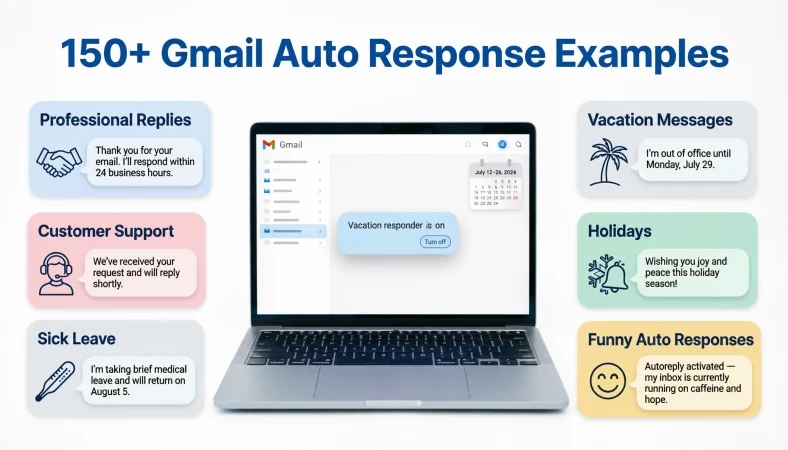
A Gmail auto response is an automatic email reply that lets people know you’re unavailable, away from work, or unable to respond immediately. You can use it for vacations, holidays, business inquiries, customer support, or simple acknowledgment messages.
Top alternatives: Gmail out-of-office reply, Gmail vacation responder, automatic email reply, Gmail autoresponder message, Gmail away message
Ever left for vacation, taken a sick day, or stepped away from your inbox only to return to 147 unread emails? Your inbox clearly didn’t get the memo! A Gmail auto response can save you from that digital pile-up by automatically telling people when you’re unavailable and when they can expect a reply.
Whether you’re managing client emails, handling customer inquiries, applying for jobs, or taking a much-needed break from work, the right automatic message keeps communication clear and professional.
The trick is choosing wording that matches your situation. A business email needs a polished response, while a vacation message can feel warmer and more relaxed.
In this guide, you’ll find ready-to-use Gmail auto response examples for work, holidays, customer service, meetings, emergencies, and everyday situations. Copy a message, personalize the details, and let Gmail handle the first reply while you focus on what matters.
Professional Gmail Auto Response Examples
1. Thank you for your email. I will respond as soon as possible.
Example: Use this as a general automatic reply when you cannot check your inbox regularly.
Meaning: Acknowledges the email and sets a reasonable expectation for a response.
2. Thank you for contacting me. I am currently unavailable but will reply when I return.
Example: Use this when attending an event or taking a short break from work.
Meaning: Explains your temporary unavailability professionally.
3. I have received your message and appreciate you reaching out.
Example: Use this when you want to acknowledge incoming emails without promising an immediate reply.
Meaning: Confirms receipt and maintains a courteous tone.
4. Thank you for your email. I will review your message and get back to you shortly.
Example: Use this when you expect to return to your inbox soon.
Meaning: Communicates that you intend to review the message and follow up.
5. I am away from my desk at the moment and will respond when available.
Example: Use this when working away from your usual workstation.
Meaning: Explains a temporary delay without sharing unnecessary details.
6. Thank you for your patience. I will respond to your inquiry as soon as I can.
Example: Use this when your workload may delay your email replies.
Meaning: Recognizes the sender’s time and sets a polite expectation.
7. Your email is important to me, and I will respond as soon as my schedule allows.
Example: Use this when communicating with clients or professional contacts.
Meaning: Shows consideration while avoiding an unrealistic deadline.
8. I am currently attending to other commitments and may be delayed in responding.
Example: Use this during a busy workday or a series of scheduled appointments.
Meaning: Provides a professional explanation for a slower response.
9. Thank you for reaching out. I will follow up once I have reviewed the details.
Example: Use this when incoming messages require careful review before a reply.
Meaning: Indicates that you intend to assess the information before responding.
10. I appreciate your message and will be in touch when I am available.
Example: Use this for general professional correspondence when your return time is uncertain.
Meaning: Keeps the response polite without giving an unconfirmed timeline.
11. I am currently unavailable by email. Thank you for your understanding.
Example: Use this when you need to step away from email for a while.
Meaning: Clearly communicates limited availability.
12. Thank you for your email. I look forward to connecting with you soon.
Example: Use this when you want a warm but professional automatic acknowledgment.
Meaning: Ends the message on a positive note.
Gmail Out-of-Office Auto Response Examples
1. Thank you for your email. I am currently out of the office and will return on [date].
Example: Use this when taking planned leave and sharing your return date.
Meaning: Tells senders when you expect to be available again.
2. I am away from the office and will respond to your message upon my return.
Example: Use this when you prefer not to give a specific return date.
Meaning: Explains that replies may be delayed until you return.
3. I am currently out of the office with limited access to email.
Example: Use this when traveling or working somewhere with unreliable internet access.
Meaning: Sets expectations about your ability to check messages.
4. Thank you for reaching out. I will be back in the office on [date].
Example: Use this for planned leave or a short business trip.
Meaning: Gives the sender a clear return date.
5. I am away until [date]. For urgent matters, please contact [colleague or team].
Example: Use this when a colleague is covering your responsibilities.
Meaning: Provides an alternative contact for urgent requests.
6. I am currently on leave and will respond to emails when I return.
Example: Use this during annual leave or personal time off.
Meaning: Communicates your absence without overexplaining it.
7. Thank you for your message. I will have limited email access during my absence.
Example: Use this when you may check messages occasionally but cannot guarantee a reply.
Meaning: Prepares senders for possible delays.
8. I am away from work until [date] and appreciate your patience.
Example: Use this for a straightforward out-of-office message.
Meaning: States your absence and politely acknowledges the delay.
9. I am currently unavailable. Your message will be reviewed after my return.
Example: Use this when you do not plan to check emails while away.
Meaning: Explains when your inbox will receive attention.
10. Thank you for your email. I will resume normal correspondence on [date].
Example: Use this when your regular email schedule will restart after leave.
Meaning: Sets an expectation for when communication will resume.
11. I am away from the office today and will respond on the next business day.
Example: Use this for a one-day absence when the next business day is accurate.
Meaning: Provides a simple and specific response timeframe.
12. I appreciate your message and will reconnect once I am back at work.
Example: Use this when you want a friendly out-of-office reply.
Meaning: Keeps communication warm while confirming your absence.
Gmail Vacation Auto Response Examples
1. I am currently on vacation and will reply after I return on [date].
Example: Use this when taking a planned holiday.
Meaning: Sets a clear expectation that replies will wait until your return.
2. Thanks for your email! I am enjoying some time off and will be back on [date].
Example: Use this for a friendly workplace where a relaxed tone is appropriate.
Meaning: Shares your absence in a warm, approachable way.
3. I am away on vacation with limited access to email. I will respond when I return.
Example: Use this when you may occasionally check messages but cannot guarantee a reply.
Meaning: Sets realistic expectations about your availability.
4. I am taking a short break and will catch up on emails after [date].
Example: Use this for a brief personal holiday.
Meaning: Communicates that replies will resume after your break.
5. Thank you for your message. I am currently recharging and will be back soon.
Example: Use this in a casual workplace with a friendly communication style.
Meaning: Signals a temporary break without sharing private details.
6. I am away enjoying some time off. For urgent work matters, contact [name].
Example: Use this when a colleague is covering important responsibilities during your vacation.
Meaning: Directs urgent requests to an available contact.
7. I will be away from email until [date]. Thank you for your patience.
Example: Use this when you plan to disconnect completely during your holiday.
Meaning: Establishes a clear communication boundary.
8. Thanks for reaching out! I will respond once I am back from vacation.
Example: Use this for a short, friendly automatic reply.
Meaning: Acknowledges the message and explains the delay.
9. I am currently on holiday and will return to emails on [date].
Example: Use this when communicating with colleagues or international contacts.
Meaning: Gives a specific date for resuming email correspondence.
10. My inbox is taking a little vacation with me. I will reply when I return!
Example: Use this when your workplace culture welcomes light humor.
Meaning: Adds personality while making your absence clear.
11. I am away on vacation and will not be monitoring emails regularly.
Example: Use this when you might check email occasionally but will not be actively available.
Meaning: Discourages expectations of an immediate response.
12. Thank you for your message. I hope to reconnect after my time off.
Example: Use this when you want a pleasant and friendly vacation reply.
Meaning: Ends the automatic message on a positive note.
Gmail Auto Response Examples for Business
1. Thank you for contacting [company name]. We have received your email.
Example: Use this as an automatic acknowledgment for a general business inbox.
Meaning: Confirms receipt of the customer’s or client’s message.
2. Thank you for your inquiry. Our team will review your request and respond as soon as possible.
Example: Use this for sales inquiries or general business questions.
Meaning: Explains that the inquiry will be reviewed before a response.
3. We appreciate your interest in our services. We will be in touch soon.
Example: Use this when a potential client contacts your company.
Meaning: Acknowledges the inquiry and encourages continued engagement.
4. Your message has reached our team. Thank you for getting in touch.
Example: Use this for a shared company inbox.
Meaning: Reassures the sender that their email reached the intended destination.
5. Thank you for contacting us. Our business hours are [days and times].
Example: Use this when customers often email outside operating hours.
Meaning: Helps senders understand when the business is available.
6. We have received your request and will direct it to the appropriate department.
Example: Use this when the company inbox handles several types of inquiries.
Meaning: Explains how the message will be routed.
7. Thank you for your interest in working with us. We appreciate the opportunity to connect.
Example: Use this for partnership, supplier, or business development inquiries.
Meaning: Creates a positive first impression.
8. Our team is currently reviewing incoming requests. We appreciate your patience.
Example: Use this during a busy period when response times may be longer.
Meaning: Sets expectations without promising an exact turnaround time.
9. Thank you for your message. Please include your reference number in any follow-up email.
Example: Use this when the company tracks inquiries by ticket or reference number.
Meaning: Helps the team locate and process the request efficiently.
10. We appreciate your email. For time-sensitive matters, please use our approved urgent contact channel.
Example: Use this when the business has a separate channel for urgent requests.
Meaning: Directs urgent issues to the correct communication route.
11. Your inquiry is important to us. We will respond through the appropriate business contact.
Example: Use this when several departments may need to review a request.
Meaning: Explains that the message will be handled through the relevant contact.
12. Thank you for contacting [company name]. We look forward to assisting you.
Example: Use this as a general acknowledgment for a company email address.
Meaning: Ends the message with a helpful, welcoming tone.
Gmail Auto Response Examples for Customer Service
1. Thank you for contacting customer support. We have received your message.
Example: Use this for a support inbox that receives customer questions and complaints.
Meaning: Confirms that the customer’s message arrived.
2. Your request has been received. Our support team will review it as soon as possible.
Example: Use this when support requests are reviewed in a queue.
Meaning: Explains that the request is awaiting attention.
3. We appreciate your patience while our team works through incoming requests.
Example: Use this during a high-volume support period.
Meaning: Acknowledges possible waiting time without promising a specific resolution.
4. Please include your order number in your reply so we can assist you more efficiently.
Example: Use this when customer support needs an order reference to investigate an issue.
Meaning: Requests information that can help speed up assistance.
5. Thank you for reporting this issue. Our team will review the details you provided.
Example: Use this when customers report a product or service problem.
Meaning: Acknowledges the report and indicates that it will be reviewed.
6. We have received your feedback and appreciate you taking the time to share it.
Example: Use this for customer comments and suggestions.
Meaning: Shows that customer feedback is valued.
7. Our support hours are [days and times]. Messages received outside these hours may take longer to receive a reply.
Example: Use this when support is available only during set hours.
Meaning: Clarifies when customers can expect assistance.
8. If your issue remains unresolved, please include your existing support reference number.
Example: Use this when handling follow-up messages about an open case.
Meaning: Helps connect the new email with the previous request.
9. Thank you for your patience. We will contact you if additional information is required.
Example: Use this when a support agent may need more details after reviewing the request.
Meaning: Explains how follow-up information will be requested.
10. We appreciate you reaching out and will direct your message to the appropriate team.
Example: Use this when a support inbox receives questions outside its main responsibility.
Meaning: Shows that the request will be routed appropriately.
11. Your feedback helps us improve our service. Thank you for letting us know.
Example: Use this after receiving a suggestion or complaint.
Meaning: Encourages customers to share useful feedback.
12. Thank you for contacting our team. We appreciate the opportunity to help.
Example: Use this as a general customer support acknowledgment.
Meaning: Creates a reassuring and service-focused impression.
Gmail Auto Response Examples for Holidays
1. Thank you for your email. Our office is closed for [holiday] and will reopen on [date].
Example: Use this when your organization closes for a public holiday.
Meaning: Explains the closure and gives the reopening date.
2. Our team is observing the holiday and will respond when normal business hours resume.
Example: Use this when a holiday affects the whole team.
Meaning: Sets expectations for delayed replies.
3. Happy holidays! We will respond to your message after our office reopens on [date].
Example: Use this for a friendly seasonal automatic reply.
Meaning: Combines a holiday greeting with practical information.
4. Thank you for reaching out. Our holiday hours are [hours].
Example: Use this when the business operates on a reduced schedule.
Meaning: Informs customers about temporary operating hours.
5. We are currently closed for the holiday. Thank you for your understanding.
Example: Use this for a short message during a company-wide closure.
Meaning: Clearly explains the temporary unavailability.
6. Our team is taking a holiday break and will return on [date].
Example: Use this when the whole office is closed for seasonal leave.
Meaning: Shares the team’s return date in a friendly way.
7. Thank you for your message. We will review incoming emails after the holiday closure.
Example: Use this when emails will not be actively monitored during the break.
Meaning: Explains when messages will be reviewed.
8. Wishing you a wonderful holiday season. We will be back in touch soon.
Example: Use this when a warm seasonal tone suits your business.
Meaning: Shares goodwill while acknowledging a delayed response.
9. Our office is closed today in observance of [holiday]. We will reopen on [date].
Example: Use this for a single-day public holiday closure.
Meaning: Provides a clear schedule update.
10. We appreciate your patience while our team enjoys the holiday break.
Example: Use this when a company expects a backlog after the holiday.
Meaning: Politely prepares customers for a possible delay.
11. For urgent matters during the holiday closure, please contact [approved contact].
Example: Use this when an emergency contact remains available.
Meaning: Gives senders a route for urgent issues.
12. Thank you for contacting us. We look forward to assisting you when we return.
Example: Use this as the closing line of a holiday auto reply.
Meaning: Ends the message with a courteous promise to resume normal communication.
Gmail Auto Response Examples for Sick Leave
1. Thank you for your email. I am currently on sick leave and will respond when I return.
Example: Use this when you need time off to recover.
Meaning: Explains your absence without disclosing medical details.
2. I am away from work today due to illness and may not be checking emails.
Example: Use this for a short absence caused by illness.
Meaning: Sets expectations about your limited availability.
3. I am currently unwell and expect to return on [date].
Example: Use this when you know your expected return date.
Meaning: Gives colleagues and clients a helpful timeline.
4. Thank you for your understanding while I take time to recover.
Example: Use this when a friendly, professional tone suits your workplace.
Meaning: Acknowledges the temporary disruption while protecting your privacy.
5. I am on medical leave and will respond to messages when I am able.
Example: Use this when you cannot confirm a return date.
Meaning: Communicates limited availability without making a firm commitment.
6. For urgent work matters, please contact [colleague or team].
Example: Use this when someone is covering important responsibilities during your absence.
Meaning: Directs urgent requests to an available person.
7. I am currently unavailable due to illness. Thank you for your patience.
Example: Use this when you need a concise sick-leave response.
Meaning: Explains the delay and remains professional.
8. I will have limited access to email while I recover.
Example: Use this when you may occasionally check messages but cannot guarantee a reply.
Meaning: Sets realistic expectations.
9. Thank you for reaching out. I will follow up once I am back at work.
Example: Use this when you plan to handle non-urgent messages after recovery.
Meaning: Confirms that you intend to resume communication.
10. I am away on sick leave until [date]. Please contact [name] for urgent requests.
Example: Use this when your absence and backup contact are confirmed.
Meaning: Gives senders a clear timeline and alternative contact.
11. I am taking time to recover and will not be responding to emails regularly.
Example: Use this when you need to disconnect during your recovery.
Meaning: Establishes a clear boundary around email availability.
12. Thank you for your message. I appreciate your patience during my absence.
Example: Use this as a simple acknowledgment while on sick leave.
Meaning: Maintains courtesy without revealing personal health information.
Gmail Auto Response Examples for Meetings and Training
1. I am currently attending a meeting and will respond when it concludes.
Example: Use this when a scheduled meeting prevents you from checking emails.
Meaning: Explains a temporary delay.
2. Thank you for your email. I am attending training and will reply when available.
Example: Use this during a training session or professional development day.
Meaning: Tells senders why you may be slow to respond.
3. I am participating in an off-site session with limited email access.
Example: Use this when working away from your usual office.
Meaning: Sets expectations for reduced availability.
4. I am in back-to-back meetings today and may respond later than usual.
Example: Use this when your calendar is full.
Meaning: Gives a brief explanation for a slower response time.
5. I will review your email after my scheduled sessions finish.
Example: Use this when you expect to return to your inbox later in the day.
Meaning: Identifies when you plan to check messages.
6. Thank you for your patience while I focus on today’s training sessions.
Example: Use this when your workplace encourages focused learning time.
Meaning: Explains your limited availability politely.
7. I am away from my inbox for a scheduled workshop and will respond afterward.
Example: Use this when attending a professional workshop.
Meaning: Communicates that the delay is temporary.
8. I am currently unavailable due to a scheduled work commitment.
Example: Use this when you prefer not to share details about your schedule.
Meaning: Gives a neutral, professional explanation.
9. For urgent matters, please contact [colleague] while I am in meetings.
Example: Use this when a teammate can handle time-sensitive requests.
Meaning: Provides an alternative route for urgent communication.
10. I will have limited access to email during this event.
Example: Use this when attending a conference or company event.
Meaning: Sets realistic expectations for email monitoring.
11. I appreciate your message and will follow up once my sessions are complete.
Example: Use this when you expect to respond after a training day.
Meaning: Acknowledges the email and explains the delay.
12. Thank you for reaching out. I will be back in my inbox as soon as my schedule allows.
Example: Use this when your availability depends on meetings finishing on time.
Meaning: Keeps the reply professional without promising an exact hour.
Gmail Auto Response Examples for Delayed Replies
1. Thank you for your email. I am experiencing a high volume of messages and may take longer to respond.
Example: Use this when your inbox is unusually busy.
Meaning: Sets expectations without ignoring the sender’s message.
2. I appreciate your patience while I work through my inbox.
Example: Use this during a busy period after a deadline or event.
Meaning: Acknowledges the possibility of a delayed reply.
3. Your message has been received. I will respond as soon as my schedule permits.
Example: Use this when your workload affects your response time.
Meaning: Confirms receipt while avoiding a specific promise.
4. Thank you for following up. I am reviewing messages in the order they can be addressed.
Example: Use this when several requests need attention.
Meaning: Explains that replies may take time.
5. I am currently catching up on emails and appreciate your understanding.
Example: Use this after returning from leave or a busy project period.
Meaning: Provides a straightforward explanation for the backlog.
6. I may be slower than usual to respond this week.
Example: Use this when you anticipate a temporary increase in workload.
Meaning: Gives advance notice of a possible delay.
7. Thank you for your patience. I will contact you if I need any additional information.
Example: Use this when messages require review before a full response.
Meaning: Explains how further communication will happen.
8. I have received your message and will review it as soon as possible.
Example: Use this when you need time to assess an inquiry.
Meaning: Acknowledges the email without implying that a full answer is ready.
9. I am prioritizing time-sensitive requests and will address other messages as soon as I can.
Example: Use this when urgent issues must be handled first.
Meaning: Explains how you are managing competing priorities.
10. Thanks for bearing with me while I catch up on outstanding messages.
Example: Use this in a friendly workplace when your inbox has accumulated.
Meaning: Recognizes the delay in a natural tone.
11. I appreciate your email and will reply once I have reviewed the relevant details.
Example: Use this when a message requires research or input from others.
Meaning: Signals that a thoughtful response may take additional time.
12. Thank you for your understanding. I will get back to you when I can provide a useful response.
Example: Use this when you want to avoid sending a rushed answer.
Meaning: Prioritizes a helpful reply over an immediate but incomplete one.
Gmail Auto Response Examples for Personal Use
1. Thanks for your email! I am away from my inbox and will reply when I can.
Example: Use this for personal correspondence during a busy day.
Meaning: Keeps the message casual and friendly.
2. I have stepped away for a bit and will get back to you soon.
Example: Use this when taking a short break from email.
Meaning: Explains a temporary absence without overcomplicating it.
3. Thanks for reaching out. I may be slow to respond today.
Example: Use this when you have limited time for personal emails.
Meaning: Sets a relaxed expectation for a delayed reply.
4. I am taking some offline time and will check messages later.
Example: Use this when you want a break from screens.
Meaning: Communicates a temporary digital break.
5. I appreciate your message and will reply when I have a moment.
Example: Use this when your personal schedule is unpredictable.
Meaning: Acknowledges the email without committing to a deadline.
6. I am away right now, but I will catch up on emails later.
Example: Use this for a casual personal auto response.
Meaning: Explains when you expect to check your inbox again.
7. Thanks for the note! I will be in touch when I am back online.
Example: Use this when traveling or spending time away from devices.
Meaning: Keeps the response warm and informal.
8. I am currently busy with personal commitments and will reply afterward.
Example: Use this when you need time for family or other personal matters.
Meaning: Explains your limited availability while preserving privacy.
9. I may not see your message immediately, but I appreciate you reaching out.
Example: Use this when you check email infrequently.
Meaning: Sets expectations and acknowledges the sender.
10. Inbox break in progress. I will reply when I am back!
Example: Use this for a playful personal email account.
Meaning: Adds humor while explaining the delay.
11. Thanks for your patience while I take care of a few things offline.
Example: Use this when stepping away for errands or personal tasks.
Meaning: Communicates that you are temporarily unavailable.
12. I will get back to you when I am available. Thanks for understanding!
Example: Use this when you want a simple, flexible personal reply.
Meaning: Keeps expectations clear and friendly.
Gmail Auto Response Examples for Freelancers and Remote Workers
1. Thank you for your email. I am currently working on scheduled deliverables and will respond as soon as possible.
Example: Use this when project work limits your availability.
Meaning: Communicates that you are occupied with existing commitments.
2. My response time may be slower during focused work hours.
Example: Use this when you block out time for deep work.
Meaning: Sets expectations around uninterrupted work periods.
3. I am currently working remotely with limited availability for email.
Example: Use this when your remote schedule affects when you can reply.
Meaning: Explains your availability without suggesting that remote work always limits communication.
4. Thank you for reaching out. I will review your project inquiry and follow up shortly.
Example: Use this when a potential client contacts you about a new project.
Meaning: Acknowledges the inquiry and signals a planned follow-up.
5. I am away from my workstation and will respond when I am back online.
Example: Use this when traveling between work locations.
Meaning: Explains a temporary delay in checking email.
6. I am currently booked with client work and may take additional time to reply.
Example: Use this when your workload affects response times.
Meaning: Sets a realistic expectation without disclosing client details.
7. For active projects, please include the project name in your email subject line.
Example: Use this when managing several clients or contracts.
Meaning: Helps organize and identify incoming project messages.
8. Thank you for your message. I will review the scope and get back to you with the next steps.
Example: Use this when a client asks about a new assignment.
Meaning: Shows that you will assess the request before making commitments.
9. My usual email hours are [days and times]. I will respond during those hours when possible.
Example: Use this when establishing communication boundaries with clients.
Meaning: Clarifies your general availability.
10. I appreciate your patience while I complete my current project commitments.
Example: Use this when you need to prioritize existing deadlines.
Meaning: Explains why a new inquiry may not receive an immediate response.
11. For urgent project matters, please use the communication channel agreed in our contract.
Example: Use this when a client has an established method for urgent communication.
Meaning: Directs important issues to the agreed channel.
12. Thanks for getting in touch. I look forward to discussing how I can support your project.
Example: Use this for new freelance or consulting inquiries.
Meaning: Ends the reply on an inviting and professional note.
Gmail Auto Response Examples for Job Applications and Recruitment
1. Thank you for your email. I appreciate your interest and will respond when possible.
Example: Use this when acknowledging a recruiter or hiring manager.
Meaning: Maintains a professional tone during job-related communication.
2. Thank you for contacting me about this opportunity.
Example: Use this when an employer or recruiter sends an initial inquiry.
Meaning: Acknowledges the message courteously.
3. I am currently unavailable but will review your message as soon as I can.
Example: Use this when job-related emails arrive during a busy period.
Meaning: Explains a delay without dismissing the opportunity.
4. Thank you for reaching out regarding [position title]. I will follow up when available.
Example: Use this when communicating about a specific role.
Meaning: Keeps the reply relevant to the opportunity.
5. I appreciate your message and the time you have taken to contact me.
Example: Use this when replying to a recruiter or professional contact.
Meaning: Shows respect for the sender’s effort.
6. I am away from email until [date] and will respond after I return.
Example: Use this when job-related communication may arrive during planned leave.
Meaning: Provides a clear return date.
7. Thank you for your interest in our hiring process. We will provide an update when one is available.
Example: Use this for a recruitment inbox, provided the organization can support this process.
Meaning: Sets expectations without promising a decision date.
8. Your application-related message has been received. Thank you for contacting our team.
Example: Use this for an employer’s recruitment email account.
Meaning: Acknowledges receipt of an applicant’s message.
9. For questions about your application, please include the position title and reference number.
Example: Use this when managing multiple vacancies.
Meaning: Helps the recruitment team identify the relevant application.
10. Thank you for your patience while we review incoming recruitment inquiries.
Example: Use this during a busy hiring period.
Meaning: Explains that a response may take additional time.
11. I appreciate the opportunity to connect and will reply when my schedule allows.
Example: Use this when communicating with professional contacts about career opportunities.
Meaning: Keeps the tone positive and respectful.
12. Thank you for reaching out. I look forward to connecting when I am available.
Example: Use this as a general automatic acknowledgment for career-related email.
Meaning: Leaves the door open for future communication.
Funny and Casual Gmail Auto Response Examples
1. Thanks for your email! My inbox and I are taking a tiny break.
Example: Use this with friends or colleagues who appreciate light humor.
Meaning: Makes your temporary absence feel relaxed and friendly.
2. I am currently away from my keyboard, living my main-character moment.
Example: Use this for a casual account during personal time off.
Meaning: Adds playful personality while explaining that you are unavailable.
3. Your email has arrived safely. My reply is still on its little journey.
Example: Use this when a humorous automatic acknowledgment suits the situation.
Meaning: Acknowledges the message in a lighthearted way.
4. I have temporarily left the email universe. Back on [date]!
Example: Use this when taking a planned break from your inbox.
Meaning: Communicates absence with a playful tone.
5. My inbox is open, but I am currently out touching grass.
Example: Use this for friends or an informal workplace.
Meaning: Jokes about taking time away from screens.
6. I am away right now. Please imagine a very polite email vacation sign.
Example: Use this for a casual account where humor is welcome.
Meaning: Makes your unavailability clear without sounding cold.
7. Email received. Human response loading…
Example: Use this when you want a short, tech-inspired automatic message.
Meaning: Playfully signals that a personal reply may take time.
8. I am currently offline, recharging my social battery.
Example: Use this when taking time to rest.
Meaning: Explains a break in a relatable way.
9. My calendar says busy, and for once, I am listening to it.
Example: Use this when you are protecting time for scheduled tasks.
Meaning: Adds humor while communicating limited availability.
10. Thanks for reaching out! I will reply after my inbox stops looking like a group project.
Example: Use this when you expect a backlog of emails.
Meaning: Jokes about a busy inbox without dismissing the sender.
11. I am on a short email break. No dramatic exit, just fewer notifications.
Example: Use this when stepping away from email for a while.
Meaning: Makes your digital break sound casual and intentional.
12. Auto-reply doing its job while I do literally anything else.
Example: Use this for a personal or informal account.
Meaning: Adds humor while explaining why a reply may be delayed.
Short and Simple Gmail Auto Response Examples
1. Thank you for your email. I will reply soon.
Example: Use this when you want a brief, general acknowledgment.
Meaning: Confirms the message and suggests a prompt reply.
2. I am currently unavailable. Thank you for understanding.
Example: Use this for a short absence with no further details.
Meaning: Clearly communicates that you cannot respond right now.
3. Message received. I will respond when available.
Example: Use this when a simple acknowledgment is sufficient.
Meaning: Confirms receipt without giving a specific timeline.
4. I am away until [date].
Example: Use this when the return date is the main information senders need.
Meaning: Provides a clear statement of your absence.
5. Thanks for reaching out. I will be in touch.
Example: Use this for a brief and friendly automatic reply.
Meaning: Acknowledges the sender and leaves room for follow-up.
6. I will respond during my next available email session.
Example: Use this when you check messages at scheduled times.
Meaning: Sets expectations for your response routine.
7. I am out of the office today.
Example: Use this for a one-day absence.
Meaning: Gives a direct update about your availability.
8. Thank you for your patience.
Example: Use this when a short acknowledgment is all that is needed.
Meaning: Recognizes that the sender may need to wait.
9. I will review your message shortly.
Example: Use this when you expect to check the email soon.
Meaning: Signals that the message will be reviewed.
10. I am currently away from email.
Example: Use this when you want a neutral, simple status message.
Meaning: Explains why a reply may not arrive immediately.
11. Please contact [name] for urgent matters.
Example: Use this when an approved alternative contact is available.
Meaning: Directs time-sensitive requests to someone who can help.
12. Thanks for your email. I will reply when I return.
Example: Use this during leave or a short planned absence.
Meaning: Acknowledges the email and explains the delay.
Gmail Auto Response Examples for Specific Situations
1. Conference: I am attending [event name] until [date] and may have limited access to email.
Example: Use this when attending a conference or industry event.
Meaning: Explains reduced availability during the event.
2. Business Travel: I am traveling for work and will respond when my schedule allows.
Example: Use this when work travel affects your email routine.
Meaning: Sets expectations without sharing travel details.
3. Deadline Week: I am focused on a scheduled project deadline and may respond more slowly than usual.
Example: Use this when a major delivery requires concentrated attention.
Meaning: Explains a temporary delay caused by work priorities.
4. Company Closure: Our office is closed from [date] to [date] and will reopen on [date].
Example: Use this when the entire organization is unavailable for a defined period.
Meaning: Provides clear closure and reopening dates.
5. Parental Leave: I am currently on leave and will return on [date]. Please contact [name] for work-related inquiries.
Example: Use this when taking planned leave and a colleague is covering responsibilities.
Meaning: Communicates your absence and provides an alternative contact.
6. Extended Leave: I am away from work until further notice. For assistance, please contact [team or person].
Example: Use this when you cannot confirm a return date and a backup contact is available.
Meaning: Sets expectations and directs senders elsewhere.
7. Limited Internet: I have limited internet access and may not respond promptly.
Example: Use this when staying somewhere with unreliable connectivity.
Meaning: Explains why email responses may be delayed.
8. Training Day: I am attending a full-day training session and will reply when I am available.
Example: Use this when professional training takes up your working day.
Meaning: Communicates a temporary schedule limitation.
9. Appointment: I am away for a scheduled appointment and will check email afterward.
Example: Use this when you need to block out part of the day.
Meaning: Gives a simple explanation for your absence.
10. Seasonal Business: Thank you for contacting us. Our seasonal response times may be longer than usual.
Example: Use this when your business receives more messages during a peak season.
Meaning: Prepares customers for a possible delay.
11. Email Maintenance: I may have limited access to email during scheduled system maintenance.
Example: Use this when planned maintenance affects your access to email.
Meaning: Explains a possible interruption to communication.
12. Returning From Leave: I am back from leave and working through accumulated messages. Thank you for your patience.
Example: Use this when you return to a large inbox after time off.
Meaning: Sets expectations while you catch up on messages.
FAQs
What Is a Gmail Auto Response?
It is an automatic email reply that Gmail sends when its vacation responder is enabled.
How Do I Turn On Gmail Auto Response?
Open Gmail settings, find Vacation responder under General, enable it, enter your message and dates, then save.
Can I Set a Gmail Auto Response for Vacation?
Yes. Set the start and end dates in Gmail’s Vacation responder settings.
Can Gmail Send an Automatic Reply to Every Email?
Gmail’s vacation responder generally replies to the same sender periodically, not to every message individually.
Can I Use Gmail Auto Response for Business?
Yes. It can acknowledge inquiries, explain business hours, and direct urgent messages to an appropriate contact.
What Should a Professional Gmail Auto Response Say?
Include your availability, expected return date when known, and an alternative contact for urgent matters.
Can I Make My Gmail Auto Response Funny?
Yes, for casual messages or informal workplaces. Keep it professional when replying to clients or formal contacts.
Can I Set Different Auto Responses for Different People?
Gmail’s standard vacation responder offers limited audience options, not fully customizable rules for every contact.
Does Gmail Auto Response Work When My Computer Is Off?
Yes. Once enabled and saved, Gmail’s vacation responder works without your computer staying on.
Can I Add a Return Date to My Gmail Auto Response?
Yes. You can set an end date so the vacation responder stops automatically.
Should I Include My Phone Number in an Auto Response?
Only if appropriate. Avoid sharing personal contact details publicly or with unknown senders.
Can I Turn Off Gmail Auto Response Early?
Yes. Return to the Vacation responder setting in Gmail and turn it off.
Conclusion
A well-written Gmail auto response saves time, sets expectations, and keeps your communication professional even when you’re away from your inbox. Whether you’re taking a vacation, managing a busy workload, responding to customer inquiries, or attending meetings, the right message helps people understand when and how you’ll reply.
Keep your wording clear, include accurate dates, and provide an alternative contact when urgent matters need attention. You can also add a little personality when the situation allows it. Choose an example from this guide, personalize it to fit your needs, and let Gmail handle the first hello. Save this list for your next day off or busy week!