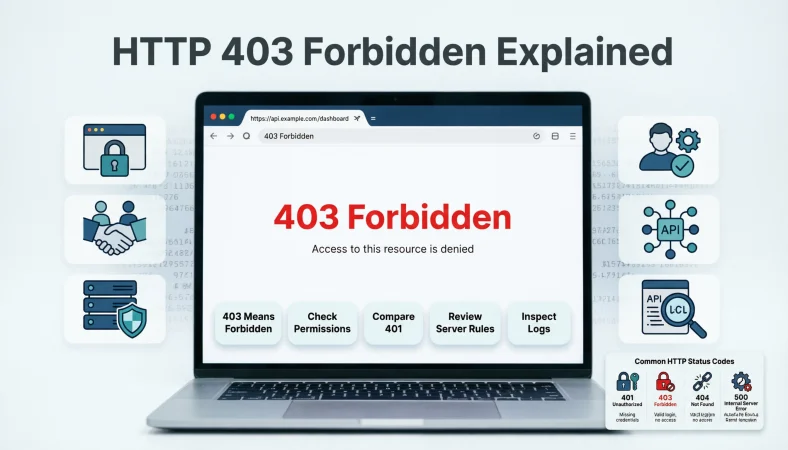
The http response code 403 means the server understood the request but refused to fulfill it because access is not permitted. Unlike a 401 response, simply authenticating again does not necessarily solve a 403 error.
Top alternatives: 403 Forbidden, HTTP 403 error, 403 access denied, 403 permission error, HTTP status 403
A 403 error is basically the web saying, “Yep, I understood what you asked for. Still no.” The http response code 403 is a client-error status that tells you the server understood the request but refuses to fulfill it. This often happens when a user or application does not have sufficient permission to access a resource, although the exact reason depends on the server and application.
Whether you encounter it while browsing a website, calling an API, uploading a file, accessing an admin area, or debugging an application, knowing what 403 actually means can save a lot of unnecessary troubleshooting. The important part is understanding that 403 is not simply “the password is wrong.”
A 401 response is generally associated with missing or invalid authentication, while 403 indicates that the request is being refused even though authentication may already be known or valid.
HTTP Response Code 403 Basics
403 means Forbidden.
Example: Use this when explaining the status code to someone seeing it for the first time.
Meaning: The server understood the request but refuses to fulfill it.
403 belongs to the 4xx client-error class.
Example: Mention this when explaining where 403 fits among HTTP statuses.
Meaning: The first digit identifies it as a client-error response.
The server understood your request.
Example: Use this to distinguish 403 from certain malformed-request errors.
Meaning: The request was understood but access was refused.
403 does not automatically mean your password is wrong.
Example: Use this when someone assumes every access error is an authentication problem.
Meaning: 403 is primarily about permission or refusal, not simply missing credentials.
A valid login does not guarantee access.
Example: Use this when a logged-in user still receives 403.
Meaning: Authentication and authorization are separate concepts.
403 can result from insufficient permissions.
Example: Mention this when an account can access some pages but not others.
Meaning: The account may lack the required rights.
The server can explain the reason in its response.
Example: Use this when inspecting an API response body.
Meaning: Servers may provide additional information about why access was refused.
Repeating the same request may not fix 403.
Example: Mention this when a browser keeps returning the same error.
Meaning: An unchanged request can continue to receive the same refusal.
403 can appear on websites and APIs.
Example: Use this when explaining why developers encounter the status code in different environments.
Meaning: HTTP access restrictions can affect many types of resources.
403 is different from 404.
Example: Mention this when someone thinks an inaccessible page must be missing.
Meaning: 403 indicates refusal, while 404 indicates that the resource was not found or is intentionally undisclosed.
403 is different from 500.
Example: Use this when distinguishing access problems from server failures.
Meaning: 403 represents a client-error response class, while 500 is a server-error response.
The exact cause depends on the server configuration.
Example: Mention this when diagnosing a website without access to its server settings.
Meaning: There is no single universal reason behind every 403 response.
Funny HTTP Response Code 403 Explanations
403: The server said, “Not today.”
Example: Use this in a lighthearted developer post about access errors.
Meaning: It humorously describes a refused request.
403: You knocked, but nobody opened the door.
Example: Use this for a beginner-friendly explanation.
Meaning: The resource exists behind an access restriction.
403: Permission denied, vibes rejected.
Example: Use this in a playful coding meme.
Meaning: Access has been refused.
403: The website knows you, but still says no.
Example: Use this when explaining the difference between authentication and authorization.
Meaning: Being recognized does not necessarily grant permission.
403: Your request has entered the VIP queue without a VIP pass.
Example: Use this for a fun team-training example.
Meaning: The resource requires permissions the requester does not have.
403: The digital bouncer has spoken.
Example: Use this in a developer meme.
Meaning: The server is blocking access.
403: You found the door, not the key.
Example: Use this when explaining protected resources.
Meaning: Reaching a resource does not guarantee access.
403: Server understood everything and still declined.
Example: Use this in a casual technical explanation.
Meaning: The refusal is deliberate rather than simply incomprehensible.
403: Request received, invitation missing.
Example: Use this as a quick social-media explanation.
Meaning: The requester lacks permission.
403: Access denied with professional confidence.
Example: Use this in a humorous coding caption.
Meaning: The server has firmly refused the request.
403: The endpoint has boundaries.
Example: Use this when teaching API permissions.
Meaning: An API can restrict certain operations.
403: HTTP’s polite way of saying “Nope.”
Example: Use this as a memorable beginner explanation.
Meaning: The status represents a refusal to fulfill the request.
Professional HTTP Response Code 403 Explanations
Use 403 when the server understands the request but refuses it.
Example: Include this wording in technical documentation.
Meaning: It closely captures the standardized meaning of the status.
Treat 403 as an access-control signal.
Example: Use this when documenting protected application resources.
Meaning: The response indicates that access is not permitted.
Do not automatically interpret 403 as failed authentication.
Example: Use this during API troubleshooting.
Meaning: Authentication and authorization should be analyzed separately.
Check authorization rules before changing credentials.
Example: Use this when a valid account repeatedly receives 403.
Meaning: The issue may involve permissions rather than identity.
Inspect the response body for application-specific details.
Example: Use this when debugging an API.
Meaning: The server may explain why the request was rejected.
Review server access-control configuration.
Example: Use this for a website returning 403 unexpectedly.
Meaning: Configuration can determine whether resources are accessible.
Check resource permissions carefully.
Example: Use this when only certain files or endpoints return 403.
Meaning: Permissions may differ between resources.
Compare successful and failed requests.
Example: Use this when one endpoint works while another returns 403.
Meaning: Differences in requests can reveal the restriction.
Document the authorization requirement.
Example: Use this in API documentation.
Meaning: Developers should know which roles or permissions are necessary.
Avoid exposing unnecessary security details.
Example: Use this when designing public error responses.
Meaning: Error messages should balance usefulness with security considerations.
Do not treat every 403 as a server malfunction.
Example: Use this when triaging support tickets.
Meaning: A refusal can be intentional.
Record the relevant request context during debugging.
Example: Use this when investigating intermittent access problems.
Meaning: Context can help identify the policy causing the refusal.
HTTP Response Code 403 Causes
Insufficient user permissions can cause 403.
Example: Use this when a standard account tries to access an administrative resource.
Meaning: The account may not have the required authorization.
Restricted directories can return 403.
Example: Mention this when a web server blocks directory access.
Meaning: Server configuration may prevent access.
File permissions can trigger 403.
Example: Use this when a web server cannot serve a protected file.
Meaning: The resource may not be accessible to the web server or requester.
Application authorization rules can produce 403.
Example: Use this when an API restricts actions by user role.
Meaning: Application logic can intentionally reject the request.
IP-based restrictions can contribute to 403 responses.
Example: Mention this when access works from one network but not another.
Meaning: Server or security policies may restrict particular network sources.
Security systems can block requests.
Example: Use this when a firewall or security layer denies access.
Meaning: Protective infrastructure can return or generate a 403 response.
Missing required permissions can block API actions.
Example: Use this when GET works but DELETE returns 403.
Meaning: Different operations can require different authorization levels.
A web application firewall can influence access decisions.
Example: Use this when requests are denied before reaching the application.
Meaning: Security infrastructure may enforce access policies.
Referrer or origin rules can sometimes contribute.
Example: Use this when access differs depending on how a resource is requested.
Meaning: Server-side policies may inspect request context.
Hotlink protection can result in access denial.
Example: Use this when an image loads directly but not from another website.
Meaning: The server may restrict external embedding.
Private resources can intentionally return 403.
Example: Use this when explaining protected content.
Meaning: The resource may require specific authorization.
A custom application rule can create a 403.
Example: Use this when standard permissions appear correct.
Meaning: Application logic can impose additional restrictions.
HTTP Response Code 403 Troubleshooting
Start by identifying which URL returns 403.
Example: Use this as the first step when debugging a website.
Meaning: The exact resource helps narrow the investigation.
Check whether the problem affects one user or everyone.
Example: Use this when investigating an access complaint.
Meaning: Scope can reveal whether the issue is account-specific or broader.
Check whether authentication is valid.
Example: Use this when access requires an account.
Meaning: Authentication problems can point toward 401 rather than 403 behavior.
Review the user’s permissions.
Example: Use this when only certain accounts receive 403.
Meaning: Authorization may be the direct cause.
Compare account roles.
Example: Use this when an administrator succeeds but a standard user fails.
Meaning: Different roles may have different permissions.
Inspect the response body.
Example: Use this when an API returns a JSON error message with the 403.
Meaning: The application may provide a useful diagnostic reason.
Check server access rules.
Example: Use this when website files are unexpectedly blocked.
Meaning: Server configuration may be denying access.
Review recent security changes.
Example: Use this after a firewall or access-policy update.
Meaning: New restrictions may explain a sudden 403.
Compare the failing request with a working request.
Example: Use this when one API call succeeds under similar conditions.
Meaning: Differences can reveal missing authorization information.
Check whether the resource itself is restricted.
Example: Use this when public and private pages behave differently.
Meaning: The restriction may be intentional.
Avoid blindly retrying the same request.
Example: Use this when an application repeatedly receives 403.
Meaning: An unchanged request is unlikely to overcome a permission restriction.
Document what changed before the error appeared.
Example: Use this after a deployment or permission update.
Meaning: Recent changes often provide useful troubleshooting clues.
HTTP Response Code 403 Vs 401
401 generally relates to missing or invalid authentication.
Example: Use this when explaining authentication errors to beginners.
Meaning: The client needs valid authentication credentials for the protected resource.
403 generally indicates refused access.
Example: Use this when explaining authorization problems.
Meaning: The server understands the request but refuses to fulfill it.
A 401 response can prompt authentication.
Example: Use this when an API requires a bearer token.
Meaning: The client may need to authenticate properly.
A 403 response does not necessarily call for another login.
Example: Use this when valid credentials still cannot access a resource.
Meaning: The problem may be insufficient permission.
401 is commonly associated with authentication.
Example: Use this as a simple training explanation.
Meaning: The server needs valid credentials.
403 is commonly associated with authorization.
Example: Use this when discussing role-based permissions.
Meaning: The requester may be known but lacks sufficient rights.
Valid credentials can still result in 403.
Example: Use this for an administrator-only endpoint.
Meaning: Authentication does not automatically grant authorization.
Changing a password is not always the answer to 403.
Example: Use this when a properly authenticated account is blocked.
Meaning: The issue may be permissions rather than credentials.
The two statuses can appear on the same application.
Example: Use this when documenting an API’s authentication flow.
Meaning: Different access problems can produce different responses.
A 401 response often includes an authentication challenge.
Example: Use this when discussing HTTP authentication.
Meaning: The server can indicate how authentication should be provided.
A 403 response communicates refusal.
Example: Use this in a permissions guide.
Meaning: The server has decided not to fulfill the request.
Always inspect the application’s documented behavior.
Example: Use this when an API appears to use 401 and 403 differently.
Meaning: Implementations can provide additional application-specific context.
HTTP Response Code 403 Vs 404
403 means access is forbidden.
Example: Use this when the server recognizes the request but refuses it.
Meaning: Access is being denied.
404 means the resource was not found or is not being disclosed.
Example: Use this when explaining missing-page errors.
Meaning: The server does not provide the requested resource representation.
A server can intentionally return 404 instead of 403.
Example: Use this when discussing protected resources.
Meaning: Hiding whether a resource exists can be a deliberate security choice.
403 does not necessarily mean the URL is wrong.
Example: Use this when a known page suddenly becomes inaccessible.
Meaning: The resource may exist but be restricted.
404 does not always prove the resource never existed.
Example: Use this when troubleshooting a deleted or moved page.
Meaning: A resource can become unavailable for several reasons.
A private admin page may return 403.
Example: Use this when a standard account accesses an administrator URL.
Meaning: The account may lack permission.
A deleted page may return 404.
Example: Use this when explaining missing content.
Meaning: The resource may no longer be available.
Security policies can blur the distinction.
Example: Use this when documenting protected resources.
Meaning: Servers may intentionally use 404 to conceal restricted resources.
Check the server’s documented behavior.
Example: Use this when troubleshooting an API.
Meaning: Applications can implement access responses differently.
Do not assume every 403 is a broken URL.
Example: Use this when supporting website visitors.
Meaning: Access restrictions are a separate possibility.
Do not assume every 404 is a permission issue.
Example: Use this when diagnosing missing resources.
Meaning: The resource may genuinely be unavailable.
Use the response body for additional clues.
Example: Use this when an API provides a structured error message.
Meaning: Extra details can help distinguish access and resource problems.
HTTP Response Code 403 In APIs
APIs can return 403 when an action is not permitted.
Example: Use this when a user can read data but cannot delete it.
Meaning: Different API operations can have different authorization requirements.
A valid token does not guarantee authorization.
Example: Use this when a bearer token works for one endpoint but not another.
Meaning: Token validity and permission scope are separate.
Role-based access can produce 403.
Example: Use this for an admin-only API operation.
Meaning: The user’s role may lack the required privilege.
Permission scopes can affect API access.
Example: Use this when an OAuth token has limited scopes.
Meaning: The token may not authorize the requested action.
The API response body may identify the missing permission.
Example: Use this when debugging a structured JSON response.
Meaning: The server can provide useful application-specific details.
Do not automatically refresh credentials for every 403.
Example: Use this when designing an API client.
Meaning: Refreshing authentication may not solve an authorization problem.
Check the API documentation for required roles.
Example: Use this when a particular endpoint consistently returns 403.
Meaning: Documentation may identify the necessary permission.
Compare permissions between successful and failed users.
Example: Use this during team debugging.
Meaning: Account differences can reveal the authorization gap.
A DELETE request can require stronger permissions than GET.
Example: Use this when explaining role-based API behavior.
Meaning: Sensitive actions commonly require additional authorization.
An endpoint can be reachable but still forbidden.
Example: Use this when explaining why a known API path returns 403.
Meaning: Endpoint existence does not guarantee permission.
Log authorization decisions carefully.
Example: Use this during backend troubleshooting.
Meaning: Relevant logs can reveal why the server rejected the request.
Return consistent API error structures.
Example: Use this when designing an API that uses 403 responses.
Meaning: Consistent errors make client-side troubleshooting easier.
HTTP Response Code 403 In JavaScript
Use the Fetch API response status to inspect 403.
Example: Check response.status after a fetch request.
Meaning: The Fetch API exposes the HTTP status code through the response object.
Check response.status === 403.
Example: Use this when your frontend needs special handling for forbidden requests.
Meaning: The condition identifies a 403 HTTP response.
Do not confuse 403 with a JavaScript exception automatically.
Example: Use this when debugging fetch behavior.
Meaning: HTTP status handling and JavaScript exceptions are separate concerns.
Read the response body when available.
Example: Parse a JSON error payload after receiving 403.
Meaning: The body may contain application-specific information.
Show a useful permission message.
Example: Display a friendly notice when the user lacks access.
Meaning: Users need understandable feedback.
Avoid pretending that a 403 is a network failure.
Example: Use this when building frontend error handling.
Meaning: The server actually responded with an HTTP status.
Log the endpoint that returned 403.
Example: Record the URL and relevant application context during development.
Meaning: This makes debugging easier.
Check the user’s application role.
Example: Use this when a component is restricted to certain users.
Meaning: Frontend permissions may correspond to backend authorization.
Do not rely only on frontend permission checks.
Example: Use this when securing administrative actions.
Meaning: The server must enforce authorization.
Handle 403 differently from 404 when useful.
Example: Show an access message rather than a missing-page message.
Meaning: The user experience can reflect the actual response.
Keep sensitive authorization details out of public messages.
Example: Use a general error message for unauthorized actions.
Meaning: Excessive detail can reveal unnecessary security information.
Test 403 handling intentionally.
Example: Add a test case where a restricted account accesses an admin endpoint.
Meaning: Controlled testing verifies that the application handles refusal correctly.
HTTP Response Code 403 For Websites
A protected page can return 403.
Example: Use this when an ordinary visitor attempts to open a restricted resource.
Meaning: The server can deny access based on permissions.
Directory restrictions can produce 403.
Example: Use this when a folder URL fails while individual pages work.
Meaning: Directory listing or access may be disabled.
File permissions should be checked on server-managed sites.
Example: Use this when a newly uploaded file returns 403.
Meaning: Incorrect permissions can prevent access.
Server configuration can affect website access.
Example: Review access rules after changing web-server settings.
Meaning: Configuration controls which resources can be served.
Security plugins can block website requests.
Example: Use this when a CMS site suddenly starts returning 403.
Meaning: Security layers can enforce access restrictions.
IP restrictions can affect specific visitors.
Example: Use this when a site works from one network but not another.
Meaning: Network-based access policies may be involved.
Check recent website configuration changes.
Example: Use this after changing permissions or firewall rules.
Meaning: Recent changes can explain newly blocked resources.
Check whether only one page is affected.
Example: Use this when most of a website works normally.
Meaning: A localized rule may be responsible.
Check whether logged-in and logged-out users behave differently.
Example: Use this when diagnosing account-specific access.
Meaning: Authentication state can influence authorization.
Review server logs when available.
Example: Use this during backend troubleshooting.
Meaning: Logs can reveal which rule rejected the request.
Do not repeatedly refresh a blocked page expecting it to unlock.
Example: Use this when a website consistently returns 403.
Meaning: A persistent authorization restriction usually requires a change in access conditions.
Contact the site administrator when access should be allowed.
Example: Use this when a legitimate account receives 403 unexpectedly.
Meaning: The administrator may need to change permissions.
HTTP Response Code 403 And Permissions
Authorization determines what an authenticated user can do.
Example: Use this when explaining role-based access control.
Meaning: Identity and permission are separate layers.
A user can be authenticated but still forbidden.
Example: Use this for an admin-only resource.
Meaning: Successful authentication does not grant every permission.
Permissions can apply to individual resources.
Example: Use this when some files are accessible and others are not.
Meaning: Access rules can vary by resource.
Permissions can apply to specific actions.
Example: Use this when GET works but DELETE fails.
Meaning: Different operations may have different authorization requirements.
Roles can determine access levels.
Example: Use this when an administrator and standard user see different results.
Meaning: Role-based policies can control access.
Groups can influence permissions.
Example: Use this when access depends on organizational membership.
Meaning: Group membership can affect authorization decisions.
Scopes can limit API capabilities.
Example: Use this when an access token lacks a required scope.
Meaning: Token permissions can restrict specific actions.
Resource ownership can affect access.
Example: Use this when users can modify only their own records.
Meaning: Authorization can depend on who owns a resource.
Permissions should be enforced server-side.
Example: Use this when designing secure web applications.
Meaning: Client-side controls alone cannot protect resources.
A 403 response can reveal an authorization boundary.
Example: Use this when mapping application access rules.
Meaning: The response can indicate where permission checks occur.
Permission changes can resolve legitimate 403 errors.
Example: Use this when an administrator confirms the user should have access.
Meaning: Correct authorization can allow the request.
Least-privilege access can reduce unnecessary exposure.
Example: Use this when designing role permissions.
Meaning: Users receive only the access they need.
HTTP Response Code 403 And Security
403 can be part of an intentional security policy.
Example: Use this when documenting protected resources.
Meaning: Access denial can be a deliberate control.
Do not expose unnecessary internal details in public errors.
Example: Use this when designing a website’s error page.
Meaning: Minimal information can reduce unwanted disclosure.
Security layers may reject suspicious requests.
Example: Use this when investigating automated traffic blocks.
Meaning: Protective systems can prevent certain requests from reaching an application.
Access controls should be tested regularly.
Example: Use this during application security reviews.
Meaning: Testing verifies that restricted resources remain protected.
Authorization failures should be logged appropriately.
Example: Use this during backend monitoring.
Meaning: Logs can support investigation of unexpected access attempts.
Avoid treating every 403 as an attack.
Example: Use this when analyzing ordinary permission failures.
Meaning: Many 403 responses are normal application behavior.
Avoid treating every 403 as harmless.
Example: Use this when monitoring unusual access patterns.
Meaning: Repeated or unexpected denials can deserve investigation.
Use clear internal access policies.
Example: Apply this when documenting administrator permissions.
Meaning: Clear policies make access decisions easier to manage.
Protect sensitive resources with server-side checks.
Example: Use this for private API endpoints.
Meaning: Backend authorization is essential for real protection.
Review access rules after deployments.
Example: Use this after changing authentication or authorization code.
Meaning: Configuration changes can accidentally block legitimate users.
Keep authorization logic consistent.
Example: Use this across several API endpoints.
Meaning: Consistency reduces confusing permission behavior.
Balance security with useful diagnostics.
Example: Use this when designing error responses for developers.
Meaning: Good systems provide enough information to troubleshoot without unnecessary exposure.
HTTP Response Code 403 Fixes For Developers
Verify the account has the required role.
Example: Use this when an admin endpoint returns 403.
Meaning: The first fix may be correcting authorization.
Check access-control rules.
Example: Use this after modifying web-server configuration.
Meaning: A rule may be denying the resource.
Inspect file and directory permissions.
Example: Use this when static files suddenly return 403.
Meaning: The server may not be permitted to serve them.
Review API scopes.
Example: Use this when a token works for one operation but not another.
Meaning: The token may lack a required scope.
Check security middleware.
Example: Use this when a request is rejected before reaching the application.
Meaning: Middleware may be enforcing the restriction.
Compare a working user’s permissions.
Example: Use this when one account succeeds and another fails.
Meaning: Permission differences can reveal the problem.
Inspect application logs.
Example: Use this during backend debugging.
Meaning: Logs may identify the authorization decision.
Inspect server logs.
Example: Use this when the application never receives the request.
Meaning: The web server or security layer may be responsible.
Check recent configuration changes.
Example: Use this after a deployment causes new 403 responses.
Meaning: A new rule may have unintentionally blocked access.
Test with an authorized account.
Example: Use this to determine whether the problem is account-specific.
Meaning: A successful authorized request can narrow the cause.
Review the endpoint’s required permissions.
Example: Use this when an API’s documentation specifies role requirements.
Meaning: The client needs the correct authorization level.
Change permissions only when appropriate.
Example: Use this when restoring legitimate access.
Meaning: Security restrictions should not be weakened without a valid reason.
HTTP Response Code 403 For SEO
A 403 can prevent crawlers from accessing a resource.
Example: Use this when diagnosing inaccessible website content.
Meaning: A blocked resource cannot be retrieved normally.
Check whether important pages are accidentally forbidden.
Example: Use this during a technical website audit.
Meaning: Unintended restrictions can affect accessibility to content.
Review server access rules after SEO migrations.
Example: Use this after moving a website to new hosting.
Meaning: Configuration changes can accidentally block resources.
Check important assets as well as HTML pages.
Example: Test images, scripts, stylesheets, and other resources.
Meaning: Supporting resources can also be restricted.
Do not assume every crawl problem is a 403.
Example: Use this during technical SEO diagnosis.
Meaning: Other HTTP responses can cause different crawl behaviors.
Compare public and restricted URLs.
Example: Use this when identifying which resources are blocked.
Meaning: Comparing responses can reveal access rules.
Review robots.txt separately from 403 responses.
Example: Use this when investigating crawling issues.
Meaning: Robots directives and HTTP access restrictions are different mechanisms.
Check server logs for repeated forbidden requests.
Example: Use this when diagnosing crawler access.
Meaning: Logs can show whether requests are being denied.
Avoid blocking essential public resources accidentally.
Example: Use this when updating firewall rules.
Meaning: Security settings should not unintentionally restrict important content.
Test critical URLs from appropriate environments.
Example: Use this after changing access policies.
Meaning: Testing can reveal unexpected restrictions.
Monitor important pages after configuration changes.
Example: Use this after a hosting migration.
Meaning: Early monitoring can catch access problems.
Treat unexpected 403 responses as technical issues worth investigating.
Example: Use this when a previously accessible public page becomes blocked.
Meaning: An accidental access restriction can affect website availability.
HTTP Response Code 403 In Browser Errors
A browser may display a plain 403 Forbidden page.
Example: Use this when explaining what visitors see after an access denial.
Meaning: The browser is showing the server’s HTTP response.
Refreshing usually does not change a genuine permission restriction.
Example: Use this when a page consistently returns 403.
Meaning: Repeating an unchanged request may produce the same refusal.
A different account may have different access.
Example: Use this when an administrator can open the page but another user cannot.
Meaning: Authorization can vary by account.
Private content can intentionally return 403.
Example: Use this when explaining restricted dashboards.
Meaning: Access control may be working as intended.
Browser extensions are not always the cause.
Example: Use this when a user assumes the browser itself is broken.
Meaning: Server-side access rules commonly determine the response.
Clearing browser data is not a universal 403 fix.
Example: Use this when troubleshooting a persistent access denial.
Meaning: The issue may be server-side authorization.
Check whether other pages on the site work.
Example: Use this as a quick diagnostic step.
Meaning: Comparing pages helps determine whether the restriction is localized.
Try the same resource from an authorized account.
Example: Use this when account permissions are suspected.
Meaning: Successful access can confirm an authorization difference.
Check whether the URL requires a particular role.
Example: Use this when accessing dashboards or management pages.
Meaning: Some resources are intentionally restricted.
A browser 403 does not automatically mean the site is down.
Example: Use this when explaining the difference between access denial and availability problems.
Meaning: The server can be online while refusing a particular request.
The server may choose 404 instead for protected resources.
Example: Use this when two restricted resources behave differently.
Meaning: Servers may hide whether a forbidden resource exists.
Contact the website owner when legitimate access is blocked.
Example: Use this when a public page unexpectedly returns 403.
Meaning: The site administrator can investigate server-side restrictions.
Clever HTTP Response Code 403 Comparisons
403 is “understood, but refused.”
Example: Use this as a quick memory trick.
Meaning: The server understands the request but denies fulfillment.
401 is “authenticate first.”
Example: Use this when teaching the basic distinction between 401 and 403.
Meaning: The request lacks valid authentication for the protected resource.
404 is “not found or not disclosed.”
Example: Use this when comparing resource availability responses.
Meaning: The server does not provide the requested resource representation.
405 is “method not allowed.”
Example: Use this when explaining API operation restrictions.
Meaning: The server knows the method but does not support it for that resource.
400 is “the request has a client-side problem.”
Example: Use this when comparing malformed requests with permission errors.
Meaning: The server cannot or will not process the request because of a client error.
500 is “the server encountered an internal problem.”
Example: Use this when distinguishing access errors from server failures.
Meaning: 500 belongs to the server-error class.
403 is about permission, not simply existence.
Example: Use this when explaining why a known URL can still be inaccessible.
Meaning: The resource may exist while remaining restricted.
A valid login can still meet a 403.
Example: Use this for an administrator-only endpoint.
Meaning: Authentication does not automatically grant authorization.
A 401 can require new authentication.
Example: Use this when an API rejects missing credentials.
Meaning: The client may need to authenticate correctly.
A 403 can require permission changes.
Example: Use this when a valid account lacks a required role.
Meaning: Authorization must allow the requested action.
A 403 can be intentional.
Example: Use this when documenting private resources.
Meaning: Not every 403 represents an error in the application.
A 403 can also reveal an accidental restriction.
Example: Use this when a previously public page becomes inaccessible.
Meaning: Configuration or authorization changes can create unintended blocks.
HTTP Response Code 403 Best Practices
Document why protected resources require permission.
Example: Use this in internal API documentation.
Meaning: Developers should understand authorization requirements.
Return consistent authorization responses.
Example: Use this across multiple restricted endpoints.
Meaning: Consistency simplifies client behavior.
Keep public error messages understandable.
Example: Use this on a customer-facing website.
Meaning: Users need useful guidance without unnecessary technical detail.
Protect authorization checks on the server.
Example: Use this for administrative API actions.
Meaning: Server-side enforcement provides the actual security boundary.
Test both authorized and unauthorized scenarios.
Example: Include access tests in application testing.
Meaning: Tests verify that permissions behave correctly.
Review permission changes carefully.
Example: Use this before deploying a new role system.
Meaning: Small permission changes can affect many resources.
Log useful diagnostic context securely.
Example: Record relevant request and authorization information during troubleshooting.
Meaning: Good logs can make 403 investigations faster.
Avoid automatically retrying identical forbidden requests.
Example: Use this in API-client design.
Meaning: Repeating an unchanged request is unlikely to resolve the restriction.
Use least-privilege permissions.
Example: Apply this when assigning API roles.
Meaning: Users should receive only the access they need.
Review security rules after infrastructure changes.
Example: Use this following a firewall or hosting migration.
Meaning: New infrastructure can introduce unexpected restrictions.
Make authorization failures easy to diagnose internally.
Example: Include meaningful server-side logs.
Meaning: Developers need enough information to identify the cause.
Keep access control aligned with application requirements.
Example: Review permissions when launching a new feature.
Meaning: Authorization should reflect actual business and technical needs.
HTTP Response Code 403 Quick Reference
403 means Forbidden.
Example: Use this as the fastest definition in technical notes.
Meaning: The server understood the request but refuses to fulfill it.
403 belongs to the 4xx class.
Example: Use this when memorizing HTTP status categories.
Meaning: It is classified as a client-error response.
401 and 403 are not interchangeable.
Example: Use this when designing authentication and authorization handling.
Meaning: 401 concerns authentication, while 403 concerns refusal despite the request being understood.
403 can happen with valid credentials.
Example: Use this when a user has logged in but lacks permission.
Meaning: Authentication does not equal authorization.
403 can occur without an authentication problem.
Example: Use this when a public request is blocked by an access rule.
Meaning: Not every 403 involves credentials.
Check permissions first.
Example: Use this as a troubleshooting shortcut for account-specific errors.
Meaning: Authorization is a common source of 403 responses.
Check server rules next.
Example: Use this when permissions look correct but the resource remains blocked.
Meaning: Infrastructure configuration can deny access.
Check security layers too.
Example: Use this when a firewall or security system may be involved.
Meaning: Requests can be restricted before reaching application code.
Inspect the response body.
Example: Use this when an API returns structured error information.
Meaning: Additional details may identify the restriction.
Compare a working request.
Example: Use this when another user or endpoint succeeds.
Meaning: Differences can reveal missing authorization or request context.
Do not assume 403 means the server is broken.
Example: Use this when explaining an access denial to a beginner.
Meaning: 403 can be an intentional security response.
Fix the underlying permission or access rule.
Example: Use this when legitimate access should be restored.
Meaning: Correcting the authorization condition is more useful than repeatedly retrying.
FAQs.
What does http response code 403 mean?
The http response code 403 means the server understood the request but refuses to fulfill it. A common reason is insufficient permission to access a resource.
Is 403 the same as 401?
No. A 401 response generally indicates missing or invalid authentication, while 403 indicates that the server is refusing the request even though authentication may already be known or valid.
Why am I getting a 403 error?
Common possibilities include insufficient permissions, restricted resources, server access rules, application authorization policies, security systems, or network-based restrictions.
Can a valid login still get a 403?
Yes. A user can be successfully authenticated and still lack permission to perform a particular action or access a particular resource.
How do I fix an HTTP 403 error?
Check the account permissions, authorization roles, server access rules, security settings, resource permissions, and application logs. The correct fix depends on what is causing the refusal.
Does refreshing fix a 403?
Usually, simply repeating the unchanged request will not resolve a genuine permission restriction.
Is 403 a server error?
It is an HTTP client-error status in the 4xx class, even though the cause can sometimes involve server configuration or application access policies.
Can a 403 become a 404?
Yes. A server may return 404 instead of 403 when it does not want to disclose that a forbidden resource exists.
Is humor appropriate when explaining a 403 error?
Absolutely. A line such as “The digital bouncer said no” can make the concept memorable, as long as the technical explanation remains accurate.
What should I say if I do not actually mean that 403 is an authentication error?
A clearer explanation is: “403 means the server understood the request but refused access, often because the requester lacks sufficient permission.” This avoids incorrectly treating 403 as simply a login failure.
Conclusion
The http response code 403 may look like a tiny three-digit number, but it can point to permissions, authorization, server rules, security controls, API scopes, or protected resources. The key idea is simple: the server understood the request and still refused to fulfill it.
Once you understand the difference between authentication and authorization, 403 errors become much easier to investigate. Instead of refreshing the same page 37 times and hoping for character development, check permissions, access rules, security layers, logs, and the response body. Save this guide for your next debugging session, share it with a developer friend, and keep it handy whenever a mysterious Forbidden message appears.








3 thoughts on “180+ HTTP Response Code 403 Examples, Meanings, Causes And Fixes For 2026”