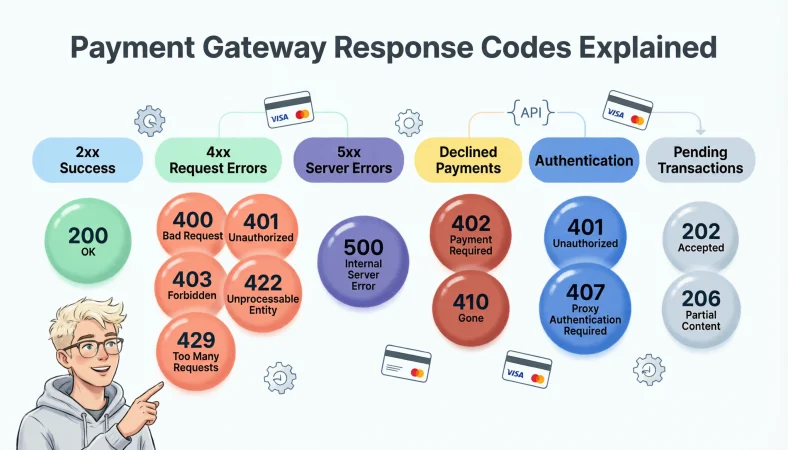
Payment gateway response codes tell you what happened when a payment request was sent, from successful processing and authentication to validation errors, declined transactions, rate limits, and server problems. Common examples include 200 OK, 400 Bad Request, 401 Unauthorized, 403 Forbidden, 422 Unprocessable Entity, 429 Too Many Requests, and 500 Internal Server Error.
Top alternatives: 200 OK, 400 Bad Request, 401 Unauthorized, 422 Unprocessable Entity, 500 Internal Server Error
Payment systems can return both HTTP status codes and payment-specific result or refusal codes, so a successful HTTP response does not always mean the payment itself was approved.
When a payment fails at checkout, everyone suddenly becomes a detective. The customer sees “Payment failed,” the developer sees a mysterious number, and the support team wonders whether the card, API, bank, or gateway decided to cause today’s plot twist. That is exactly why understanding payment gateway response codes matters.
These codes appear in online stores, mobile apps, subscriptions, payment APIs, dashboards, logs, and support tickets. A 400 can point toward a request problem, while a 401 may involve authentication and a 500 can indicate a server-side issue. Some gateways also return their own result codes and refusal reasons that provide more payment-specific information.
Knowing what each response means helps developers troubleshoot faster, helps businesses explain failures clearly, and helps customers understand what to try next. Let’s decode the numbers without making your payment logs feel like ancient hieroglyphics.
Basic Payment Gateway Response Codes
Successful Payment Gateway Response Codes
200 OK
Use this when the API request was processed successfully.
Meaning: The request succeeded at the HTTP level, but the payment outcome still needs to be checked.
201 Created
Use this when a successful request creates a new payment-related resource.
Meaning: The gateway accepted the request and created something new.
202 Accepted
Use this when processing may continue after the initial request.
Meaning: The request was accepted but may not have reached a final payment state.
204 No Content
Use this when the operation succeeds without returning response content.
Meaning: The server completed the request without sending a response body.
Client-Side Payment Gateway Errors
400 Bad Request
Use this when the payment request contains invalid information.
Meaning: Something about the request needs correction before it can be processed.
401 Unauthorized
Use this when authentication credentials are missing or invalid.
Meaning: The system could not verify the requester’s identity.
403 Forbidden
Use this when access is denied despite the request being understood.
Meaning: The authenticated requester does not have permission to perform the action.
404 Not Found
Use this when the requested payment resource or endpoint cannot be found.
Meaning: The requested destination or resource does not exist at that location.
Payment Validation and Rate Limit Errors
422 Unprocessable Entity
Use this when the request is syntactically valid but contains unacceptable data.
Meaning: The gateway understands the request but cannot process its current content.
429 Too Many Requests
Use this when the integration sends too many requests in a short period.
Meaning: Rate limiting has temporarily restricted additional requests.
Server-Side Payment Gateway Errors
500 Internal Server Error
Use this when the gateway encounters an unexpected server-side problem.
Meaning: The receiving server could not complete the request because of an internal issue.
503 Service Unavailable
Use this when the payment service is temporarily unavailable.
Meaning: The service may need time before it can handle another request.
HTTP 2xx Payment Responses
200 means the request worked
Use this when logs show a normal API response.
Meaning: The HTTP request was processed successfully.
201 means something was created
Use this when a payment API creates a resource after a request.
Meaning: The server successfully created the requested resource.
202 means processing may continue
Use this for asynchronous payment workflows.
Meaning: Acceptance does not necessarily mean final completion.
204 means success without content
Use this for successful operations returning no body.
Meaning: The request succeeded but supplied no additional content.
2xx generally signals success
Use this when reviewing broad HTTP response categories.
Meaning: The API request generally completed successfully.
200 does not always mean paid
Use this when explaining payment status to a team.
Meaning: HTTP success and payment authorization are separate concepts.
Check the payment result too
Use this when a 200 response appears after a payment request.
Meaning: The transaction-specific status still needs verification.
Review the response body
Use this when the HTTP status alone is unclear.
Meaning: Additional payment fields can reveal the actual transaction state.
Check webhooks when applicable
Use this when payment completion happens asynchronously.
Meaning: A later event may provide the definitive transaction outcome.
Do not equate HTTP success with authorization
Use this during integration reviews.
Meaning: A technically successful API call can still contain a refused payment result.
Use 2xx handling carefully
Use this when designing payment workflows.
Meaning: HTTP-level success should trigger the correct business-level checks.
Separate request success from payment success
Use this in technical documentation.
Meaning: API transport status and financial authorization should be handled independently.
HTTP 4xx Payment Gateway Errors
400 Bad Request
Use this when request data is malformed or invalid.
Meaning: The gateway cannot process the submitted request as provided.
401 Unauthorized
Use this when credentials fail authentication.
Meaning: The gateway cannot verify the caller.
403 Forbidden
Use this when the caller lacks required permission.
Meaning: Access is denied by authorization or security rules.
404 Not Found
Use this when the requested resource is unavailable.
Meaning: The endpoint or resource cannot be located.
405 Method Not Allowed
Use this when the HTTP method does not match the endpoint.
Meaning: The endpoint does not permit the requested operation type.
406 Not Acceptable
Use this when the server cannot provide an acceptable representation.
Meaning: The requested response format may not be supported.
409 Conflict
Use this when the request conflicts with the current resource state.
Meaning: Existing transaction or resource conditions prevent the requested action.
410 Gone
Use this when a previously available resource has been permanently removed.
Meaning: The requested resource is no longer available.
415 Unsupported Media Type
Use this when the request format is not supported.
Meaning: The submitted content type does not match what the endpoint expects.
422 Unprocessable Entity
Use this when submitted data fails semantic validation.
Meaning: The request is readable but contains unacceptable values.
429 Too Many Requests
Use this when the rate limit has been exceeded.
Meaning: The integration needs to slow down its requests.
4xx generally means client-side request trouble
Use this when explaining a gateway error category.
Meaning: The problem commonly involves request data, credentials, permissions, validation, or rate limits.
HTTP 5xx Payment Gateway Errors
500 Internal Server Error
Use this when the gateway reports an unexpected internal problem.
Meaning: The server encountered a condition that prevented normal processing.
501 Not Implemented
Use this when the requested functionality is unsupported.
Meaning: The server does not provide the required operation.
502 Bad Gateway
Use this when an intermediary receives an invalid upstream response.
Meaning: Communication between gateway components did not complete correctly.
503 Service Unavailable
Use this during temporary service disruption.
Meaning: The gateway is currently unable to handle the request.
504 Gateway Timeout
Use this when an upstream service does not respond in time.
Meaning: The gateway or proxy waited too long for another service.
5xx often points toward server trouble
Use this when categorizing gateway errors.
Meaning: The failure is generally associated with service-side processing.
Check gateway status information
Use this when multiple transactions suddenly return server errors.
Meaning: A wider service issue may be affecting the integration.
Review request timing
Use this when investigating timeout-related failures.
Meaning: Slow upstream responses may be contributing to the problem.
Avoid blind retries
Use this when a payment request returns an uncertain server error.
Meaning: Retrying financial operations without safeguards can create duplicate-payment risks.
Use idempotency where supported
Use this when retrying payment operations.
Meaning: Idempotency helps prevent repeated processing of the same intended transaction.
Capture request identifiers
Use this when escalating gateway failures.
Meaning: Unique identifiers make individual failed requests easier to investigate.
Separate temporary failures from permanent failures
Use this when building retry logic.
Meaning: Some server errors may recover while others require investigation.
Payment Authorization Response Codes
Authorised
Use this when the payment has been approved.
Meaning: The transaction received successful authorization.
Refused
Use this when the payment has been rejected.
Meaning: The payment method or financial institution did not approve the transaction.
Cancelled
Use this when the transaction was stopped before completion.
Meaning: The payment flow was cancelled by the shopper or system.
Error
Use this when payment processing encountered an error.
Meaning: The transaction could not complete normally because of a processing issue.
Received
Use this when the gateway confirms receipt of the payment request.
Meaning: The request arrived successfully but may not have a final outcome yet.
Pending
Use this when the final payment status is not available.
Meaning: Processing is still underway or depends on another step.
Partially Authorised
Use this when only part of the requested amount receives authorization.
Meaning: The available authorized amount is less than the original payment amount.
Authentication Finished
Use this when required payment authentication has completed.
Meaning: The authentication stage has successfully finished.
Authentication Not Required
Use this when the transaction does not need authentication.
Meaning: The payment flow can continue without an additional authentication step.
Challenge Shopper
Use this when additional shopper authentication is required.
Meaning: The customer must complete an authentication challenge.
Identify Shopper
Use this when the payment flow requires shopper identification.
Meaning: Additional device or shopper verification is needed.
Redirect Shopper
Use this when the customer must complete authentication elsewhere.
Meaning: The shopper needs to continue the payment flow on another page or application.
Card Decline Response Codes
Declined
Use this when the issuer does not approve the card transaction.
Meaning: The requested payment was not authorized.
Insufficient Funds
Use this when the available balance cannot cover the transaction.
Meaning: The account may not have enough available funds.
Expired Card
Use this when the card expiration date has passed.
Meaning: The payment method is no longer valid for authorization.
Invalid Card Number
Use this when the card number fails validation.
Meaning: The submitted card number may be incorrect or incorrectly formatted.
Blocked Card
Use this when the issuer has restricted the card.
Meaning: The card cannot currently be used for the transaction.
Transaction Not Permitted
Use this when the issuer does not allow the requested transaction.
Meaning: The transaction type is restricted for that payment method.
Issuer Unavailable
Use this when the card issuer cannot respond normally.
Meaning: The issuing bank may be temporarily unavailable.
Not Supported
Use this when the requested payment operation is unsupported.
Meaning: The payment method or transaction type cannot handle the request.
Fraud-related refusal
Use this when the gateway reports a fraud-related refusal.
Meaning: The transaction was rejected because of a fraud or risk decision.
Invalid PIN
Use this for a PIN validation failure where applicable.
Meaning: The submitted PIN did not pass validation.
PIN Tries Exceeded
Use this when too many incorrect PIN attempts have occurred.
Meaning: Further PIN attempts may be restricted.
3D Not Authenticated
Use this when required 3D Secure authentication was not completed.
Meaning: The authentication requirement prevented the payment from being authorized.
Payment Validation Response Codes
Invalid Amount
Use this when the payment amount fails validation.
Meaning: The submitted amount is missing, malformed, unsupported, or otherwise unacceptable.
Invalid Currency
Use this when the currency value is not accepted.
Meaning: The payment request contains an unsupported or incorrectly formatted currency.
Missing Required Field
Use this when mandatory payment data is absent.
Meaning: The gateway cannot validate the request without the required information.
Invalid Customer Data
Use this when customer information fails validation.
Meaning: One or more supplied customer fields do not meet gateway requirements.
Invalid Card Data
Use this when card information does not pass validation.
Meaning: The payment method details need correction.
Invalid Expiry Date
Use this when expiration information is missing or incorrect.
Meaning: The card expiration details cannot be accepted.
Invalid Security Code
Use this when the card security code fails a check.
Meaning: The supplied CVC, CVV, or CID information did not meet the required validation.
Invalid Payment Method
Use this when the selected payment method cannot be processed.
Meaning: The payment method is unsupported or incorrectly configured.
Invalid Order Reference
Use this when the transaction reference does not meet requirements.
Meaning: The supplied identifier needs correction.
Invalid Address Data
Use this when address information fails required validation.
Meaning: Billing or shipping information may need adjustment.
Unsupported Country
Use this when the transaction country is not supported.
Meaning: The gateway or payment method does not permit processing from that location.
Validation Failed
Use this as a broad description when submitted data does not pass gateway rules.
Meaning: The request needs correction before another attempt.
Authentication And 3D Secure Responses
Authentication Required
Use this when additional customer verification is necessary.
Meaning: The payment cannot continue until the required authentication step is completed.
Challenge Required
Use this when the issuer requests an active authentication challenge.
Meaning: The shopper must complete an additional security step.
Challenge Completed
Use this when the customer successfully completes the challenge.
Meaning: The authentication stage has been completed successfully.
Authentication Failed
Use this when the verification attempt does not succeed.
Meaning: The required authentication could not be completed successfully.
Authentication Not Required
Use this when no additional authentication is needed.
Meaning: The payment can proceed without another verification step.
Redirect Required
Use this when the shopper needs to continue on another page or app.
Meaning: Authentication requires an external interaction.
Identify Shopper
Use this when device or shopper identification is requested.
Meaning: The payment flow needs additional information before continuing.
Challenge Shopper
Use this when the customer must actively authenticate.
Meaning: The shopper needs to complete the requested challenge.
3D Secure Not Authenticated
Use this when required 3D Secure authentication did not complete.
Meaning: The payment may be refused because the security requirement was not satisfied.
Authentication Finished
Use this when the authentication-only stage has completed.
Meaning: The authentication result is ready for the next payment step.
Authentication Error
Use this when an authentication process encounters an error.
Meaning: The verification flow could not finish normally.
Authentication Timeout
Use this when the authentication flow takes too long.
Meaning: The required verification step did not complete within the allowed period.
Payment Gateway Error Messages
“Invalid request”
Use this when the gateway rejects the structure or content of a request.
Meaning: The submitted request needs correction.
“Authentication failed”
Use this when API credentials cannot be verified.
Meaning: The integration’s authentication details need review.
“Access denied”
Use this when permissions prevent the operation.
Meaning: The account or credential lacks required authorization.
“Invalid card number”
Use this when card-number validation fails.
Meaning: The submitted card number needs checking.
“Expired card”
Use this when the card expiration date is no longer valid.
Meaning: Another valid payment method may be needed.
“Insufficient funds”
Use this when available funds are inadequate.
Meaning: The account cannot currently cover the requested amount.
“Payment refused”
Use this when the payment is rejected.
Meaning: The transaction did not receive approval.
“Service unavailable”
Use this when the gateway cannot currently process requests.
Meaning: A temporary service problem may be affecting the request.
“Request timed out”
Use this when the gateway does not receive a timely response.
Meaning: The operation may require careful retry handling.
“Rate limit exceeded”
Use this when request volume is too high.
Meaning: The integration is sending requests faster than allowed.
“Configuration error”
Use this when gateway setup prevents processing.
Meaning: Merchant or integration settings may need correction.
“Internal server error”
Use this when the gateway reports an unexpected internal issue.
Meaning: The failure occurred during server-side processing.
Funny Payment Gateway Response Code Examples
200: We survived checkout.
Use this for a lighthearted developer status message after a successful API request.
Meaning: The HTTP request completed successfully.
400: The request needs therapy.
Use this when a malformed request appears in development logs.
Meaning: Something in the submitted data needs fixing.
401: Who are you again?
Use this for an authentication failure during testing.
Meaning: The gateway could not verify the credentials.
403: Nice try, access denied.
Use this when a permission issue blocks an operation.
Meaning: The request was understood but not authorized.
404: This endpoint has left the chat.
Use this when a requested resource cannot be found.
Meaning: The requested destination does not exist.
422: Technically valid, emotionally unacceptable.
Use this when data passes syntax checks but fails semantic validation.
Meaning: The gateway understands the request but rejects its content.
429: Please stop refreshing.
Use this when rate limits are triggered during testing.
Meaning: Too many requests were sent too quickly.
500: Server chose chaos today.
Use this for an internal server failure in a developer-friendly log.
Meaning: The server encountered an unexpected processing problem.
503: Payment gateway is taking five.
Use this when a service is temporarily unavailable.
Meaning: The service needs time before processing normally again.
504: Upstream is ghosting us.
Use this when an upstream service times out.
Meaning: The gateway did not receive a timely upstream response.
Declined: The card said no thanks.
Use this in informal internal documentation.
Meaning: The payment was not approved.
Pending: Payment is still loading.
Use this when explaining an unfinished transaction state.
Meaning: The final payment result has not arrived yet.
Professional Payment Gateway Response Messages
Payment request received successfully.
Use this for customer-facing confirmation when the request has been accepted.
Meaning: The system received the payment request without claiming final authorization.
Payment authorization completed.
Use this after the transaction receives successful authorization.
Meaning: The payment was authorized.
Payment is currently pending.
Use this when the final status is not available yet.
Meaning: The transaction is still awaiting completion.
Payment could not be authorized.
Use this when the gateway reports a refusal.
Meaning: The requested transaction was not approved.
Please verify your payment details.
Use this for validation-related failures.
Meaning: The customer should review the submitted payment information.
Please try another payment method.
Use this after a card or payment method is refused.
Meaning: Another available method may complete the transaction.
Authentication is required to continue.
Use this when additional verification is needed.
Meaning: The customer must complete the authentication step.
The payment service is temporarily unavailable.
Use this during a temporary gateway outage or service issue.
Meaning: The payment system cannot currently process the request.
Your payment request timed out.
Use this when the gateway does not respond within the expected period.
Meaning: The request did not receive a timely result.
Your request could not be processed.
Use this for a general processing failure.
Meaning: The transaction could not be completed successfully.
Please try again shortly.
Use this for potentially temporary service problems.
Meaning: A later attempt may succeed if the underlying issue clears.
Contact support with your transaction reference.
Use this when technical investigation is required.
Meaning: Support can use the reference to locate the affected transaction.
Payment Gateway Response Codes For Developers
Log the HTTP status.
Use this as a baseline for API troubleshooting.
Meaning: The HTTP status provides the first layer of response information.
Log the gateway-specific code.
Use this when the provider returns additional error information.
Meaning: Provider-specific codes can explain payment failures more precisely.
Capture the transaction reference.
Use this when investigating individual payment attempts.
Meaning: A unique reference helps trace the transaction.
Inspect the response body.
Use this when the status code alone is insufficient.
Meaning: Additional fields can explain the failure or transaction state.
Check authentication headers.
Use this when receiving 401 responses.
Meaning: Credentials or authentication configuration may be incorrect.
Check permissions.
Use this when receiving 403 responses.
Meaning: The credentials may not have the required access.
Validate request fields.
Use this when receiving 400 or 422 responses.
Meaning: Request data may violate formatting or business rules.
Review endpoint configuration.
Use this when receiving unexpected 404 responses.
Meaning: The URL, environment, or API version may be incorrect.
Implement rate-limit handling.
Use this when receiving 429 responses.
Meaning: The integration should control request frequency.
Use controlled retries.
Use this for temporary failures that are safe to retry.
Meaning: Retry logic should distinguish recoverable errors from permanent failures.
Protect against duplicate payments.
Use this whenever retries involve financial operations.
Meaning: Payment retries should avoid unintentionally charging the customer twice.
Monitor recurring failures.
Use this when the same response code appears repeatedly.
Meaning: Repeated patterns can reveal configuration, integration, or service problems.
Payment Gateway Response Codes For Troubleshooting
Start with the HTTP status.
Use this when a transaction fails unexpectedly.
Meaning: The status helps identify the broad class of problem.
Read the gateway error message.
Use this after identifying the status code.
Meaning: The message may provide the next troubleshooting clue.
Check the request payload.
Use this for validation failures.
Meaning: Incorrect or missing fields can cause the gateway to reject a request.
Verify API credentials.
Use this for authentication-related errors.
Meaning: Incorrect keys or credentials can block access.
Check merchant permissions.
Use this for authorization errors.
Meaning: Account permissions may prevent the requested operation.
Confirm the API endpoint.
Use this when a resource cannot be found.
Meaning: A wrong URL or endpoint can produce a not-found response.
Check supported payment methods.
Use this when a selected payment method fails.
Meaning: The gateway may not support that method for the transaction.
Review currency settings.
Use this when payment amounts or currencies are rejected.
Meaning: Merchant configuration and transaction currency must align.
Inspect authentication results.
Use this when 3D Secure is involved.
Meaning: Authentication outcomes can determine whether authorization proceeds.
Check service availability.
Use this when 5xx errors suddenly increase.
Meaning: The provider may be experiencing a temporary service problem.
Review rate limits.
Use this when 429 responses appear.
Meaning: Excessive request volume may be triggering restrictions.
Test failure scenarios before launch.
Use this during integration development.
Meaning: Testing helps verify that the application handles unsuccessful payment flows correctly.
Smart Payment Gateway Response Handling
Treat each code according to its meaning.
Use this when designing error-handling logic.
Meaning: Different failures require different actions.
Do not retry every error.
Use this when implementing automatic retry logic.
Meaning: Permanent validation failures should not be repeatedly submitted.
Retry temporary failures carefully.
Use this for appropriate server or availability errors.
Meaning: Recoverable problems can sometimes succeed after a controlled retry.
Use exponential backoff.
Use this when handling rate-limit or temporary service failures.
Meaning: Increasing retry intervals reduce unnecessary request pressure.
Add jitter to retries.
Use this when many clients may retry simultaneously.
Meaning: Randomized delays can reduce synchronized request spikes.
Use idempotency for supported operations.
Use this when retrying payment requests.
Meaning: Idempotency can help prevent duplicate processing.
Keep customer messages simple.
Use this for checkout error screens.
Meaning: Customers need actionable guidance rather than technical jargon.
Keep technical details in logs.
Use this when designing customer-facing payment failures.
Meaning: Developers need diagnostic information while customers need clarity.
Track payment status separately from HTTP status.
Use this when handling gateway responses.
Meaning: API transport success does not necessarily equal transaction authorization.
Use webhooks for asynchronous outcomes.
Use this when payment completion can happen later.
Meaning: Later events may provide the final transaction status.
Test both success and failure paths.
Use this before releasing a payment integration.
Meaning: Reliable payment handling requires more than testing successful purchases.
Document retry rules.
Use this when multiple developers maintain payment code.
Meaning: Clear rules prevent inconsistent transaction handling.
Payment Gateway Response Codes By Common Scenario
Card declined: check the refusal reason.
Use this when a shopper’s card does not authorize.
Meaning: The refusal reason can identify the next appropriate action.
Invalid request: inspect the payload.
Use this when a 400 response appears.
Meaning: Request data likely needs correction.
Authentication failure: verify credentials.
Use this when a 401 response appears.
Meaning: The gateway could not authenticate the caller.
Permission failure: review access.
Use this when a 403 response appears.
Meaning: The authenticated account lacks required authorization.
Missing resource: inspect the endpoint.
Use this when a 404 response appears.
Meaning: The requested resource or endpoint cannot be located.
Validation failure: correct the data.
Use this when a 422 response appears.
Meaning: The request is structurally readable but contains unacceptable values.
Rate limit: slow requests down.
Use this when a 429 response appears.
Meaning: Request frequency needs to decrease.
Internal error: investigate server behavior.
Use this when a 500 response appears.
Meaning: An unexpected server-side condition interrupted processing.
Service unavailable: check availability.
Use this when a 503 response appears.
Meaning: The service may be temporarily unable to accept requests.
Timeout: review upstream behavior.
Use this when a 504 response appears.
Meaning: The gateway did not receive a timely upstream response.
Pending payment: wait for the final result.
Use this when the gateway reports an intermediate state.
Meaning: The transaction has not reached a final outcome.
Successful API call: verify payment result.
Use this after receiving HTTP 200 for a payment operation.
Meaning: The request succeeded technically, but the transaction may still be refused, cancelled, or pending.
Best Practices For Payment Gateway Response Codes
Map technical codes to useful actions.
Use this when building an error-handling system.
Meaning: Each response should lead the application toward an appropriate next step.
Keep payment errors observable.
Use this when maintaining production systems.
Meaning: Monitoring makes recurring failures easier to detect.
Record safe diagnostic information.
Use this when creating payment logs.
Meaning: Useful records should support troubleshooting without exposing sensitive payment data.
Use clear customer messages.
Use this when designing checkout screens.
Meaning: Customers should understand what they can do next.
Avoid exposing sensitive refusal details.
Use this when displaying payment errors publicly.
Meaning: Some gateway refusal information is better kept out of customer-facing messages.
Build separate handling for validation errors.
Use this when processing 4xx responses.
Meaning: Correctable request problems should not be treated like outages.
Build separate handling for server errors.
Use this when processing 5xx responses.
Meaning: Temporary infrastructure failures often require different retry behavior.
Use webhook verification.
Use this when receiving asynchronous payment updates.
Meaning: Payment events should be validated before changing order status.
Keep order status synchronized carefully.
Use this when payment states can change after the initial response.
Meaning: The application should avoid treating an intermediate result as final.
Test duplicate scenarios.
Use this before production deployment.
Meaning: Retry behavior should not accidentally create duplicate transactions.
Test declined scenarios.
Use this during payment integration testing.
Meaning: The checkout should handle unsuccessful payments gracefully.
Review gateway documentation regularly.
Use this when maintaining a long-running integration.
Meaning: Provider-specific response codes and behaviors can differ and change over time.
Quick Reference Payment Gateway Response Codes
200 OK = request processed
Use this as a quick reference when checking a successful HTTP response.
Meaning: The API request completed successfully at the HTTP level.
201 Created = resource created
Use this when a new payment-related resource is generated.
Meaning: The server successfully created the requested resource.
202 Accepted = processing may continue
Use this for asynchronous operations.
Meaning: The request was accepted but may not be finished.
204 No Content = successful empty response
Use this when no response body is expected.
Meaning: The server completed the request without additional content.
400 Bad Request = fix request data
Use this when malformed or invalid data causes failure.
Meaning: The request needs correction.
401 Unauthorized = check authentication
Use this when credentials are rejected.
Meaning: The gateway cannot authenticate the caller.
403 Forbidden = check permissions
Use this when access is blocked.
Meaning: The requester does not have permission for the operation.
404 Not Found = check endpoint
Use this when a resource cannot be located.
Meaning: The requested endpoint or resource is unavailable.
422 Unprocessable Entity = fix semantic data
Use this when valid syntax contains unacceptable information.
Meaning: The gateway understands the request but rejects its content.
429 Too Many Requests = slow down
Use this when rate limits are exceeded.
Meaning: Request frequency must be reduced.
500 Internal Server Error = investigate server failure
Use this when unexpected server processing fails.
Meaning: The gateway encountered an internal problem.
504 Gateway Timeout = investigate upstream delay
Use this when the gateway waits too long for another service.
Meaning: An upstream response did not arrive within the required time.
FAQs
What are payment gateway response codes?
Payment gateway response codes indicate what happened to a payment request, including standard HTTP codes and provider-specific results or refusal reasons.
What does a 200 payment gateway response mean?
A 200 HTTP response indicates API-level success, but you must also check the payment result to confirm authorization.
What does a 400 payment gateway response mean?
A 400 response usually means the request contains invalid or malformed information. Checking the request payload, required fields, formatting, and values is a sensible first troubleshooting step.
What does a 401 payment gateway response mean?
A 401 response generally indicates an authentication problem. The API credentials, authentication method, or authorization setup should be reviewed.
What does a 403 payment gateway response mean?
A 403 response generally means the request was understood but access was denied. Account permissions, API roles, security restrictions, or merchant configuration may need review.
What does a 422 payment gateway response mean?
A 422 response generally means the request is syntactically valid but semantically unacceptable. For example, a required value may be invalid even though the overall request format is correct.
What does a 429 payment gateway response mean?
A 429 response means too many requests have been sent within a particular period. Rate-limit handling, controlled retries, exponential backoff, and jitter can help manage this situation.
What does a 500 payment gateway response mean?
A 500 response indicates an internal server error. It can point toward an unexpected condition on the receiving service, although specific providers may also return 500 for certain request-related issues.
Are payment gateway response codes the same for every provider?
Payment gateways may use standard HTTP codes plus provider-specific result, refusal, and error codes, so always check the gateway’s documentation.
Conclusion
Payment gateway response codes may look like random numbers at first, but they are really tiny clues explaining what happened behind the checkout button. From 200 OK and 201 Created to 400 Bad Request, 422 Unprocessable Entity, 429 Too Many Requests, and 500 Internal Server Error, each response can point you toward a different next step. The biggest takeaway is simple: do not look at the HTTP status alone.
Payment-specific results, refusal reasons, authentication states, and asynchronous updates can matter too. Keep your handling clear, test the awkward failure scenarios, and turn confusing errors into useful actions. Save this guide for your next payment integration or troubleshooting session, and share it with the developer who always says, “It works on my machine.”