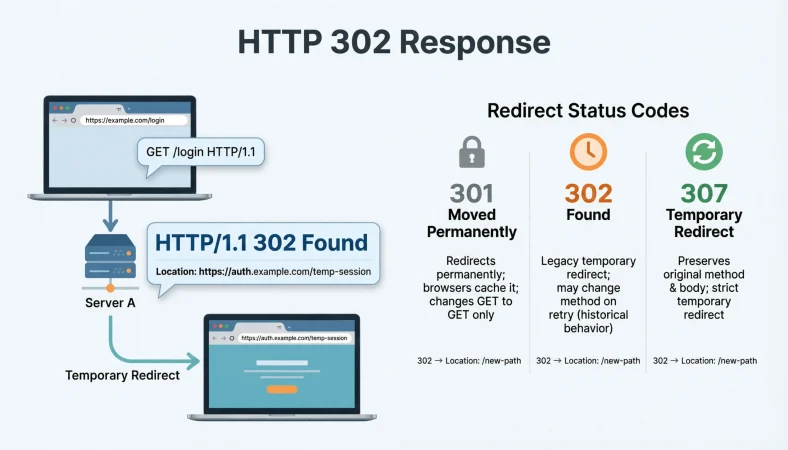
An HTTP 302 response means the requested resource is temporarily available at another URI. A server typically sends a Location header telling the browser or client where to go next, making 302 a common temporary redirect status.
Top alternatives: 302 Found, temporary redirect, HTTP temporary redirect, 302 redirect, temporary URL redirect
Ever clicked a page and suddenly landed somewhere else? That little detour may be an HTTP 302 response doing its job behind the scenes. In simple terms, a 302 tells a client that the requested resource is temporarily available at another location. Browsers can follow the destination supplied in the Location header automatically.
You might encounter a 302 while testing a website, moving traffic temporarily, handling login flows, running experiments, or troubleshooting unexpected redirects. Unlike a permanent redirect, a 302 is intended to communicate temporary movement. That distinction matters for developers, SEO specialists, server administrators, and anyone debugging a redirect chain.
The good news? Once you understand what the status means, those mysterious redirect messages become much less mysterious. Think of 302 as your website saying, “The usual place is taking a short detour. Go over here for now.”
HTTP 302 Response Basics
“302 means temporarily redirected.”
Example: Use this when explaining the status code to someone new to HTTP.
Meaning: It summarizes the core purpose of the response.
“302 Found points somewhere else for now.”
Example: Use this when explaining temporary resource movement.
Meaning: It emphasizes that the destination is not necessarily permanent.
“Think temporary, not permanent.”
Example: Use this when comparing 302 with 301.
Meaning: It highlights the key distinction between the redirect types.
“The server is sending you to another URI.”
Example: Use this when describing redirect behavior.
Meaning: It explains that the client receives another destination.
“302 belongs to the 3xx redirect family.”
Example: Use this in an HTTP status code overview.
Meaning: It places 302 within the redirection class.
“The Location header usually carries the destination.”
Example: Use this when explaining a typical 302 response.
Meaning: It identifies where the redirect target is communicated.
“The original URI can remain the usual address.”
Example: Use this when explaining temporary redirects.
Meaning: It reflects the temporary nature of 302.
“302 is a redirect, not a server error.”
Example: Use this when troubleshooting status codes.
Meaning: It distinguishes redirection from 4xx and 5xx failures.
“The client decides what to do with the redirect.”
Example: Use this when discussing HTTP client behavior.
Meaning: It recognizes that redirect handling occurs on the client side.
“A browser can follow the redirect automatically.”
Example: Use this when explaining everyday browser behavior.
Meaning: It describes how browsers commonly handle 302 responses.
“Temporary routing is the heart of 302.”
Example: Use this as a concise technical explanation.
Meaning: It captures the main purpose of the status.
“302 is basically a temporary detour sign for HTTP.”
Example: Use this in a beginner-friendly tutorial.
Meaning: It makes the technical concept easier to visualize.
Funny HTTP 302 Response Explanations
“The URL took a quick detour.”
Example: Use this when explaining a temporary redirect casually.
Meaning: It compares 302 behavior with taking another route.
“Your webpage went sightseeing.”
Example: Use this in a lighthearted developer presentation.
Meaning: It humorously describes temporary movement.
“302 said, ‘Not here, try over there.’”
Example: Use this in a beginner-friendly explanation.
Meaning: It simplifies the redirect concept.
“The server changed the itinerary.”
Example: Use this when discussing temporary destinations.
Meaning: It compares routing to travel planning.
“HTTP took the scenic route.”
Example: Use this for a playful technical post.
Meaning: It jokes about redirect behavior.
“The page is temporarily playing hide-and-seek.”
Example: Use this when introducing redirects to beginners.
Meaning: It humorously explains why the destination changes.
“302 is the internet saying, ‘This way for now.’”
Example: Use this in a casual technical explanation.
Meaning: It emphasizes temporary routing.
“Your request got a temporary forwarding address.”
Example: Use this when explaining a 302 response.
Meaning: It compares redirection with temporary mail forwarding.
“No panic, the server just sent directions.”
Example: Use this during basic troubleshooting.
Meaning: It reassures beginners that 302 is not automatically an error.
“The URL changed lanes for a moment.”
Example: Use this in social content about HTTP.
Meaning: It makes redirect behavior easier to imagine.
“302: because sometimes websites need a temporary Plan B.”
Example: Use this as a playful explanation.
Meaning: It describes temporary routing as an alternate path.
“The browser got a new destination card.”
Example: Use this when explaining the Location header.
Meaning: It humorously describes receiving the redirect target.
Professional HTTP 302 Response Examples
“HTTP 302 indicates a temporary redirect.”
Example: Use this in technical documentation.
Meaning: It provides a concise formal definition.
“The response should identify the temporary destination.”
Example: Use this when reviewing server configuration.
Meaning: It focuses on communicating the target URI.
“Check the Location header first.”
Example: Use this during redirect troubleshooting.
Meaning: It identifies a key response field to inspect.
“Confirm that the redirect is intentional.”
Example: Use this during website diagnostics.
Meaning: It helps distinguish configuration from accidental routing.
“Review the complete redirect chain.”
Example: Use this when several redirects appear.
Meaning: It encourages checking every routing step.
“Compare 302 behavior with the intended redirect type.”
Example: Use this during implementation review.
Meaning: It helps verify whether temporary routing is appropriate.
“Inspect both the response status and destination.”
Example: Use this during HTTP testing.
Meaning: It prevents focusing on the status code alone.
“Document temporary redirect rules.”
Example: Use this for production server management.
Meaning: It makes redirect behavior easier to maintain.
“Monitor unexpected 302 responses.”
Example: Use this during website operations.
Meaning: It helps identify accidental routing changes.
“Validate redirects across supported clients.”
Example: Use this during compatibility testing.
Meaning: It checks practical behavior beyond server configuration.
“Keep redirect logic predictable.”
Example: Use this when designing application routing.
Meaning: It encourages maintainable behavior.
“Remove temporary rules when their purpose ends.”
Example: Use this during redirect maintenance.
Meaning: It prevents outdated temporary redirects from lingering.
HTTP 302 Response For Temporary Redirects
“Use 302 when the destination is temporary.”
Example: Use this when choosing a redirect status.
Meaning: It aligns the response with temporary resource movement.
“Keep the original URL available for future requests.”
Example: Use this when explaining temporary routing.
Meaning: It reflects the expectation that the original URI remains relevant.
“Redirect traffic without declaring a permanent move.”
Example: Use this in a migration discussion.
Meaning: It distinguishes temporary routing from permanent relocation.
“Use the Location header to identify the target.”
Example: Use this when configuring a 302 response.
Meaning: It tells the client where the temporary resource can be found.
“Make the temporary purpose clear in documentation.”
Example: Use this when maintaining redirect rules.
Meaning: It reduces confusion for future developers.
“Check whether the redirect should eventually disappear.”
Example: Use this when reviewing temporary rules.
Meaning: It encourages lifecycle management.
“Test the redirect before production deployment.”
Example: Use this during website changes.
Meaning: It reduces unexpected routing problems.
“Watch for redirect loops.”
Example: Use this during troubleshooting.
Meaning: It highlights a common redirect configuration problem.
“Check whether multiple redirects are necessary.”
Example: Use this when reviewing a redirect chain.
Meaning: It encourages simpler routing.
“Keep temporary redirects intentional.”
Example: Use this during server configuration.
Meaning: It discourages accidental 302 responses.
“Review temporary redirects after major site changes.”
Example: Use this during website maintenance.
Meaning: It helps prevent outdated routing.
“Treat 302 as a temporary traffic instruction.”
Example: Use this when explaining the concept to nontechnical teams.
Meaning: It makes the behavior easier to understand.
HTTP 302 Response In Web Development
“302 can redirect a browser to another URI.”
Example: Use this when explaining server-side web routing.
Meaning: It describes a common browser-facing use.
“Return the redirect from the appropriate server logic.”
Example: Use this when implementing application routing.
Meaning: It connects the status to backend behavior.
“Test both the source and destination.”
Example: Use this during development.
Meaning: It verifies the complete redirect path.
“Check headers before blaming the frontend.”
Example: Use this during browser debugging.
Meaning: It encourages inspecting the HTTP response itself.
“Trace every redirect in the request flow.”
Example: Use this when debugging chained redirects.
Meaning: It helps identify where unexpected routing begins.
“Confirm the destination responds correctly.”
Example: Use this after configuring a 302.
Meaning: It verifies that the target actually works.
“Keep temporary redirects separate from permanent rules.”
Example: Use this in routing configuration.
Meaning: It makes redirect intent easier to manage.
“Test redirects with realistic request methods.”
Example: Use this when an application handles more than GET requests.
Meaning: It recognizes that method behavior can matter.
“Check client behavior for non-GET requests.”
Example: Use this during API testing.
Meaning: It acknowledges historical and current redirect handling differences.
“Use logs to identify unexpected redirects.”
Example: Use this when diagnosing production behavior.
Meaning: It helps trace server-side routing decisions.
“Keep application redirects easy to audit.”
Example: Use this in a large codebase.
Meaning: It improves maintainability.
“Treat redirect handling as part of the request lifecycle.”
Example: Use this in developer documentation.
Meaning: It places 302 behavior within the broader HTTP flow.
HTTP 302 Response For SEO
“A 302 generally signals temporary movement.”
Example: Use this when explaining redirect intent to an SEO team.
Meaning: It distinguishes temporary routing from permanent migration.
“Do not use 302 simply because 301 looks intimidating.”
Example: Use this during redirect planning.
Meaning: It encourages choosing the status based on actual intent.
“Match the redirect code to the migration strategy.”
Example: Use this during SEO planning.
Meaning: It connects technical implementation with site structure.
“Review temporary redirects that remain for long periods.”
Example: Use this during technical SEO audits.
Meaning: It encourages checking whether temporary rules are still appropriate.
“Check redirect destinations for relevance.”
Example: Use this during SEO troubleshooting.
Meaning: It focuses on whether users reach an appropriate page.
“Avoid unnecessary redirect chains.”
Example: Use this during site audits.
Meaning: It encourages simpler navigation paths.
“Monitor temporary redirects after launches.”
Example: Use this after website migrations or campaigns.
Meaning: It helps identify unexpected routing changes.
“Do not confuse 302 with permanent relocation.”
Example: Use this in an SEO training guide.
Meaning: It reinforces the temporary nature of 302.
“Inspect the Location target during audits.”
Example: Use this when analyzing redirect behavior.
Meaning: It identifies an important part of the response.
“Review temporary redirects alongside canonical strategy.”
Example: Use this during technical SEO analysis.
Meaning: It encourages looking at related signals together.
“Use redirect intent as the deciding factor.”
Example: Use this when selecting between redirect codes.
Meaning: It keeps the implementation aligned with the site’s actual purpose.
“A temporary redirect should have a reason.”
Example: Use this as an SEO audit reminder.
Meaning: It encourages intentional redirect management.
HTTP 302 Response In APIs
“Check whether the API client follows redirects.”
Example: Use this when debugging API behavior.
Meaning: It recognizes that client handling can affect results.
“Inspect the Location header.”
Example: Use this when an API unexpectedly returns 302.
Meaning: It identifies the likely destination.
“Do not assume every API client behaves like a browser.”
Example: Use this during API testing.
Meaning: It highlights differences in redirect handling.
“Test redirect behavior with the actual HTTP method.”
Example: Use this when testing POST requests.
Meaning: It helps identify method-related behavior.
“Review authentication across the redirect.”
Example: Use this when login-related redirects occur.
Meaning: It encourages checking whether authentication remains appropriate.
“Log the original request and redirect target.”
Example: Use this during API diagnostics.
Meaning: It creates useful troubleshooting evidence.
“Check whether the redirect is expected.”
Example: Use this when an endpoint suddenly returns 302.
Meaning: It helps distinguish design from misconfiguration.
“Consider whether the API should redirect at all.”
Example: Use this during API architecture reviews.
Meaning: It questions whether redirection is appropriate for the endpoint.
“Test clients independently.”
Example: Use this when browser behavior differs from application behavior.
Meaning: It recognizes that clients may handle redirects differently.
“Inspect response headers before changing application code.”
Example: Use this during debugging.
Meaning: It encourages evidence-based troubleshooting.
“Document redirect behavior for API consumers.”
Example: Use this when maintaining public APIs.
Meaning: It reduces integration surprises.
“Treat unexpected 302 responses as a debugging clue.”
Example: Use this during failed API requests.
Meaning: It frames the response as useful diagnostic information.
HTTP 302 Response With Location Header
“Location tells the client where to go.”
Example: Use this when explaining the response structure.
Meaning: It describes the role of the header.
“Check Location before checking everything else.”
Example: Use this during a quick redirect investigation.
Meaning: It provides a practical first step.
“A 302 commonly pairs with Location.”
Example: Use this in an HTTP fundamentals guide.
Meaning: It explains the typical relationship between status and destination.
“Verify that Location contains the intended URI.”
Example: Use this when testing server configuration.
Meaning: It checks whether the redirect points correctly.
“Inspect absolute and relative destination behavior.”
Example: Use this during advanced HTTP testing.
Meaning: It encourages careful handling of URI references.
“Do not ignore response headers during redirect debugging.”
Example: Use this when a browser jumps unexpectedly.
Meaning: It emphasizes header inspection.
“A correct status with a bad Location still creates a bad experience.”
Example: Use this during QA testing.
Meaning: It shows why both parts of the response matter.
“Track Location changes during redirect chains.”
Example: Use this when debugging multiple redirects.
Meaning: It helps identify the full route.
“Confirm the destination exists.”
Example: Use this after adding a redirect.
Meaning: It prevents redirects from leading to broken resources.
“Keep redirect destinations intentional.”
Example: Use this during production configuration.
Meaning: It reduces accidental routing.
“Use response inspection to find hidden redirect behavior.”
Example: Use this when a page appears to move unexpectedly.
Meaning: It encourages examining the raw HTTP response.
“Location is the signpost; 302 is the instruction.”
Example: Use this in a beginner-friendly explanation.
Meaning: It gives an easy mental model for the response.
HTTP 302 Response Compared With 301
“302 is temporary; 301 is permanent.”
Example: Use this as the starting point for a redirect comparison.
Meaning: It states the central difference.
“Choose 302 when the move is temporary.”
Example: Use this during redirect planning.
Meaning: It aligns status selection with intended duration.
“Choose 301 when a resource has moved permanently.”
Example: Use this when explaining permanent migration.
Meaning: It distinguishes long-term relocation.
“Do not swap 301 and 302 casually.”
Example: Use this during technical SEO reviews.
Meaning: It emphasizes that redirect intent matters.
“302 says the original URI may return to normal.”
Example: Use this in a beginner explanation.
Meaning: It describes temporary routing.
“301 communicates permanent relocation.”
Example: Use this in a developer guide.
Meaning: It describes the purpose of a 301.
“302 and 301 can behave differently for SEO.”
Example: Use this when discussing search-engine handling.
Meaning: It highlights an important planning consideration.
“Think campaign versus migration.”
Example: Use this as a simple comparison.
Meaning: It contrasts temporary campaigns with permanent moves.
“Think temporary detour versus permanent address change.”
Example: Use this when teaching redirects.
Meaning: It creates an easy mental distinction.
“Check the business reason before selecting the code.”
Example: Use this during implementation planning.
Meaning: It keeps technical choices connected to actual needs.
“Do not let habit choose your redirect status.”
Example: Use this during code review.
Meaning: It encourages deliberate implementation.
“The right redirect depends on what you intend to communicate.”
Example: Use this in a technical SEO guide.
Meaning: It emphasizes semantic intent.
HTTP 302 Response Compared With 307
“302 and 307 both represent temporary redirection.”
Example: Use this when comparing temporary redirect codes.
Meaning: It identifies their shared purpose.
“307 is stricter about preserving the request method.”
Example: Use this when discussing POST requests.
Meaning: It identifies a major behavioral difference.
“302 may allow historical method-changing behavior.”
Example: Use this in an HTTP standards discussion.
Meaning: It explains why 307 exists as a clearer alternative for method preservation.
“Use 307 when method preservation matters.”
Example: Use this when designing non-GET redirects.
Meaning: It points toward the status designed for method-preserving behavior.
“GET redirects are usually straightforward.”
Example: Use this when explaining common browser scenarios.
Meaning: It reflects typical GET redirect handling.
“POST redirects deserve extra testing.”
Example: Use this during API development.
Meaning: It highlights a scenario where redirect behavior can matter.
“Do not assume 302 and 307 are interchangeable.”
Example: Use this during API review.
Meaning: It points out their semantic distinction.
“Check the request method before choosing a redirect.”
Example: Use this during server configuration.
Meaning: It connects status selection with request behavior.
“307 explicitly preserves the method.”
Example: Use this in an HTTP status comparison.
Meaning: It states the defining characteristic of 307.
“302 has more historical ambiguity around method changes.”
Example: Use this when teaching HTTP redirect evolution.
Meaning: It explains why developers should test non-GET scenarios.
“Redirect semantics matter more than the number.”
Example: Use this when choosing between status codes.
Meaning: It encourages understanding the actual behavior.
“Pick the code that communicates your intended request handling.”
Example: Use this during API architecture planning.
Meaning: It keeps implementation aligned with semantics.
HTTP 302 Response Troubleshooting
“Start by checking the response status.”
Example: Use this when a page redirects unexpectedly.
Meaning: It establishes the first diagnostic step.
“Inspect the Location header next.”
Example: Use this during redirect troubleshooting.
Meaning: It identifies the destination to investigate.
“Check whether the redirect repeats.”
Example: Use this when diagnosing redirect loops.
Meaning: It helps identify circular routing.
“Test the destination directly.”
Example: Use this when a 302 leads to an unexpected page.
Meaning: It separates source and destination problems.
“Review recent server changes.”
Example: Use this when a redirect appears suddenly.
Meaning: It connects new behavior with recent configuration updates.
“Check application routing rules.”
Example: Use this when server configuration looks correct.
Meaning: It investigates redirects generated by application logic.
“Inspect cookies and authentication state.”
Example: Use this when redirects occur during login.
Meaning: It considers session-related causes.
“Compare browser and API-client behavior.”
Example: Use this when results differ between tools.
Meaning: It helps identify client-specific handling.
“Look for multiple redirects.”
Example: Use this when the browser takes several hops.
Meaning: It identifies potentially unnecessary routing.
“Check whether the redirect was intended to be temporary.”
Example: Use this during old-site maintenance.
Meaning: It helps uncover outdated rules.
“Review server logs for redirect triggers.”
Example: Use this when the cause is unclear.
Meaning: It provides another source of diagnostic evidence.
“Fix the cause, not just the visible redirect.”
Example: Use this when troubleshooting recurring 302 responses.
Meaning: It encourages resolving the underlying configuration issue.
HTTP 302 Response Best Practices
“Use 302 for genuinely temporary redirects.”
Example: Use this as a redirect configuration rule.
Meaning: It keeps status semantics aligned with intent.
“Always verify the redirect destination.”
Example: Use this before deploying a redirect.
Meaning: It prevents incorrect routing.
“Inspect the Location header.”
Example: Use this during QA checks.
Meaning: It confirms where clients are being directed.
“Avoid unnecessary redirect chains.”
Example: Use this when optimizing website routing.
Meaning: It keeps navigation simpler.
“Test redirects with real request methods.”
Example: Use this when APIs handle POST or other methods.
Meaning: It exposes method-specific behavior.
“Document why each temporary redirect exists.”
Example: Use this when managing production rules.
Meaning: It makes future maintenance easier.
“Review temporary redirects regularly.”
Example: Use this during scheduled technical audits.
Meaning: It prevents temporary rules from becoming forgotten infrastructure.
“Monitor unexpected 302 responses.”
Example: Use this in production observability.
Meaning: It helps detect routing changes.
“Keep user journeys short.”
Example: Use this when reviewing redirect chains.
Meaning: It reduces unnecessary navigation.
“Match the status code to the intended behavior.”
Example: Use this during implementation reviews.
Meaning: It encourages correct semantic choices.
“Test both successful and failed redirect scenarios.”
Example: Use this during QA.
Meaning: It checks more than the ideal path.
“Treat redirects as part of the user experience.”
Example: Use this during website architecture planning.
Meaning: It connects technical routing with real-world usability.
HTTP 302 Response Testing And Monitoring
“Test the status code before testing the page.”
Example: Use this during automated redirect checks.
Meaning: It verifies server behavior first.
“Verify the Location target.”
Example: Use this in a redirect test suite.
Meaning: It confirms the intended destination.
“Test redirect chains from start to finish.”
Example: Use this during website QA.
Meaning: It validates the complete request journey.
“Test temporary rules after deployment.”
Example: Use this following a routing change.
Meaning: It catches production-specific issues.
“Monitor unusual spikes in 302 responses.”
Example: Use this in server observability.
Meaning: It can reveal unexpected application behavior.
“Compare expected and actual redirect destinations.”
Example: Use this during automated testing.
Meaning: It checks whether routing matches the design.
“Test authenticated and unauthenticated requests separately.”
Example: Use this when redirects depend on login state.
Meaning: It recognizes that sessions can change routing.
“Test multiple clients where relevant.”
Example: Use this when an application serves browsers and APIs.
Meaning: It checks practical compatibility.
“Record redirect failures for later analysis.”
Example: Use this during monitoring setup.
Meaning: It creates useful troubleshooting data.
“Retest after changing server rules.”
Example: Use this after modifying redirect configuration.
Meaning: It reduces regression risk.
“Include temporary redirects in technical audits.”
Example: Use this during routine site maintenance.
Meaning: It prevents redirects from being overlooked.
“A redirect that works today should still be explainable tomorrow.”
Example: Use this when documenting production behavior.
Meaning: It encourages maintainable and understandable routing.
FAQs
What does an HTTP 302 response mean?
An HTTP 302 response means the requested resource is temporarily available at another URI. The server commonly identifies the destination with a Location header.
Is an HTTP 302 response an error?
No. A 302 is a redirection response in the 3xx class, not a client or server error.
What is the difference between HTTP 302 and 301?
A 302 communicates temporary relocation, while a 301 communicates that a resource has moved permanently.
What is the difference between HTTP 302 and 307?
Both are temporary redirects, but 307 explicitly preserves the request method, while 302 has historically allowed clients to change a non-GET request to GET in some circumstances.
Does an HTTP 302 response use the Location header?
Typically, yes. The Location header identifies the URI associated with the redirect destination.
Is HTTP 302 good for SEO?
A 302 communicates temporary redirection, so it should be used when the move is genuinely temporary. Search engines can treat temporary redirects differently from permanent redirects.
Why is my website returning an HTTP 302 response?
Possible causes include application routing, temporary redirect rules, authentication flows, server configuration, or another component intentionally redirecting the request.
Can HTTP 302 cause a redirect loop?
Yes. If redirect rules repeatedly point requests back and forth, clients can become trapped in a redirect loop.
Can an HTTP 302 response redirect an API request?
Yes, but the behavior should be tested with the specific HTTP method and client because redirect handling can differ, particularly for non-GET requests.
Is HTTP 302 permanent?
No. HTTP 302 is defined as a temporary redirect.
Should I use 302 or 307?
The choice depends on the intended behavior. If preserving the original request method is important, 307 provides explicit method-preserving semantics.
How do I troubleshoot an unexpected HTTP 302 response?
Start by inspecting the status code, Location header, redirect chain, server configuration, application routing, authentication state, and recent changes.
Conclusion
An HTTP 302 response may look like a tiny three-digit detail, but it can tell you a lot about how a website or application handles requests. Once you understand that 302 communicates temporary redirection, the mystery starts disappearing. Check the Location header, inspect redirect chains, compare 302 with 301 and 307, and test behavior with the request methods your application actually uses.
Whether you are debugging a website, working on an API, managing redirects, or learning HTTP fundamentals, the right mental model makes everything easier. Try these explanations as quick references, save the guide for your next troubleshooting session, and share it with another developer who has ever wondered, “Why did my request just go there?”