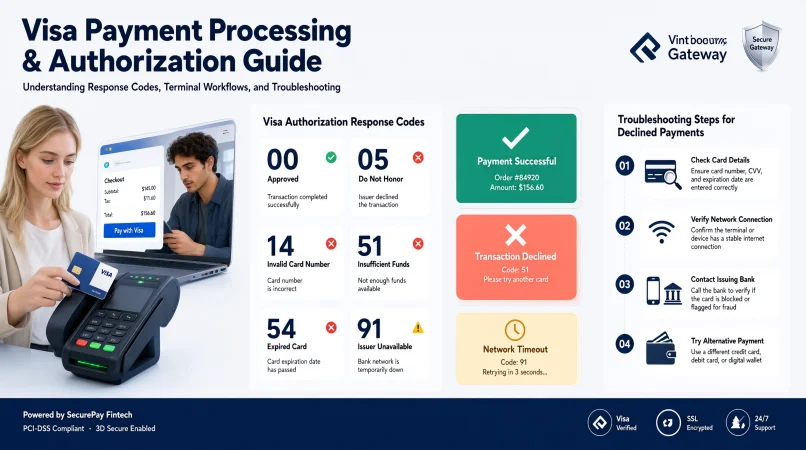
Visa response codes are indicators returned during card payment processing that help explain whether a transaction was approved, declined, partially approved, or affected by a processing issue. Understanding these codes helps merchants, developers, and payment teams troubleshoot failed payments and choose the right next step.
Top alternatives: Visa authorization codes, Visa transaction response codes, Visa decline codes, payment gateway response codes, VisaNet response codes
Ever had a perfectly normal card payment fail at checkout, leaving everyone wondering what went wrong? For merchants, payment developers, and online businesses, a declined transaction can mean a frustrated customer, an abandoned order, or another support ticket waiting to happen.
That is where Visa response codes come in. These codes communicate the outcome or status of a payment request and help payment systems determine what to do next. Some indicate approval, while others point to insufficient funds, incorrect card details, suspected fraud, issuer unavailability, or technical problems.
But here is the important part: not every code means the same thing across every payment gateway. Visa’s official authorization action codes, legacy response codes, and processor-specific messages can differ. Understanding which code your system returns is essential for troubleshooting accurately.
This guide explains common Visa authorization codes, practical examples, troubleshooting steps, and best practices in straightforward language, so payment errors feel less like a mystery and more like a problem you can solve.
Common Visa Response Codes and Their Meanings
Approval, Issuer Guidance, and Merchant Validation
1. Code 00: Approved
Example: A merchant receives an approval response after a customer pays for an online order.
Meaning: The transaction was approved successfully in the applicable Visa action-code reference.
2. Code 01: Refer to Card Issuer
Example: A customer contacts their bank after a payment receives this response.
Meaning: The transaction requires guidance or further handling through the card issuer.
3. Code 03: Invalid Merchant
Example: A payment processor flags a transaction because the merchant information is invalid.
Meaning: The merchant or transaction configuration may need investigation.
Errors, Partial Approvals, and Transaction Validation
4. Code 05: Do Not Honor
Example: A customer sees a generic decline message during checkout.
Meaning: The issuer declined the transaction without providing a more specific explanation through this code.
5. Code 06: Error
Example: A payment request returns an error that requires checking the transaction details.
Meaning: An error occurred, but the code alone does not identify its exact cause.
6. Code 10: Partial Approval
Example: A payment system approves only part of an eligible transaction amount.
Meaning: The transaction was approved partially rather than for the full requested amount.
Amount and Account Details
7. Code 12: Invalid Transaction
Example: A merchant submits a transaction type that is not valid for the card or processing setup.
Meaning: The transaction request may need correction or a different supported method.
8. Code 13: Invalid Amount
Example: A payment request contains an invalid amount or problematic currency conversion value.
Meaning: The transaction amount or related field requires review.
9. Code 14: Invalid Account Number
Example: A customer enters card details that cannot be associated with a valid account.
Meaning: The account number was not recognized as a valid account in the applicable processing context.
Funds, Expiration, and Processing Availability
10. Code 51: Insufficient Funds
Example: A customer attempts a purchase that exceeds the available funds on their card account.
Meaning: The issuer indicates that sufficient funds are not available for the transaction.
11. Code 54: Expired Card
Example: A customer attempts payment using an expired card.
Meaning: The card’s expiration information is missing or indicates an expired card.
12. Code 91: Issuer or Switch Unavailable
Example: A payment attempt fails while the issuer or an intermediate processing system is unavailable.
Meaning: The transaction could not be processed normally because of a processing availability issue.
Visa publishes authorization action-code definitions in its official developer documentation. Always check the code set used by your processor before interpreting a response.
Funny Visa Response Code Explanations
Approvals and Everyday Declines
1. Code 00: Payment Says Yes
Example: A developer celebrates when a test transaction returns an approval response.
Meaning: The payment request received an approval result.
2. Code 05: The Bank Said Nope
Example: A customer receives a generic decline during an otherwise routine checkout.
Meaning: The issuer declined the transaction, although the code does not reveal the precise reason.
3. Code 51: Wallet Needs a Break
Example: A customer attempts a purchase that exceeds their available funds.
Meaning: The available balance may not cover the transaction.
Card Details and Processing Glitches
4. Code 54: Card Time Machine Needed
Example: A customer tries to use a card that has passed its expiration date.
Meaning: The card expiration details need attention.
5. Code 14: Card Number Plot Twist
Example: A checkout form rejects an incorrectly entered card number.
Meaning: The account number may be invalid or entered incorrectly.
6. Code 91: The Bank Went Offline
Example: A payment fails while the issuer’s processing system is unavailable.
Meaning: The problem may be temporary rather than related to the customer’s balance.
Retrying and Merchant Setup
7. Code 96: Technical Difficulties Enter the Chat
Example: A merchant receives a system-malfunction response during payment processing.
Meaning: A technical issue requires investigation.
8. Code 19: Try That Again
Example: A processor asks for a transaction to be re-entered under the relevant processing rules.
Meaning: The request may need to be submitted again with appropriate handling.
9. Code 03: Merchant Setup Check
Example: A newly configured online store receives an invalid-merchant response.
Meaning: Merchant configuration may need review.
Security Flags and Duplicate Requests
10. Code 12: Wrong Transaction Energy
Example: A developer submits an unsupported transaction type in a test environment.
Meaning: The requested transaction operation may not be valid.
11. Code 59: Fraud Check Alert
Example: A transaction receives a suspected-fraud response from the applicable authorization system.
Meaning: The transaction has triggered a fraud-related decision.
12. Code 94: Duplicate Payment Déjà Vu
Example: A payment system identifies a request as a duplicate transaction.
Meaning: The system has recognized a possible repeated request that needs careful handling.
Professional Visa Response Code Explanations
Approval and Issuer Guidance
1. Code 00: Authorization Approved
Example: A finance team records an approved payment in its transaction monitoring dashboard.
Meaning: The applicable authorization response indicates approval.
2. Code 01: Issuer Consultation Required
Example: A support agent advises a cardholder to contact their issuing bank.
Meaning: Further guidance from the issuer is needed.
3. Code 03: Merchant Configuration Review
Example: A payment operations team investigates merchant credentials and processing settings.
Meaning: The merchant setup may be responsible for the failure.
Merchant Setup and Transaction Validation
4. Code 05: Issuer Decline
Example: A support representative explains that the issuing bank declined a transaction.
Meaning: The payment was declined, but the code does not disclose a specific cause.
5. Code 12: Transaction Validation
Example: A developer reviews the transaction type and request parameters.
Meaning: The transaction request may not meet the applicable processing requirements.
6. Code 13: Amount Validation
Example: A payment team checks the submitted amount and currency fields.
Meaning: The amount or related conversion data requires correction or investigation.
Amount, Account, and Funds Checks
7. Code 14: Account Validation
Example: A support agent asks the customer to verify the card number.
Meaning: The account number was not accepted as a valid account.
8. Code 51: Funds Availability
Example: A merchant displays a neutral payment-failure message without exposing unnecessary details.
Meaning: The issuer indicates insufficient available funds.
9. Code 54: Card Expiration Review
Example: A customer updates expired payment details in their account.
Meaning: The expiration information must be corrected or replaced with valid card details.
Card Restrictions and Processing Availability
10. Code 57: Cardholder Transaction Restriction
Example: A customer asks their issuer why a particular purchase is not permitted.
Meaning: The transaction is not allowed for the cardholder under the applicable rules or settings.
11. Code 61: Approval Limit Exceeded
Example: A payment operations team investigates a transaction exceeding an issuer-defined approval limit.
Meaning: The requested amount exceeds the applicable limit.
12. Code 91: Processing Availability Issue
Example: An engineering team checks issuer connectivity and processor status after a transaction fails.
Meaning: The processing destination may be temporarily unavailable.
Visa Response Codes for Declined Transactions
General Declines and Invalid Accounts
1. Code 05: Do Not Honor
Example: A merchant receives a generic decline and advises the customer to contact their bank.
Meaning: The issuer declined the transaction without a specific reason in this code.
2. Code 14: Invalid Account Number
Example: A customer checks the card number entered into a payment form.
Meaning: The account number was not recognized as valid.
3. Code 41: Lost Card
Example: A transaction is declined because the card is recorded as lost.
Meaning: The card has a lost-card status and should not be used.
Lost, Stolen, and Closed Cards
4. Code 43: Stolen Card
Example: A payment system returns a response associated with a reported stolen card.
Meaning: The card has a stolen-card status requiring appropriate handling.
5. Code 46: Closed Account
Example: A customer attempts to pay using a card linked to a closed account.
Meaning: The account is closed and may no longer be used for the transaction.
6. Code 51: Insufficient Funds
Example: A transaction exceeds the available funds on the associated account.
Meaning: The issuer reports that sufficient funds are unavailable.
Funds and Expiration Issues
7. Code 54: Expired Card
Example: A customer attempts payment with an expired card.
Meaning: The expiration date is missing or the card has expired.
8. Code 55: Incorrect or Missing PIN
Example: A card-present transaction fails after an incorrect PIN entry.
Meaning: The PIN is incorrect or required PIN information is missing.
9. Code 57: Transaction Not Permitted to Cardholder
Example: A cardholder attempts a transaction that their card does not permit.
Meaning: The transaction is restricted for that cardholder.
PIN, Fraud, and Card Restrictions
10. Code 59: Suspected Fraud
Example: An authorization request receives a suspected-fraud response.
Meaning: Fraud concerns have affected the authorization decision.
11. Code 62: Restricted Card
Example: A transaction is attempted in a region where the card is restricted.
Meaning: The card is invalid for the applicable region or country.
12. Code 65: Withdrawal Frequency Limit Exceeded
Example: A cardholder exceeds the permitted frequency for a qualifying withdrawal transaction.
Meaning: The applicable transaction-frequency limit has been reached.
Visa Response Codes for Approved Payments
Approval Outcomes and Authorization Records
1. Code 00: Approved Successfully
Example: A merchant receives a successful authorization response for a customer purchase.
Meaning: The transaction was approved under the applicable action-code reference.
2. Code 10: Partial Approval
Example: A payment terminal accepts part of a requested amount and asks for another payment method for the remainder.
Meaning: Only part of the requested amount was approved.
3. Code 11: Approved VIP
Example: A transaction receives this specific approval response in a supported processing context.
Meaning: The applicable Visa action-code reference identifies the transaction as approved.
Authentication and Transaction Matching
4. Approval Code Returned
Example: A payment system records the issuer’s authorization code with the transaction.
Meaning: The returned authorization code provides a reference for the approved transaction.
5. Approval With Additional Authentication Context
Example: An online merchant reviews the authorization result alongside authentication information.
Meaning: The approval outcome and authentication result are separate details that may both matter.
6. Approval With a Verified Transaction Record
Example: A finance team reconciles the authorization response with the transaction reference.
Meaning: The team connects the approval outcome to the correct payment record.
Amount and Currency Validation
7. Approval With Correct Amount
Example: A cashier confirms that the approved amount matches the purchase total.
Meaning: The transaction should be checked against the intended amount.
8. Approval With Currency Validation
Example: An online store confirms that the approved transaction used the intended currency.
Meaning: Currency details should align with the checkout request.
9. Approval With Order Matching
Example: A merchant links the approved transaction to the correct customer order.
Meaning: It helps avoid fulfillment and reconciliation mistakes.
Order Checks, Duplicate Prevention, and Settlement
10. Approval With Duplicate Checks
Example: A merchant verifies that an approved transaction was not accidentally processed twice.
Meaning: Approval should be reconciled against existing transaction records.
11. Approval With Settlement Monitoring
Example: A finance team checks the later settlement status of an approved payment.
Meaning: Authorization and settlement are different stages of payment processing.
12. Approval With Proper Logging
Example: A developer records the response code, transaction reference, and timestamp.
Meaning: Complete records support later troubleshooting and reconciliation.
Visa Response Codes for Insufficient Funds and Card Limits
Funds and Approval Amount Limits
1. Code 51: Insufficient Funds
Example: A cardholder attempts a purchase that exceeds available funds.
Meaning: The issuer indicates that sufficient funds are not available.
2. Code 61: Approval Amount Limit Exceeded
Example: A transaction exceeds the amount allowed for the applicable approval request.
Meaning: The requested amount is above the relevant limit.
3. Code 65: Frequency Limit Exceeded
Example: A cardholder reaches a permitted transaction-frequency limit.
Meaning: The issuer reports that the applicable frequency limit has been exceeded.
Frequency and Cash Limits
4. Code N4: Cash Request Exceeds Limit
Example: An eligible cash transaction exceeds the issuer’s or approved cash limit.
Meaning: The requested cash amount is above the applicable limit.
5. Code N8: Amount Exceeds Preauthorized Approval
Example: A later transaction amount exceeds the amount previously authorized for a supported transaction.
Meaning: The submitted amount exceeds the earlier approval amount.
6. Code 52: No Checking Account
Example: A transaction requiring a checking account receives this response in a supported context.
Meaning: The relevant checking account is not available.
Account Availability
7. Code 53: No Savings Account
Example: A transaction requires a savings account that is not available.
Meaning: The applicable savings account does not exist or cannot be used.
8. Code 39: No Credit Account
Example: A transaction requires a credit account that is not associated with the relevant card.
Meaning: The expected credit account is unavailable.
9. Code 57: Cardholder Restriction
Example: A cardholder attempts a transaction restricted by their card settings.
Meaning: The cardholder is not permitted to complete that transaction type.
Cardholder, Geographic, and PIN Restrictions
10. Code 62: Geographic Restriction
Example: A payment is attempted in a region where the card is restricted.
Meaning: The card cannot be used in the applicable region or country.
11. Code 78: Card Not Properly Unblocked
Example: A newly issued card is used before its required activation or unblocking process is complete.
Meaning: The card has a first-use or activation-related restriction.
12. Code 75: PIN Attempts Exceeded
Example: A cardholder reaches the allowed number of PIN-entry attempts.
Meaning: The permitted PIN attempts have been exceeded.
Visa Response Codes for Invalid Card Details
Account Number, Expiration, and PIN
1. Code 14: Invalid Account Number
Example: A shopper enters an incorrect card number at checkout.
Meaning: The account number was not recognized as valid.
2. Code 54: Expired Card
Example: A customer attempts payment using a card that has expired.
Meaning: The expiration information indicates an expired card or is missing.
3. Code 55: Incorrect PIN
Example: A card-present payment fails because the PIN is incorrect.
Meaning: The PIN information is invalid or missing.
Card Verification and Authentication
4. Code 82: Negative CVV or Card Verification Result
Example: A payment receives a response associated with failed card verification data.
Meaning: A security verification result was negative in the applicable context.
5. Code N7: CVV2 Failure
Example: An online transaction is declined after the CVV2 verification result fails.
Meaning: The card security code did not pass the relevant verification process.
6. Code 6P: Verification Data Failed
Example: A transaction receives a verification-data failure response in a supported processing flow.
Meaning: The applicable verification information did not pass validation.
Reversal Statuses
7. Code Q1: Card Authentication Failed
Example: A transaction fails a supported card-authentication check.
Meaning: The card authentication process did not succeed.
8. Code 76: Unsolicited Reversal
Example: A payment operations team investigates a reversal-related response.
Meaning: The response identifies an unsolicited reversal condition in the applicable code set.
9. Code 79: Already Reversed
Example: A processor identifies that a transaction has already been reversed.
Meaning: The transaction has an existing reversal status.
Duplicate Requests and Transaction Validation
10. Code 94: Duplicate Request
Example: A merchant checks whether a repeated payment request has already been processed.
Meaning: The request was identified as a duplicate.
11. Code 12: Invalid Transaction
Example: A payment system rejects a transaction with an invalid operation type.
Meaning: The transaction type or request details require review.
12. Code 13: Invalid Amount
Example: A checkout request contains an amount that fails validation.
Meaning: The transaction amount or related currency data needs checking.
Visa Response Codes for Fraud and Security Issues
Card Pickup and Card Status
1. Code 04: Pick Up Card
Example: A merchant receives a card-pickup instruction and follows its applicable acceptance procedures.
Meaning: The response indicates that the card should be retained where required by the relevant rules and circumstances.
2. Code 07: Pick Up Card, Special Condition
Example: An authorized payment professional reviews a special card-pickup response.
Meaning: The response indicates a special pickup condition associated with a fraud-related account status.
3. Code 41: Lost Card
Example: A transaction is associated with a card reported lost.
Meaning: The card has a lost-card status.
Fraud and Security Violations
4. Code 43: Stolen Card
Example: A transaction receives a stolen-card response.
Meaning: The card has a stolen-card status requiring appropriate handling.
5. Code 59: Suspected Fraud
Example: A transaction receives a fraud-related authorization decline.
Meaning: The transaction was flagged for suspected fraud.
6. Code 63: Security Violation
Example: A payment system detects a security-related problem with the transaction source or issuer information.
Meaning: The transaction has triggered a security violation response.
Card Verification Failures
7. Code 82: Negative Card Verification
Example: A transaction fails the applicable CVV or card verification check.
Meaning: Verification information did not pass the relevant security check.
8. Code N7: CVV2 Failure
Example: An e-commerce payment fails the CVV2 check.
Meaning: The CVV2 verification result was negative.
9. Code 9G: Blocked Transaction
Example: A transaction receives a blocked-status response that may require cardholder contact.
Meaning: The transaction is blocked under the applicable response conditions.
Blocked and Stop-Payment Instructions
10. Code R0: Stop This Payment
Example: A recurring payment request receives a stop-payment response.
Meaning: The response indicates that the specified payment should be stopped.
11. Code R1: Stop Future Payments
Example: A recurring billing system receives an instruction to stop future payments.
Meaning: The response indicates that future payments should be stopped under the applicable rules.
12. Code R3: Stop All Merchants
Example: A payment team receives a response instructing that transactions across merchants be stopped in the relevant context.
Meaning: The response identifies a broader stop instruction requiring careful handling.
Visa Response Codes for Technical Errors
General Errors and Transaction Re-Entry
1. Code 06: Error
Example: A transaction fails with a general error response.
Meaning: The code signals an error without identifying its exact cause.
2. Code 19: Re-Enter Transaction
Example: A payment professional reviews a transaction that requires re-entry under the relevant rules.
Meaning: The request may need to be entered again using the correct process.
3. Code 28: File Temporarily Unavailable
Example: A system cannot access a required file during an update or inquiry.
Meaning: A file or service is temporarily unavailable for that operation.
File Access and PIN Cryptography
4. Code 81: PIN Cryptographic Error
Example: A payment system identifies a cryptographic problem involving PIN data.
Meaning: The response indicates a PIN-related cryptographic error.
5. Code 86: Cannot Verify PIN
Example: A PIN verification request cannot be completed.
Meaning: The system cannot verify the PIN in the applicable context.
6. Code 91: Issuer or Switch Unavailable
Example: A payment fails because an issuer or switch is not operating normally.
Meaning: A processing destination is unavailable or has timed out.
Issuer Connectivity and Routing
7. Code 92: Routing Destination Not Found
Example: A transaction cannot be routed because the receiving institution identifier is invalid.
Meaning: The routing destination cannot be found in the applicable network context.
8. Code 96: System Malfunction
Example: A merchant receives a system-malfunction response during checkout.
Meaning: A technical issue has interrupted transaction processing.
9. Code Z3: Unable to Go Online
Example: A transaction cannot go online and receives an offline-decline response.
Meaning: The transaction could not be approved through the required online path.
System Errors and Verification Results
10. Code 1: Switch Timeout in a Legacy Response Set
Example: A developer investigates a timeout using the specific legacy Visa response-code field.
Meaning: The request timed out in that documented legacy response context.
11. Code S: System Error in a Verification Context
Example: A payment developer reviews a CVV2 or dCVV2 verification response after required data was not supplied.
Meaning: The applicable verification service could not perform the requested check because required information was missing.
12. Code U: Unable to Verify
Example: A transaction receives an unable-to-verify result from a supported card verification service.
Meaning: The verification could not be completed in the applicable service context.
The exact field matters: a Visa authorization actionCode is not interchangeable with every legacy responseCode, gateway code, or verification result.
Visa Response Codes for Online Payments
Approvals and Generic Declines
1. Code 00: Approved Online Payment
Example: An e-commerce order receives an approval response from the payment processor.
Meaning: The authorization request was approved.
2. Code 05: Generic Online Decline
Example: A shopper’s card is declined without a more specific reason.
Meaning: The issuer declined the transaction under the generic response.
3. Code 14: Invalid Card Number
Example: A customer enters an incorrect account number during checkout.
Meaning: The card account number was not accepted as valid.
Card Details and Verification
4. Code 54: Expired Card
Example: A saved payment method uses an expired card.
Meaning: The card’s expiration information is invalid or missing.
5. Code N7: CVV2 Failure
Example: An online transaction fails a CVV2 check.
Meaning: The card security-code verification failed.
6. Code 57: Transaction Not Permitted
Example: A customer attempts an online transaction that is restricted for their card.
Meaning: The transaction is not permitted to that cardholder.
Transaction Restrictions and Fraud
7. Code 59: Suspected Fraud
Example: An e-commerce authorization receives a fraud-related decline.
Meaning: The transaction was flagged for suspected fraud.
8. Code 61: Amount Limit Exceeded
Example: An online order exceeds the applicable approval amount limit.
Meaning: The requested amount is above the relevant limit.
9. Code 62: Restricted Card
Example: A customer attempts an online transaction from a restricted region.
Meaning: The card is restricted in the applicable geographic context.
Limits, Availability, and Authentication
10. Code 91: Issuer Unavailable
Example: An online payment fails while the issuer’s system is unavailable.
Meaning: The transaction could not be processed normally because of an availability problem.
11. Code 94: Duplicate Transaction
Example: A checkout system submits a payment request that is identified as a duplicate.
Meaning: The request may already have been processed and needs checking.
12. Code 1A: Additional Authentication Required
Example: An online checkout flow needs the cardholder to complete an additional authentication step.
Meaning: The response indicates that additional customer authentication is required in the applicable code set.
Visa Response Codes for Refunds, Reversals, and Duplicate Payments
Reversal and Duplicate Statuses
1. Code 76: Unsolicited Reversal
Example: A payment operations team investigates a reversal that was not expected.
Meaning: The response identifies an unsolicited reversal condition.
2. Code 79: Already Reversed
Example: A transaction is submitted for handling after a reversal has already been recorded.
Meaning: The system indicates that the transaction was already reversed.
3. Code 94: Duplicate Request
Example: A merchant checks whether a repeated transaction request has already been handled.
Meaning: The request was identified as a duplicate.
Financial Impact and No-Action Results
4. Code 80: No Financial Impact
Example: A payment operations team reviews a transaction response that carries no financial impact in its documented context.
Meaning: The response identifies a no-financial-impact condition.
5. Code 21: No Action Taken
Example: A payment request receives a no-action-taken response.
Meaning: No action was taken for the request in the applicable processing context.
6. Code 25: Record Not Located
Example: A transaction inquiry cannot locate the expected record.
Meaning: The requested record could not be found in the applicable file.
Record Lookup and File Availability
7. Code 28: File Temporarily Unavailable
Example: A transaction inquiry cannot access a file during a temporary service interruption.
Meaning: The file is not currently available for the requested operation.
8. Check the Original Transaction Reference
Example: A merchant compares the refund request with the original payment record.
Meaning: Matching references helps prevent refunding the wrong transaction.
9. Confirm the Transaction Status
Example: A support agent checks whether the original payment was authorized, captured, settled, or reversed.
Meaning: The transaction’s current status determines the appropriate next step.
Refund Checks and Reconciliation
10. Avoid Blindly Repeating Refund Requests
Example: A merchant checks the existing refund status before submitting another request.
Meaning: It helps reduce duplicate refund attempts.
11. Reconcile the Payment Records
Example: A finance team compares gateway records with its order-management system.
Meaning: Reconciliation helps identify inconsistencies between systems.
12. Escalate Unclear Reversal Results
Example: A payment specialist contacts the processor when transaction records disagree.
Meaning: Processor guidance can clarify ambiguous or conflicting statuses.
How to Troubleshoot Visa Response Codes
Identify the Code and Documentation
1. Read the Exact Code and Field Name
Example: A developer confirms whether the result came from actionCode, responseCode, or a gateway-specific field.
Meaning: Correct identification prevents confusion between different code systems.
2. Check the Processor’s Documentation
Example: A merchant compares the returned value with its payment provider’s current response-code guide.
Meaning: The provider’s documentation explains how that integration uses the code.
3. Verify the Transaction Amount
Example: A developer checks the amount and currency sent in the authorization request.
Meaning: Incorrect transaction values can cause validation problems.
Validate Transaction and Card Details
4. Confirm the Card Details
Example: A customer checks the card number and expiration date entered at checkout.
Meaning: Correct card details help resolve data-entry errors.
5. Review Verification Results
Example: A payment team checks the CVV2 or other applicable verification result.
Meaning: Verification fields can help explain a card-security-related failure.
6. Inspect the Transaction Timestamp
Example: An engineer matches the response to the correct payment attempt.
Meaning: Accurate timestamps help distinguish retries from separate transactions.
Review Verification, Timing, and Duplicates
7. Check for Duplicate Requests
Example: A developer reviews transaction identifiers before retrying a failed request.
Meaning: It helps prevent accidental duplicate processing.
8. Investigate Processor Availability
Example: An engineer reviews system health after receiving repeated issuer-unavailable responses.
Meaning: Temporary processing issues may require a different response than a card decline.
9. Apply Safe Retry Rules
Example: A payment system retries a potentially transient failure only when its processor’s guidance permits it.
Meaning: Controlled retries reduce duplicate charges and unnecessary traffic.
Retries, Customer Guidance, and Escalation
10. Give Customers Clear Instructions
Example: A checkout page suggests checking card details or contacting the issuer when appropriate.
Meaning: Clear guidance helps customers take a useful next step.
11. Record Relevant Diagnostic Details
Example: A support team records the response code, transaction reference, timestamp, and gateway status.
Meaning: Structured logs make investigations easier.
12. Escalate Persistent Issues
Example: A merchant contacts its payment processor when valid requests continue to fail.
Meaning: Processor support can help identify integration or routing problems.
Best Practices for Handling Visa Response Codes
Consistent Mapping and Error Classification
1. Map Codes to Clear Internal Labels
Example: A merchant maps documented processor responses to understandable internal payment statuses.
Meaning: It helps support staff interpret payment outcomes consistently.
2. Separate Declines From Technical Errors
Example: A dashboard distinguishes insufficient-funds declines from issuer timeouts.
Meaning: Different failures require different troubleshooting actions.
3. Avoid Guessing the Decline Reason
Example: A support agent does not tell a customer that their balance is insufficient when the code only says do not honor.
Meaning: It prevents unsupported explanations.
Processor Guidance and Data Protection
4. Use Processor-Specific Guidance
Example: A developer follows the gateway’s documented retry rules for each response category.
Meaning: It keeps error handling aligned with the actual integration.
5. Protect Cardholder Data
Example: A support log records a transaction reference without exposing full card details.
Meaning: It reduces unnecessary exposure of sensitive payment information.
6. Use Idempotency Where Supported
Example: A developer uses an integration’s supported idempotency mechanism for eligible payment requests.
Meaning: It helps prevent duplicate processing when requests are retried.
Safe Retries and Performance Monitoring
7. Avoid Endless Payment Retries
Example: A system stops repeating a hard decline and provides an appropriate customer action.
Meaning: It reduces unnecessary attempts and customer frustration.
8. Monitor Decline Trends
Example: A merchant reviews changes in decline rates by response category.
Meaning: Trends can reveal configuration issues or changes in payment performance.
9. Test Error Handling
Example: A developer tests approval, decline, timeout, and duplicate-request scenarios in a supported test environment.
Meaning: Testing confirms that the application handles different outcomes correctly.
Testing, Customer Messages, and Audit Trails
10. Keep Code Mappings Updated
Example: A payment team reviews its internal mappings after a processor updates its documentation.
Meaning: It reduces errors caused by outdated assumptions.
11. Keep Customer Messages Neutral
Example: A checkout message says the payment could not be completed and suggests a relevant next step.
Meaning: Neutral language avoids blaming customers or exposing sensitive risk decisions.
12. Maintain an Audit Trail
Example: A payment team stores the response, timestamp, transaction reference, and resulting action.
Meaning: An audit trail supports reconciliation and incident investigation.
Common Mistakes When Interpreting Visa Response Codes
Code-System and Field Confusion
1. Treating Every Code as Universal
Example: A developer assumes a gateway’s code means exactly the same thing in Visa’s native authorization reference.
Meaning: Code definitions can depend on the field and integration.
2. Confusing actionCode With responseCode
Example: An analyst interprets a Visa Direct response-source field as an authorization outcome.
Meaning: Different fields communicate different information.
3. Assuming Code 05 Reveals the Exact Reason
Example: A support agent tells a customer their card is blocked after seeing a do-not-honor response.
Meaning: A generic decline does not establish the specific underlying reason.
Decline and Retry Assumptions
4. Retrying Every Declined Payment
Example: A system repeatedly resubmits a transaction without checking the response.
Meaning: Unnecessary retries can create duplicate attempts and poor customer experiences.
5. Ignoring Partial Approval
Example: A cashier treats a partial approval as though the full purchase amount was covered.
Meaning: The approved amount must be distinguished from the requested amount.
6. Treating Authorization as Settlement
Example: A merchant assumes an approved payment has already been settled.
Meaning: Authorization and settlement are separate payment stages.
Approval, Settlement, and Validation Mistakes
7. Ignoring Duplicate Indicators
Example: A developer repeats a request after receiving a duplicate-transaction response.
Meaning: The original request’s status should be checked before another attempt.
8. Blaming the Customer Too Quickly
Example: A support agent assumes every decline means the customer entered incorrect information.
Meaning: Declines can have several causes, including issuer restrictions and technical issues.
9. Overlooking Currency and Amount Fields
Example: A developer investigates an invalid-amount response without checking the submitted currency.
Meaning: Related transaction fields may contribute to validation failures.
Customer Treatment, Security, and Outdated Lists
10. Confusing Verification With Authorization
Example: A merchant assumes that a successful CVV check guarantees payment approval.
Meaning: Card verification and transaction authorization are different checks.
11. Exposing Sensitive Risk Details
Example: A merchant displays internal fraud-screening details in a customer-facing error message.
Meaning: Customer messages should be helpful without disclosing sensitive security information.
12. Using Outdated Code Lists
Example: A developer relies on an old response-code table after a processor changes its integration.
Meaning: Current documentation is essential for accurate interpretation.
Visa Response Codes for Developers, Merchants, and Support Teams
Developer Logging and Status Handling
1. Developer: Log the Raw Response
Example: An engineer stores the returned response fields with the transaction identifier.
Meaning: Raw diagnostic data helps trace what the payment system actually returned.
2. Developer: Normalize Internal Statuses
Example: A payment application maps documented provider responses into approved, declined, pending, or error categories.
Meaning: Consistent internal statuses simplify application logic.
3. Developer: Handle Timeouts Carefully
Example: An engineer checks the transaction status before retrying after a timeout.
Meaning: A timeout does not always prove that the original payment failed.
Timeouts, Partial Approvals, and Log Protection
4. Developer: Test Partial Approval
Example: A developer verifies that the checkout flow can handle a partial approval when supported.
Meaning: It prevents the application from treating a partial amount as full payment.
5. Developer: Protect Diagnostic Logs
Example: An engineer excludes sensitive cardholder data from ordinary application logs.
Meaning: It helps protect payment information.
6. Merchant: Explain Declines Clearly
Example: A store displays a neutral message and suggests checking details or contacting the issuer when appropriate.
Meaning: It helps customers understand their next step without unsupported claims.
Merchant Monitoring and Support Guidance
7. Merchant: Monitor Authorization Rates
Example: A business compares approval rates across transaction types and time periods.
Meaning: Monitoring helps identify changes in payment performance.
8. Merchant: Review Failed Orders
Example: An operations team checks whether failed payments correspond to abandoned or duplicate orders.
Meaning: It supports accurate order handling.
9. Support Team: Ask for Safe Details
Example: An agent requests the transaction date and reference instead of asking for a full card number.
Meaning: It supports troubleshooting while limiting exposure of sensitive information.
Finance Reconciliation and Operations Review
10. Support Team: Direct Issuer-Specific Questions to the Bank
Example: A customer receives a generic decline that the merchant cannot explain.
Meaning: The issuing bank may be able to provide information unavailable to the merchant.
11. Finance Team: Reconcile Transactions
Example: A finance analyst compares authorization records with captured and settled payment records.
Meaning: It helps identify missing, duplicated, or mismatched transactions.
12. Operations Team: Review Recurring Issues
Example: A payment operations team groups recurring errors and assigns follow-up actions.
Meaning: Trend analysis helps prioritize fixes that improve payment reliability.
FAQs
What do Visa response codes mean?
They indicate payment outcomes or processing conditions, such as approval, decline, verification failure, or system issues.
What is Visa response code 00?
In Visa’s authorization action-code reference, 00 means approved and completed successfully.
What does Visa response code 05 mean?
Code 05 means do not honor. It does not reveal the exact reason for the decline.
What does Visa response code 51 mean?
Code 51 indicates insufficient funds in the applicable authorization code set.
What does Visa response code 14 mean?
Code 14 indicates an invalid account number or an account that cannot be found.
What does Visa response code 54 mean?
Code 54 indicates an expired card or missing expiration information in the applicable code set.
What does Visa response code 91 mean?
Code 91 generally indicates an issuer, switch, or processing availability issue in the documented action-code set.
Are Visa response codes the same for every payment gateway?
No. Gateways may translate, supplement, or expose different fields and descriptions.
Should a declined Visa payment always be retried?
No. Check the exact response and processor guidance before retrying a transaction.
Do Visa response codes reveal fraud for certain?
No. A fraud-related code indicates a particular response, not proof of criminal activity by a customer.
Is an approved Visa payment already settled?
Not necessarily. Authorization and settlement are separate stages in the payment process.
Where can I verify official Visa response codes?
Use Visa’s official developer documentation and the current documentation provided by your payment processor.
Conclusion
Understanding Visa response codes can make payment troubleshooting much less frustrating for merchants, developers, and support teams. From approvals and insufficient-funds declines to duplicate requests and processing outages, each response provides a clue about what happened during a transaction. The trick is to interpret the correct field, check the relevant documentation, and choose a response that matches the actual situation.
Avoid guessing, retrying every failure, or treating authorization as proof of settlement. Instead, maintain clear logs, use safe retry practices, and give customers helpful instructions. Save this guide for your next payment investigation, share it with your team, and use it as a starting point for more reliable payment operations. A little code knowledge can save a lot of checkout confusion!