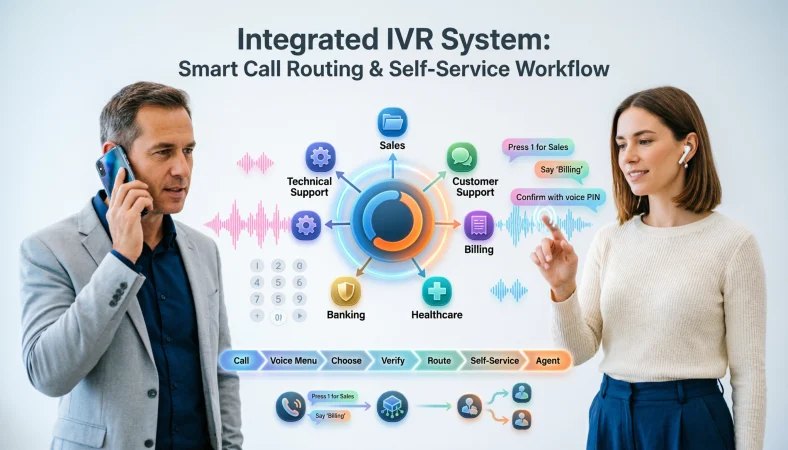
An integrated voice response system is a telephone-based system that lets callers interact with automated voice menus using keypad inputs, voice commands, or both. Modern IVR systems can route calls, collect information, connect with business systems, and handle routine requests without requiring an agent for every interaction.
Top alternatives: IVR system, integrated voice response, interactive voice response system, IVR phone system, automated voice response system
Ever called a company and heard, “Press 1 for sales, press 2 for support,” while wondering whether the phone menu has a personal grudge against you? That familiar experience is powered by an integrated voice response system, commonly called IVR. These systems help organisations manage incoming calls, guide customers through menus, collect information, route callers to the right department, and sometimes provide answers without involving a live agent.
IVR can appear in banks, healthcare, government services, retail, telecommunications, utilities, and customer support centres. Modern systems can also connect with databases, CRM platforms, call management tools, and voice technologies. The real value comes from designing the experience carefully. A useful IVR should make the caller’s journey clearer, not turn a simple question into an unexpected audio escape room.
Integrated Voice Response System Basics
“Welcome to our automated phone service.”
Example: Use this as a professional opening for a business IVR.
Meaning: It immediately tells callers they have reached an automated system.
“Please choose an option to continue.”
Example: Use this before presenting the main menu.
Meaning: It prepares callers for the next interaction.
“Press 1 for sales.”
Example: Use this when separating sales calls from other requests.
Meaning: It directs callers toward the appropriate team.
“Press 2 for customer support.”
Example: Use this for a standard business support menu.
Meaning: It provides a clear route to assistance.
“Press 3 for billing.”
Example: Use this when billing has its own service team.
Meaning: It helps callers reach the financial support function.
“Please enter your account number.”
Example: Use this when identifying customers before service.
Meaning: It collects information needed for account lookup.
“Please enter your PIN.”
Example: Use this when secure account verification is required.
Meaning: It supports an authentication step.
“You entered an invalid option.”
Example: Use this when the caller selects an unavailable menu choice.
Meaning: It tells the caller that the input was not accepted.
“Please try again.”
Example: Use this after an incorrect keypad selection.
Meaning: It gives the caller another opportunity to continue.
“Your call is being transferred.”
Example: Use this when the IVR has identified the appropriate department.
Meaning: It confirms that routing is taking place.
“Please stay on the line.”
Example: Use this while connecting a caller to an agent.
Meaning: It signals that the next step requires waiting.
“Thank you for calling.”
Example: Use this when ending an automated interaction.
Meaning: It provides a courteous closing.
IVR systems commonly provide automated telephone interaction through voice menus and keypad inputs, while more advanced implementations can support voice recognition and other integrated functions.
Integrated Voice Response System Features
“Multi-level voice menus.”
Example: Use this when a business needs several layers of call routing.
Meaning: It allows callers to navigate increasingly specific options.
“DTMF keypad input.”
Example: Use this when callers select options by pressing phone keys.
Meaning: Dual-tone multi-frequency input lets the system interpret keypad selections.
“Voice recognition.”
Example: Use this when callers should be able to speak their choices.
Meaning: Voice input can make interaction more natural.
“Text-to-speech support.”
Example: Use this when information needs to be generated dynamically.
Meaning: Text-to-speech can turn system data into spoken responses.
“Call routing.”
Example: Use this when different departments handle different requests.
Meaning: The system directs calls according to selected criteria.
“Database integration.”
Example: Use this when callers need account-specific information.
Meaning: The IVR can interact with stored customer data.
“CRM integration.”
Example: Use this when support teams need customer information during calls.
Meaning: IVR can connect call activity with customer records.
“Call transfer.”
Example: Use this when automation cannot complete the request.
Meaning: The caller can move from automation to human support.
“Caller identification.”
Example: Use this when the business needs to recognise an incoming caller.
Meaning: Caller information can help personalise routing.
“Call recording.”
Example: Use this when conversations require monitoring or training.
Meaning: Recorded calls can support review and quality processes.
“Reporting dashboards.”
Example: Use this when managers need visibility into call activity.
Meaning: Reporting helps teams understand system usage.
“Language selection.”
Example: Use this when serving customers across multiple language groups.
Meaning: Callers can receive instructions in a supported language.
Modern IVR implementations can integrate with CRM and customer tools, support custom call flows, and provide routing based on departments, skills, or availability.
Integrated Voice Response System Benefits
“Faster call routing.”
Example: Use this when explaining why a company adopts IVR.
Meaning: Automated menus can direct callers without manual sorting.
“Reduced repetitive workload.”
Example: Use this when discussing routine customer requests.
Meaning: Automation can handle simple tasks before an agent becomes involved.
“24/7 self-service.”
Example: Use this for businesses offering information outside office hours.
Meaning: Customers can access supported automated services beyond staffed periods.
“Consistent greetings.”
Example: Use this when standardising customer interactions.
Meaning: Every caller receives the same opening experience.
“Better call organisation.”
Example: Use this when discussing high call volumes.
Meaning: Structured routing helps organise incoming requests.
“Improved information collection.”
Example: Use this when callers need to provide account details.
Meaning: The system can collect information before an agent answers.
“Lower agent interruption.”
Example: Use this when employees spend too much time answering basic questions.
Meaning: Automation can absorb some routine interactions.
“Scalable call handling.”
Example: Use this when a business expects call volumes to grow.
Meaning: Automated systems can support larger call flows.
“More consistent workflows.”
Example: Use this when standard processes matter.
Meaning: IVR can guide callers through predefined paths.
“Improved routing accuracy.”
Example: Use this when departments receive misdirected calls.
Meaning: Structured menus can send requests toward relevant teams.
“Better customer self-service.”
Example: Use this when customers frequently request simple information.
Meaning: Callers can complete supported tasks without waiting for an agent.
“Useful call analytics.”
Example: Use this when management needs operational insights.
Meaning: Call data can help identify patterns and bottlenecks.
Government and organisational deployments have used IVR to provide information, route callers, collect data, and reduce the amount of routine work handled directly by staff.
Integrated Voice Response System For Customer Service
“How can we help you today?”
Example: Use this as the opening customer-service prompt.
Meaning: It frames the IVR around the caller’s needs.
“Press 1 for order support.”
Example: Use this for customers asking about purchases.
Meaning: It separates order-related requests.
“Press 2 to check your account.”
Example: Use this when customers need account information.
Meaning: It provides a direct self-service route.
“Press 3 to speak with an agent.”
Example: Use this when customers need human assistance.
Meaning: It gives callers a clear human-support option.
“Enter your order number.”
Example: Use this before retrieving order information.
Meaning: The system can identify the relevant transaction.
“Your order is being located.”
Example: Use this while the system retrieves customer information.
Meaning: It reassures callers that processing is underway.
“Your request has been received.”
Example: Use this after collecting a service request.
Meaning: It confirms successful submission.
“Would you like to hear your account balance?”
Example: Use this in a financial self-service workflow.
Meaning: It offers a specific automated information service.
“For frequently asked questions, press 4.”
Example: Use this when common questions can be automated.
Meaning: It directs simple inquiries away from live agents.
“If you need additional assistance, press 0.”
Example: Use this when providing an agent-access route.
Meaning: It gives callers an alternative when menus do not solve their issue.
“Please have your reference number ready.”
Example: Use this before transferring a complex case.
Meaning: It prepares the caller to provide useful information.
“We appreciate your patience.”
Example: Use this during a longer automated process.
Meaning: It acknowledges the caller’s waiting time.
Integrated Voice Response System For Call Routing
“Press 1 for the sales team.”
Example: Use this when sales requires a dedicated queue.
Meaning: It directs sales-related callers to the correct group.
“Press 2 for technical support.”
Example: Use this for technology-related customer requests.
Meaning: It separates technical calls from general enquiries.
“Press 3 for accounts.”
Example: Use this when finance handles billing questions.
Meaning: It provides a dedicated financial route.
“Press 4 for general enquiries.”
Example: Use this when callers have broader questions.
Meaning: It creates a general-purpose destination.
“Please select your department.”
Example: Use this when an organisation has several service areas.
Meaning: It lets callers determine the appropriate destination.
“Please tell us why you are calling.”
Example: Use this when speech recognition is enabled.
Meaning: The system uses spoken intent for routing.
“Your call is being routed.”
Example: Use this after the caller chooses a department.
Meaning: It confirms that routing has started.
“We are connecting you with the next available representative.”
Example: Use this when agents are placed into shared queues.
Meaning: It explains why the caller is waiting.
“Your selected department is currently busy.”
Example: Use this when the target queue has high demand.
Meaning: It gives the caller context about the delay.
“Press 1 to return to the main menu.”
Example: Use this when callers choose the wrong department.
Meaning: It provides an easy recovery route.
“Press 2 to choose another department.”
Example: Use this when multiple destinations are available.
Meaning: It allows callers to correct their routing choice.
“Please hold while we connect your call.”
Example: Use this before transferring the caller.
Meaning: It prepares the caller for a brief connection delay.
Integrated Voice Response System For Banking
“Press 1 for account information.”
Example: Use this for general banking self-service.
Meaning: It creates a direct route to account information.
“Press 2 for recent transactions.”
Example: Use this when customers need transaction history.
Meaning: It provides an automated transaction-information option.
“Press 3 for card services.”
Example: Use this when card-related requests are common.
Meaning: It groups card services into one menu.
“Press 4 to report a lost card.”
Example: Use this for urgent card-related support.
Meaning: It creates a direct route for reporting a lost card.
“Please enter your customer number.”
Example: Use this during account identification.
Meaning: It collects information needed to locate the customer profile.
“Please enter your security information.”
Example: Use this when additional verification is required.
Meaning: It introduces an authentication step.
“Your request is being processed.”
Example: Use this after receiving an eligible banking request.
Meaning: It confirms that the system is working on the request.
“For fraud-related concerns, press 5.”
Example: Use this when separating security concerns from general support.
Meaning: It directs potentially urgent financial concerns appropriately.
“To speak with a banking representative, press 0.”
Example: Use this when customers need human assistance.
Meaning: It preserves access to live support.
“Your account information is being retrieved.”
Example: Use this while the system accesses customer records.
Meaning: It explains a short processing period.
“Please do not share your security code.”
Example: Use this as a security reminder in sensitive workflows.
Meaning: It encourages safer handling of authentication information.
“Thank you for using our automated banking service.”
Example: Use this when completing a self-service call.
Meaning: It provides a professional closing.
Integrated Voice Response System For Healthcare
“Press 1 for appointments.”
Example: Use this when routing patients to scheduling services.
Meaning: It creates a direct appointment pathway.
“Press 2 for prescription information.”
Example: Use this when pharmacies or clinics receive medication-related calls.
Meaning: It separates prescription requests from other enquiries.
“Press 3 for billing.”
Example: Use this when financial enquiries need a dedicated queue.
Meaning: It routes billing questions to the appropriate team.
“Please enter your patient number.”
Example: Use this when identifying an existing patient.
Meaning: It helps locate the relevant record.
“Please select your preferred language.”
Example: Use this when serving multilingual patients.
Meaning: It lets callers choose an available language.
“For urgent medical concerns, follow the appropriate emergency procedure.”
Example: Use this in a healthcare IVR that needs clear emergency guidance.
Meaning: It distinguishes urgent situations from routine administrative calls.
“Your appointment request has been received.”
Example: Use this after collecting scheduling information.
Meaning: It confirms successful submission.
“Please have your appointment details ready.”
Example: Use this before transferring a caller to scheduling staff.
Meaning: It prepares the caller for the next step.
“Press 0 for assistance.”
Example: Use this when callers need human support.
Meaning: It offers a simple escape from automated menus.
“Please listen carefully to the following options.”
Example: Use this before a detailed healthcare menu.
Meaning: It encourages callers to hear the available choices.
“Your call is being transferred to the appropriate team.”
Example: Use this when the system has identified the relevant department.
Meaning: It confirms the routing decision.
“Thank you for contacting our healthcare service.”
Example: Use this at the end of a routine call.
Meaning: It closes the interaction respectfully.
Integrated Voice Response System For Retail
“Press 1 to check an order.”
Example: Use this when customers frequently request order updates.
Meaning: It offers direct access to order information.
“Press 2 for returns.”
Example: Use this when returns have a dedicated process.
Meaning: It directs callers toward return support.
“Press 3 for delivery information.”
Example: Use this when delivery questions are common.
Meaning: It provides a dedicated delivery pathway.
“Enter your order number.”
Example: Use this before retrieving an order.
Meaning: It helps identify the correct purchase.
“Your order information is being retrieved.”
Example: Use this while the system searches customer records.
Meaning: It explains the short processing stage.
“Press 4 for store information.”
Example: Use this when callers ask about locations or opening information.
Meaning: It separates store enquiries from online orders.
“For product information, press 5.”
Example: Use this when customers need product assistance.
Meaning: It routes product questions appropriately.
“Would you like to speak with a representative?”
Example: Use this after automated information has been provided.
Meaning: It offers a human-support option.
“Your return request has been received.”
Example: Use this after collecting return information.
Meaning: It confirms that the request was submitted.
“Please keep your confirmation number.”
Example: Use this after a successful transaction or request.
Meaning: It encourages callers to retain useful reference information.
“Press 0 to return to the main menu.”
Example: Use this when callers want another service.
Meaning: It provides easy navigation.
“Thank you for shopping with us.”
Example: Use this as a retail IVR closing.
Meaning: It creates a friendly ending.
Integrated Voice Response System For Small Businesses
“Thanks for calling our business.”
Example: Use this as a friendly small-business greeting.
Meaning: It creates a welcoming first impression.
“Press 1 for sales.”
Example: Use this when a small team separates sales from support.
Meaning: It keeps commercial enquiries organised.
“Press 2 for support.”
Example: Use this when existing customers need assistance.
Meaning: It provides a simple support route.
“Press 3 for billing.”
Example: Use this when financial questions go to a specific person.
Meaning: It reduces unnecessary transfers.
“Please leave your name and number.”
Example: Use this when no live agent is immediately available.
Meaning: It allows the business to return the call.
“We will return your call as soon as possible.”
Example: Use this during periods of high call volume.
Meaning: It sets a reasonable expectation.
“Press 0 if you need assistance.”
Example: Use this for callers who cannot find a suitable menu option.
Meaning: It offers a simple human-support route.
“For opening hours, press 4.”
Example: Use this when customers frequently ask about business hours.
Meaning: It automates a common enquiry.
“For location information, press 5.”
Example: Use this when customers ask where the business is located.
Meaning: It provides an easy information route.
“Please leave a message after the tone.”
Example: Use this when the business cannot answer immediately.
Meaning: It gives callers a way to communicate asynchronously.
“Your call is important to us.”
Example: Use this as a brief reassurance during waiting.
Meaning: It acknowledges the caller’s time.
“Thanks for reaching out.”
Example: Use this as a casual closing for a modern small business.
Meaning: It creates a warm final impression.
Integrated Voice Response System For Call Centers
“Welcome to customer support.”
Example: Use this as a call-center opening.
Meaning: It immediately identifies the service.
“Please choose from the following options.”
Example: Use this before presenting several departments.
Meaning: It prepares callers for menu navigation.
“Press 1 for account support.”
Example: Use this for account-related requests.
Meaning: It separates account cases from other calls.
“Press 2 for technical support.”
Example: Use this for technical problems.
Meaning: It directs callers toward specialist assistance.
“Press 3 for billing support.”
Example: Use this for financial enquiries.
Meaning: It creates a focused billing route.
“Please enter your customer number.”
Example: Use this before an account-specific workflow.
Meaning: It helps identify the caller.
“Your information is being verified.”
Example: Use this during an authentication step.
Meaning: It explains why the system is temporarily processing information.
“We found your account.”
Example: Use this after successful account lookup.
Meaning: It confirms that the system located the relevant record.
“Please choose your reason for calling.”
Example: Use this when the system supports detailed routing.
Meaning: It gathers intent before connecting the call.
“You can say the name of the service you need.”
Example: Use this when voice recognition is enabled.
Meaning: It offers spoken navigation instead of keypad-only input.
“An agent will assist you shortly.”
Example: Use this after successful routing.
Meaning: It sets an expectation for human assistance.
“Please remain on the line.”
Example: Use this before transferring the call.
Meaning: It tells the caller that the connection is continuing.
Integrated Voice Response System With CRM Integration
“Welcome back.”
Example: Use this when a system can recognise an existing customer.
Meaning: It creates a more personalised experience.
“We found your customer profile.”
Example: Use this after successful CRM lookup.
Meaning: It confirms that the caller’s record is available.
“Please confirm your account details.”
Example: Use this when additional verification is required.
Meaning: It supports accurate customer identification.
“Your recent request is available.”
Example: Use this when CRM data includes recent service activity.
Meaning: It gives callers access to relevant information.
“Press 1 to check your open case.”
Example: Use this when support tickets are connected to the IVR.
Meaning: It provides a route to case information.
“Press 2 to update your request.”
Example: Use this when customers can modify existing cases.
Meaning: It supports self-service case management.
“Your case number is ready.”
Example: Use this after retrieving a support record.
Meaning: It provides useful case identification.
“Your information has been updated.”
Example: Use this after a successful CRM change.
Meaning: It confirms completion.
“We are connecting you with your assigned team.”
Example: Use this when CRM information determines routing.
Meaning: Customer data can help direct the call.
“Your previous interaction has been identified.”
Example: Use this when the system can recognise prior service activity.
Meaning: It helps create continuity.
“Please confirm that you are calling about the same issue.”
Example: Use this when an existing support case is detected.
Meaning: It helps connect the new call with the correct record.
“Thank you for confirming your information.”
Example: Use this after successful verification.
Meaning: It provides a courteous transition.
Integrated Voice Response System And Automation
“Your request can be completed automatically.”
Example: Use this when a simple service does not require an agent.
Meaning: It encourages efficient self-service.
“Press 1 to continue.”
Example: Use this before an automated transaction.
Meaning: It gives the caller control over proceeding.
“Your request is being processed.”
Example: Use this during an automated task.
Meaning: It reassures the caller that processing is underway.
“No representative is required for this request.”
Example: Use this when automation can fully complete the task.
Meaning: It explains why the caller is staying within the automated system.
“You can complete this step by phone.”
Example: Use this when offering telephone self-service.
Meaning: It highlights that no separate channel is necessary.
“Your information has been successfully recorded.”
Example: Use this after collecting caller details.
Meaning: It confirms successful data capture.
“Please review your selection.”
Example: Use this before completing an automated action.
Meaning: It gives the caller a chance to catch an error.
“Press 1 to confirm.”
Example: Use this when final confirmation is needed.
Meaning: It provides explicit approval.
“Press 2 to make a change.”
Example: Use this when callers need to correct information.
Meaning: It provides a recovery option.
“Your request is complete.”
Example: Use this after successful automation.
Meaning: It confirms the end of the workflow.
“Would you like to complete another task?”
Example: Use this when multiple self-service functions are available.
Meaning: It keeps callers within the system when useful.
“Returning you to the main menu.”
Example: Use this when the caller chooses another service.
Meaning: It resets navigation without ending the call.
Integrated Voice Response System Troubleshooting
“We did not recognise that selection.”
Example: Use this when the system cannot interpret the caller’s input.
Meaning: It clearly identifies an input problem.
“Please enter your selection again.”
Example: Use this after an invalid keypad entry.
Meaning: It provides another attempt.
“Please speak after the tone.”
Example: Use this when voice input is expected.
Meaning: It tells the caller when to provide spoken information.
“We did not understand your response.”
Example: Use this when speech recognition fails.
Meaning: It explains why the system cannot continue.
“Please say that again.”
Example: Use this after unclear voice input.
Meaning: It requests another attempt.
“You can also use your keypad.”
Example: Use this when voice recognition is unavailable or unreliable.
Meaning: It provides an alternative interaction method.
“Please check the information you entered.”
Example: Use this when account details do not match.
Meaning: It helps callers correct input errors.
“That option is currently unavailable.”
Example: Use this when a service cannot be completed automatically.
Meaning: It explains why the selected path cannot continue.
“Please try another option.”
Example: Use this when a selected service is unavailable.
Meaning: It keeps the caller moving through the menu.
“We are unable to complete that request right now.”
Example: Use this during a temporary service issue.
Meaning: It honestly communicates a processing limitation.
“Press 0 for assistance.”
Example: Use this when automated troubleshooting does not resolve the issue.
Meaning: It provides access to human help.
“Thank you for your patience.”
Example: Use this after a technical delay.
Meaning: It acknowledges the caller’s inconvenience.
Integrated Voice Response System Design And Best Practices
“Keep the main menu short.”
Example: Use this when designing a new IVR menu.
Meaning: Fewer choices can make navigation easier.
“Put common options first.”
Example: Use this when analysing frequent caller requests.
Meaning: High-demand services should be easy to find.
“Use plain language.”
Example: Use this when writing voice prompts.
Meaning: Simple wording makes instructions easier to understand.
“Avoid unnecessary menu layers.”
Example: Use this when reviewing a complicated IVR tree.
Meaning: Excessive depth can make navigation frustrating.
“Offer a clear agent option.”
Example: Use this when designing customer-service workflows.
Meaning: Callers should have an understandable route to human assistance.
“Make recovery easy.”
Example: Use this when creating error handling.
Meaning: Callers should be able to correct mistakes without restarting everything.
“Test every menu path.”
Example: Use this before launching an IVR workflow.
Meaning: Testing helps uncover broken or confusing routes.
“Review real caller behaviour.”
Example: Use this during ongoing IVR optimisation.
Meaning: Actual usage can reveal where callers struggle.
“Keep prompts concise.”
Example: Use this when recording voice instructions.
Meaning: Short prompts reduce unnecessary listening time.
“Use consistent terminology.”
Example: Use this across all departments.
Meaning: Consistent wording creates a more predictable experience.
“Provide useful confirmations.”
Example: Use this after collecting important information.
Meaning: Confirmation reassures callers that their input was received.
“Measure where callers drop off.”
Example: Use this when analysing IVR performance.
Meaning: Abandonment points can identify confusing parts of the experience.
Effective IVR design is not simply about adding more menu options. Existing implementations show that IVR can be integrated with call management, data collection, routing, and other business functions, making workflow design and testing important parts of deployment.
Integrated Voice Response System Examples And Use Cases
“Banking account information.”
Example: Use this when customers need basic account details by telephone.
Meaning: IVR can provide supported information through automated interaction.
“Healthcare appointment scheduling.”
Example: Use this when patients need a structured scheduling pathway.
Meaning: IVR can collect information and route appointment requests.
“Retail order tracking.”
Example: Use this when customers frequently ask about deliveries.
Meaning: Automated systems can provide order-related information.
“Telecommunications account support.”
Example: Use this when customers need service or account assistance.
Meaning: IVR can organise common telecom requests.
“Utility account enquiries.”
Example: Use this when customers need information about their service account.
Meaning: Automated menus can route utility-related requests.
“Government information services.”
Example: Use this when citizens need access to routine information.
Meaning: IVR can provide telephone-based public information.
“Insurance claim routing.”
Example: Use this when claims require specialised departments.
Meaning: IVR can direct callers toward relevant claim services.
“Appointment reminders.”
Example: Use this when organisations need automated outbound call workflows.
Meaning: Voice systems can communicate scheduled information.
“Customer verification.”
Example: Use this when callers need to identify themselves before account access.
Meaning: IVR can support structured identification workflows.
“Service request collection.”
Example: Use this when callers need to submit routine requests.
Meaning: Automated prompts can collect required information.
“After-hours support.”
Example: Use this when businesses receive calls outside staffed hours.
Meaning: IVR can provide supported information and routing when agents are unavailable.
“Emergency call prioritisation.”
Example: Use this when a specialised organisation needs to identify certain urgent call types.
Meaning: Advanced voice systems can help route or identify priority interactions when appropriately designed.
Public-sector examples demonstrate that IVR can support information access, call routing, request collection, and connections to wider call-management systems.
FAQs
What is an integrated voice response system?
Review service scope, activation, SLAs, contacts, pricing, coverage, escalation, evidence handling, and exclusions.
What does IVR stand for?
IVR can mean Interactive Voice Response or Integrated Voice Response, both referring to automated telephone interaction systems.
How does an integrated voice response system work?
IVR lets callers use keypad or voice inputs to follow automated prompts, receive information, provide data, or route calls.
What is an integrated voice response system used for?
Common uses include customer support, banking, healthcare, retail, telecommunications, government services, appointment handling, account information, call routing, and automated self-service.
Is IVR the same as an automated phone system?
IVR is a type of automated phone system that allows interactive caller input. A basic automated message may only provide information, while IVR can accept selections and respond dynamically.
Can an IVR system understand spoken commands?
Some IVR systems support voice recognition, allowing callers to speak instead of relying entirely on keypad selections. The available capabilities depend on the specific implementation.
Can IVR connect to a CRM?
Yes. An IVR can be integrated with CRM and other customer systems so that call flows can use relevant customer information and route interactions based on available data.
Can an IVR system transfer calls to employees?
Yes. Call transfer and routing are common IVR functions. The system can direct callers to departments, queues, or individual support paths based on the configured workflow.
Is an integrated voice response system useful for small businesses?
It can be useful when a small business receives enough calls to benefit from automated routing, basic information services, appointment handling, or customer self-service.
Can IVR work outside normal business hours?
Yes. An IVR can provide automated information and supported self-service functions when live staff are unavailable. The exact services depend on how the system is configured.
Does IVR reduce the need for customer-service agents?
It can reduce the amount of routine work handled by agents, but it does not eliminate the need for human support in every situation. Complex, sensitive, or unusual requests may still require people.
Conclusion
An integrated voice response system can be much more than a voice saying, “Press 1, press 2, press 3.” When thoughtfully designed, it can organise calls, provide self-service, collect information, connect customers with the right teams, and support smoother business workflows. The key is keeping the experience simple, useful, and easy to navigate.
Whether you’re researching IVR for a call centre, healthcare organisation, bank, retailer, government service, or growing business, the right structure can make a noticeable difference. Use these examples as inspiration when planning menus, prompts, routing paths, and automation ideas. Save this guide for your next IVR project, share it with your team, and turn that endless phone maze into something people can actually navigate.